









OVERSTOCK.COM BUSTED AGAIN – USING BLACK HAT SEO
Once again, Overstock.com is suspected of playing dirty.
Last February, Overstock.com was penalized by Google for manipulating the search engines. The online retailer offered students and faculty discounts in exchange for posting links from college and university websites to Overstock.com. Their motivation? Ranking in search engines are, in large part determined by assessing the number of sites that link back to the site being ranked. In order to avoid artificial influence on search engines, Google forbids sites from paying other websites to embed links on their pages, and penalized Overstock.com for this unethical (“black hat”) practice. The Wall Street Journal quotes Patrick Byrne, Overstock’s chief executive, as saying, “We understand Google’s position and have made the appropriate changes to remain within Google’s guidelines.”
But they might be at it again.
I made this discovery while working on a competitive analysis for a client who wanted to rank for the keyword “kids’ bedding”. The top organic position was held by Overstock.com with this page: www.overstock.com/Home-Garden/Kids-Bedding/5389/subcat.html. My browser tools indicated the page had a large number of backlinks, an unusually large number for even a large retailer. I looked further. Using Open Site Explorer I found they had some very suspicious backlinks, including:
- http://stevesloanmusic.com/3comp_.html
- http://essencenet.ca/mainp.html
- http://dvihome.com.au/wp-admin/includes/co_mma.html
All of the above pages follow the same basic format. They’re branded to look like part of Overstock.com and filled with anchor text links that guide users back to the Overstock site. The pages themselves, though, are hosted on sites that are unrelated to Overstock or its products, including the websites of a writer, a musical composer, and an Australian photography and printing service.
The pages listed above are not the only suspicious-looking ones. Many of Overstock.com’s top-ranking pages have similar backlink profiles. You can check them out yourself using keywords like “Egyptian cotton sheets”, “sateen sheets”, “bedspreads”, “kids’ bedding”, and “bathrobes.” You’ll find many more.
Based on my years of industry experience, this type of activity seems to be as “black hat” as it gets. I can imagine two scenarios that might explain these links:
- These are paid links, and the sites’ webmasters allowed Overstock.com to post the pages.
- The sites were hacked, and the pages were placed on the sites without the webmasters’ knowledge.
Either way, the Overstock pages on these sites appear very suspicious. Overstock.com, whether intentionally or not, is clearly violating Google’s webmaster guidelines again. Based on these guidelines, I am curious to see how long it will take Google to serve up another penalty.
Overstock.com may or may not be aware of these pages. The world of Internet Marketing is full of miscommunications, implementation errors, and newly developed techniques that might be considered “grey hat”. We don’t want to accuse Overstock of trying to manipulate search engines again, but only bring attention to these questionable SEM tactics.
What’s your take on this issue? I’d like to hear your viewpoint. Please leave your thoughts in the comment section below.
TOP RESPONSIVE WEBSITES PT. 1
Ever since Ethan Mercotte published his seminal article coining the term, “Responsive Web Design”, the trend has near reached its tipping point. Today, client expectations are growing and more and more websites have evolved to respond to the context of the media device.
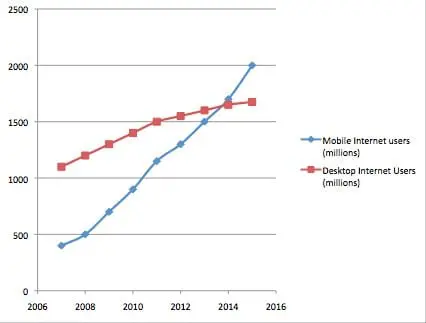
Thus it only makes sense for us to highlight some of the top responsive web sites on the internet now:
Sasquatch Festival – http://sasquatchfestival.com/
Stephen Caver – http://www.stephencaver.com/
Clear Air Challenge: http://clearairchallenge.com/
Stijlroyal – http://stijlroyal.com
Four Kitchens – https://www.fourkitchens.com/
Looking for more? Here’s Laundry list of Sites featuring responsive designs:
NEW TOP LEVEL DOMAIN EXTENSIONS (TLDS)
Transcription
Eric: Hi. I’m here at Globe Runner SEO and I want to talk about some big news in the world of search today. We’ve got new TLDs. So new domain level extensions, so instead of just .com, .net, .org and the other 26 extensions that are out there right now, the organization that controls the domain names has announced that next year they’re going to allow companies to start buying and producing their own domain name extensions.
So a brand could have their own domain name extension. You could have google.google if you really wanted to.
But here at Globe Runner we thought what is the real business potential behind this? Who would actually do this and why? Now first off, it’s not cheap. It costs $180,000 to register your new TLD. In addition to that you’ve got to have a support team in place. There’s legal work that needs to be done.
I’m actually estimating that it will probably end up costing closer to a million dollars a year for all the overhead that goes into this. It will probably be about a million bucks a year to get this thing rolling.
So if I’m right and it costs about a million dollars a year, who would want to spend that kind of money on a domain extension. Here are some ideas. Here’s some really good business opportunities out there that I think should be explored.
First off, companies like GoDaddy and other large hosting and domain selling companies would want to get into this business. Essentially they’re buying a vertical. If they could buy .shop, for instance, or .web or something that isn’t out there right now that gives them a new extension. This would just be like GoDaddy running that commercial on the Super Bowl this last year for .co.
.co was a way that they could sell lots of new domain names under a new extension. It gave them a whole new vertical. Millions and millions of people registered domains.
So even if it cost you a million dollars a year, if I can sell these for $20 a year or $10 a year and I sell a million of them that’s a $10 million sale, pretty easy ROI case to make there.
Other companies that might use it are large companies that have a large number of websites they want to tie together through an extension. A way that I see this going is like Warner Brothers. Maybe a movie company might want to buy .mov, .movie so that they could tie their network of websites together through this extension and they’re a large enough operation, a large enough organization that it makes sense for them.
Another good example would be sports leagues. So I definitely could see the NFL would want .nfl. You’d have cowboys.nfl and all the other NFL teams would have a .nfl official website. And they could control that and guarantee that when a viewer goes to their website they’re looking at the official website for that particular team. So I see those as two particular ways that this can be used for a business advantage for a company.
The other one that we see potential for is any kind of website that has a large number of sub domains. So a good example is WordPress. If you set up a WordPress website you can set them up two ways. Obviously you can do a self hosted WordPress, but a lot of people just go to wordpress.com, create an account, instantly have a website up, and it’s yourwebsite.wordpress.com.
Well now you’ve got a sub domain. Well I think WordPress might register something like .wp and then you would have yourwebsite.wp instead of yourwebsite.wordpress.com. So there’s those types of opportunities too. I could definitely see somebody like Google trying to make their blog platform more effective and get .blog for instance, instead of .blogger.com.
So there’s a lot of opportunities here for business to really expand the marketplace. I think it’s a good shift. It certainly will reshuffle search some. We’ll see, over the coming few years, how this affects search going forward. If these get preferential treatment or if they’re a little harder to rank. I think there’s arguments to be made for both.
Certainly your TLD having an effect on search today. A .edu will rank differently than a .org or a .com or a .biz. Those differences are less and less important, I think, than they used to be. During the original rollouts of the web we saw that .coms got preferential treatment.
Today I think that if you have a really good .net and it’s got good information it can rank just as well as a .com. So we’ll be interested to see how that rolls out and how those changes make.
But if you’re in the business of buying TLDs, you’re in business now.
DRUPAL COMMERCE FIELD DELETION FAILURE AFTER UNINSTALL
I thought i’d share with everyone a helpful solution to a nasty bug in drupal / drupal commerce
Issue:
You’re excited. A new drupal module version is released. You’re trying to upgrade and now you’re ridden with a fatal error.
Problem:
There’s a nasty bug in Drupal entity fields that is currently trying to be sorted out. When you upgrade you may be unable to fully upgrade because modules are unable to delete previous database fields. It’s best if you uninstall then reinstall particular modules. There’s no direct path to upgrading for some particular modules Dependant on the entity field system.
At this moment of writing, when you upgrade a module there’s not a way to delete existing entity fields in the database. They’re currently working on this issue in drupal 7/8.
Thus, when you upgrade modules there will be lots of zombie fields in your drupal database. So when you upgrade you’ll
Solution:
- Backup your database.
- The only way of dealing with this issue is to manually delete all the database fields in drupal.
- Using a script remove the database fields: Commerce Clean up Script for versions alpha2-alpha4 (Use with lots of caution. I do not provide any warrantee for this script):
Related Drupal.org Issue queues:
Drupal Commerce uninstall field failure: https://www.drupal.org/node/858722
Drupal Commerce Uninstall Instructions: https://www.drupal.org/node/858722#comment-4165896
ANATOMY OF AN ORGANIC TREND, OR “WHAT I LEARNED FROM #ZEBRAGIRL”
I spend most of my day signed into Twitter (I hate leaving it behind when I leave my desk) and have my Trending Topics set to Dallas-Fort Worth. Cody our Internet marketing specialist pointed out to me that #ZebraGirl was trending, and neither of us knew what that was, let alone how it ended up the third-most popular topic on Twitter for DFW.
It took awhile looking through the search results for #zebragirl to figure out why people were talking about it, but Cody and I quickly discovered people were talking about a girl on the campus of the University of North Texas in Denton who was wearing a two piece black and white outfit in a psychedelic print, and they had nicknamed her Zebra Girl. People sent in “sightings” of Zebra Girl, and there seemed to be an unwritten rule that someone SHOULD tell her, but no one was going to.
In an hour or so since it began, it has become the second highest trending topic, second only to Promoted Trend #subwayfan. It’s trending higher than “Marvin’s Room”, the name of a new single by hip-hop artist Drake which was organically trending nationally. Someone was tweeting about this girl every ten seconds, and that’s not even at the peak of the trend.
The trick to this becoming an organic trend was that it was left alone, just like any other piece of bad PR. But in this case there was also a mystery- who was this girl? Where was she going? People were out on campus trying to spot her. If this were guerrilla marketing, she’d have some sort of reward for those who found her in the form of a promotion or free product. But the authenticity here is what’s keeping the trend going and why people have been talking about a pair of leggings all afternoon. This wouldn’t continue if people were trying to find the BRAND NAME Zebra Girl Spokesperson. It wouldn’t be fun OR funny to find her around campus. The allure is in the idea that her outfit looks insane and she ostensibly doesn’t know.
Authentic intrigue is the key to establishing a social media trend. Upset the ordinary and people will talk about you. Both Alamo Drafthouse and NYC restaurant Jo’s have figured this out recently by creating the best anti-texting PSA ever and writing a scathing rebuttal to a Yelp Review respectively. They threw out “business as usual” (some people might argue it flies in the face of “the customer is always right” to tell people their business isn’t welcome if they act up) and it got them serious attention. You’d think this would be an obvious proposition, but the common approach seems to be “sneak in the marketing and see if they notice” a la Virgin Mobile’s new “Sparah” campaign. You can’t tell me Ashton Kutcher was really excited about that.
No, the hardest thing to do in social media is simply to be interesting, and too many people afraid to be different. But go against the norm, and organic trends are yours.
HOW WILL SCHEMA.ORG AFFECT SEO?
Google, Bing and Yahoo announced today that they all were adopting a new extended markup called schema.org.
This extended markup allows webmasters to add additional markup to their site to help search engines better understand their content.
The elements of your site that you can use the schema.org markup on are:
- Creative works: CreativeWork, Book, Movie, MusicRecording, Recipe, TVSeries …
- Embedded non-text objects: AudioObject, ImageObject, VideoObject
- Event
- Organization
- Person
- Place, LocalBusiness, Restaurant …
- Product, Offer, AggregateOffer
- Review, AggregateRating
Google has a rich snippets testing tool that will validate the code on your site.
We here at Globe Runner SEO anticipate that sites which utilize the schema.org markup will see increased traffic as the search engines more accurately place pages in search results. Search engines will give natural preferences to pages that give a clear window into their content.
Transcription
Eric McGehearty: Hi, it’s Eric with Globe Runner SEO, and I want to talk about something new, it’s Schema.org. Today Google Bing announced jointly that they were going to use Schema.org. Schema.org is basically very similar to what I’ve talked about before, which is microformats.
It’s a language system, it’s an add on system to an HTML markup that you would have on your page and your website page that Google, Bing, Yahoo have all agreed to use. It’s going to continue to grow, it’s going to be a library of markups that we can add to a webpage. The whole idea is to make search engines smarter so they can better engage with your content.
Honestly, it’s really not that complicated. There are extra codes, extra tags that I can put next to specific types of elements that allows a search engine a greater depth of understanding. So for instance, the example that they give on Schema.org is “Avatar”. If I put in my website a headline that said “Avatar”, how does the search engine know that I want to talk about the movie “Avatar” or if I’m talking about an avatar for representing a person’s face, right? How do they know?
Well, I could put in, from Schema.org, these additional microformats that would then tell the search engine, “This page is about the movie ‘Avatar’.” I want to also put in some extra text in there and I could in a person’s name and I could specifically label that name using the microformats and say, “And the director is,” right? So I’m able to actually tell the search engine all the nitty gritty details about the pieces of content on my page.
Here’s what’s neat microformats have been used been used for a little while, but the initial push of microformats was, for instance, reviews were a big push on microformats so that the search engine could put star ratings next to search results. That’s certainly still part of it, but now there’s an emphasis on people, places and things as well. Events are still part of it, that was part of the initial microformats rollout.
Today, if you have a company page and you have your employee page, you can add microformats in there to say, “This is a person. Here’s their email address, here’s their contact information,” things like that. If you’re a small business, a local business, or if you have locations of any kind, this is a really great opportunity to tag your location. You can tag your phone number, you tag your address, tag your business name, and you can really optimize that content so that the search engine really understands that you’re referring to yourself.
Also, let’s say that you had your address and then an alternative location on that same page. Well, you want to make sure that you tag your address properly so in local search results you come up, but that other addresses on the page are tagged differently to represent that those are representing other places on web, other things that you’re listing on your page. So there’s a lot of ways you might think about using it.
There was one that I found particularly interesting as an SEO person. There’s actually a way, using these microformats, to indicate a link without having a clickable link on your page. So, for instance, if I was referencing something, and I wanted to reference the Wikipedia article so Google knew that I was talking about this specific thing that Wikipedia is talking, I could do that without linking to Wikipedia.
I don’t actually affect the user experience, the user doesn’t even see a link, there’s no clickable text on my page, but Google sees that there’s a link out to Wikipedia. That would almost certainly affect search results in the same way that links now affect search results as a vote or passing credibility.
So Schema.org, visit it. If you’re a web developer and you’re interested in SEO, it’s a must have. You must learn this stuff if you want to stay on the cutting edge. Here at Globe Runner, of course, we’re staying on the cutting edge for our clients, and we’re excited to start integrating this in. It was announced this morning and I look forward to talking to you again soon.
GET YOUR TWITTER FOLLOW BUTTON!
Back in February, we did a blog post about Twitter redesigning its interface with additional features and rich media integration. Now, Twitter has recently rolled out another change that may have a large impact for businesses; the Twitter Follow Button. Users can now click an embedded Twitter button to follow Twitter accounts directly from websites that interest them.
Officially released on May 31st, this new feature allows businesses with a Twitter presence to generate a simple code for the follow button that embeds on their website, allowing users to follow the company’s account on Twitter with a single click. This single-click action is important because it allows visitors to remain on the company’s domain without being redirected in order to access Twitter, preventing them from having to leave the page and alter their train of thought. Users must be logged in with Twitter to be able to one-click follow- if they are not, they will be prompted to log into Twitter through a pop-up window.
With the option for a business to show how many Twitter followers they have next to the follow button, companies can flaunt their massive amount of followers. Or, companies can choose to hide their number of followers if they don’t feel confident with the figures. It’s common for consumers to judge the validity of a business based upon the number of followers, friends, and reviews they have, so some may find this feature beneficial.
Social media marketing strategies are very important, and social media sites are adapting to the changing consumer and the way they interact with businesses. Sites like Twitter allow companies to communicate with consumers in a unique and personal manner, but driving traffic away from a company’s main site to access another communication channel is superfluous and unnecessary. The Twitter follow button presents a simple solution to growing your Twitter community without disrupting the user experience of your home site.
WORDPRESS SITE HACKED: HACKED AFTERMATH GUIDE
This is very common these days. There are lots of hackers that want to insert unwanted links into your website. This guide will provide you solutions to neutralize the situation.
WordPress itself can be properly secured when taking into account the appropriate standards and procedures. Spending a little time and proactive steps will allow you to overcome any issues that may arise from an intrusion into your wordpress blog or wordpress site.
How do you detect if your website has been intruded upon?
- Utilize TAC: This plugin will allow you to detect if your theme has been hacked or altered with malicious links
- Review Source: Look over your website in code view. See if they’ve comprimised any links.
What are some common causes of any security intrusion:
- Simple Passwords
- Plugins that expose security risks
- Non-secure File Transfers
How do you avoid being hacked again?
There are some simple and low cost proactive steps to make your website become more difficult from being hacked. A handful of these may be obvious steps:
Passwords
- Change passwords often
- Utilize a password generator (See Links below).
- Make sure your password is more than 14 characters long and utilizes capital letters, integers or numerals and various symbols.
Backup your WordPress site
- Backup your WordPress site and WordPress database frequently
- Install a wordpress plugin to backup your website
- Store backups on dropbox
- SCM: Utilize Git or SVN and deploy your files using version control
Utilize Secure Entry
- Transfer files utilizing SFTP or SCP.
- Login using HTTPs
- Force SSL when exchanging passwords
Restrict Access
- Set restrictive permissions in areas of possible intrusions. Especially for your wp-config file. If your wp-config file is exposed; it contains your database password.
- Setup htaccess password for your wp-content folder
- Store database dumps in a folder inaccessible to the web and spiders
- Set up a wordpress salt for your password. This will allow only users with the particular salt entry to your wordpress site.
- Limit access to your mysql database. Limit external access to your database if you can.
Finally
- Update WordPress: Keep your WordPress core updated. There may be important security releases that will avoid you future headaches!
What if my wordpress blog has already been hacked?
Most likely the intruder or the hacker has probably added malicious links to your website.
This may mean removing the code that has been altered.
- Recover as much data from your WordPress theme as you can. If you have a backup restore it from a safe point.
- Backup the malicious theme or site: Doesn’t hurt to be able to have something to compare your changes with.
- If you cannot you must manually remove code in your theme and database
- Reinstall WordPress: The core of WordPress may have been altered or changed. Doesn’t hurt to upgrade and get the latest version of WordPress. There may have been a security release that will save you future headaches.
Resources
- GRC Password Generator – Secure password auto generator. The page itself is also secured via https !
- Random Phrase Generator – If you require remembering your password i recommend using this tool. I would recommend using numerals and different case to increase your password complexity
- WordPress Documentation on Security
- WordPress File Monitor Plugin
Update: Thanks Jon Hoff for the tips
SOCIAL SEARCH
If you’ve done a search on Bing or Google recently, you may have noticed the addition of “social circle” qualities included within the search results. For example, links that have been “liked” by members of your Facebook network may be pushed towards the top of the search results when searching with Bing. Or, if you’re using Google, you may see links that have been shared by members of your Twitter network included within the search results. This new feature of a social search allows a user to view more personally relevant results determined by the user’s social networks, making results unique to each person who has their own network of friends. Traditional search algorithms are used alongside the new social search feature, so search results will still appear normal if not shared or liked by anybody in your social network.
Through research, Bing states in a recent blog post that 90% of consumers look to their family and friends when making a purchase decision, and almost 80% of consumers will postpone a purchase decision until getting approval from a friend. Adding social qualities within the search results creates more of a conversational aspect to the search process, using the collective knowledge of the web as opposed to only facts and inbound links. Your friends, and the global community, can now help you discover information that is more relevant to you.
There was one issue with Bing’s social search that I found misleading when searching for a particular product. After searching for a specific product category, like cameras, it appeared on the search results page that a handful of my friends on Facebook liked some of the camera product pages on certain websites. In reality, that was not the case. My Facebook friends only liked the parent website that the products are listed under, i.e. Overstock.com, and not the actual product page. This may fool some consumers into making a purchase because they perceive they’re friends “liking” the product page when they actually have no interest in the product. Bing claims this will allow you to trust the source from which you are buying your product, but I don’t think users will view it that way.
Now you may be asking yourself, “What about Google?” Google still has a stronghold on the search process with a large following. Although Facebook and Bing have created a partnership to give Bing better access to Facebook’s information for search results, Google can also use your “social circle” to give you personally optimized and relevant results. Google uses Twitter, Flickr, Blogger, and other publicly available sites to show you results that people in your social circle have shared or recommended. It operates in a very similar way to the Bing social search, but without access to Facebook data. Google claims they will soon find a way to access Facebook’s data for similar search purposes, but I wouldn’t expect a partnership to form.
Google is also trying to implement a new social layer, called “+1”, which will allow a user to publicly approve of a link or website. This appears to be Google’s attempt to compete with Bing’s inclusion of Facebook data in their search results. Something tells me that it’ll be difficult for +1 to catch on with users, as there is already a wide assortment of social features and buttons on the web, and adding another might create more clutter for the user. Although, Google has surprised me in the past, so I can’t ever completely count them out.
I recently attended a seminar for the Dallas Ft. Worth Search Engine Marketing Association where they discussed these new social search features in detail. Their was much talk about creating valuable content that will entice viewers to like, share, or repost within their social circles. After all, content is the reason your brand gets shared. Finding the social “influencers” of the net and using them to share your content can help generate traffic and exposure. Conversations are happening right now about your brand, and real-time marketing should be implemented to be a part of that conversation. There is social relevancy in what is being said about your brand, and having a consistent presence in conversations will work in your favor.
How do these new social search feature effect your business? Are you going to have to change your current SEO tactics? Do you need a Facebook page? Will this benefit local search? Contact us today to learn how our team at Globe Runner can help your business adapt and benefit from these changes.
- « Previous Page
- 1
- …
- 38
- 39
- 40
- 41
- 42
- …
- 44
- Next Page »