










PROOF GOOGLE DOESN’T CARE ABOUT NOFOLLOW LINKS
I have known for a while now that Google doesn’t care too much about the nofollow attribute that’s added to links. I won’t go into statements from Matt Cutts about nofollow links, since he’s currently on vacation and not here to defend himself. But, nonetheless, let’s look at some recent proof that you can rank really well in Google organic search with nofollow links from Twitter.
Let’s take a not-so-recent blog post of mine, right here in this blog, where I wrote about Business Insider’s Top 100 Tech Influencers on Twitter. The post is a topical post, and I refer to it as a list to use to start connecting with tech influencers. It’s a helpful post for many. But that’s not the issue here. What’s the issue here is the statistics for this blog post:
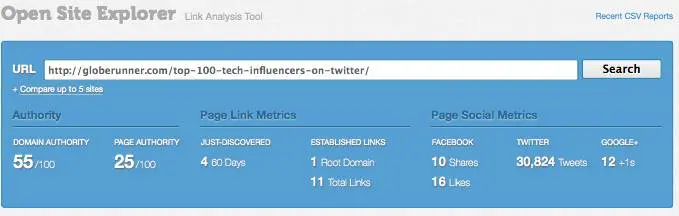
To see the live stats, you can go right to Open Site Explorer and enter the URL of the post. I have personally done no link building for this post. As you can see, the “normal” links are only really from our own site, whereas the links are from the home page and other blog category pages. So, the fact that the post is on our blog isn’t necessarily a reason for the post to rank well in Google organic search.
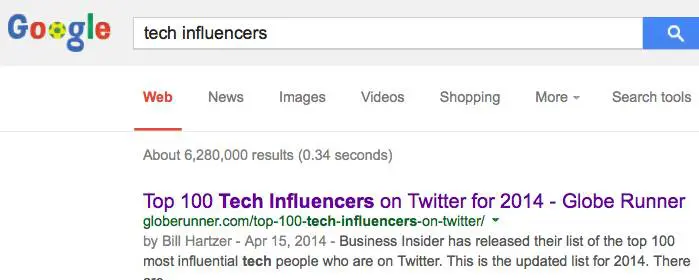
The majority of the activity is ONLY from Twitter. As of this post, there’s over 30,000 tweets or mentions on Twitter. Those are 100 percent “nofollow” links. As a result of those tweets of the blog post’s URL, the blog post is ranking number one for many related keyword phrases, such as “tech influencers”:
The links to this blog post (all of the Tweets and RTs) are tagged as being “nofollow” links. So, they’re not supposed to “count” when Google analyzes them for organic search engine rankings. Let’s take a look at some sample Tweets of this post. You’ll see below that the links have a dotted line around them. That’s from my Firefox browser add-on, which highlights links that are “nofollow” links.
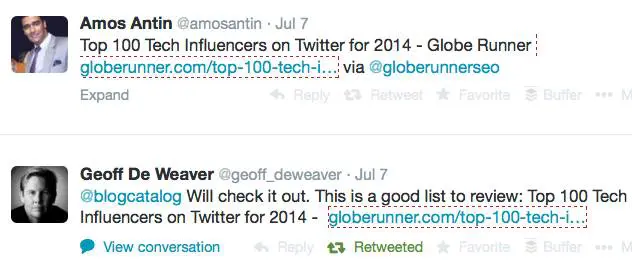
I’ve written before about the marrying of social and search, and even spoken about it at several conferences, such as Pubcon. Social media plays a huge role now in SEO, and if you’re not Tweeting, Plus 1ing, and Liking your new blog posts, then you’re missing out–and not doing proper SEO. SEO is not just about on-site optimization, it’s about getting real human eyeballs to your site. And Google knows that. That’s exactly why that post is ranking well in Google organic search.
So, frankly, there’s proof enough for me that Google doesn’t care much about nofollow links anymore. At least when it comes to Twitter.
Bill Hartzer is Globe Runner’s Senior SEO Strategist. Follow him on Google Plus. You can also follow him on Twitter as @bhartzer.
HTTPS SECURE WEBSITES HELP TRUST AND SEARCH ENGINE RANKINGS
Back in 2013, Google quietly moved to secure search, passing less keyword referral data to website owners. Now, Google is officially recommending that website owners move their websites from http to https, making their websites secure. If Google can trust your site more, know that it is secure and you’re the one who posted content on it, then your site could rank higher. Google is “starting to use HTTPS as a ranking signal.”
Because of Google’s official stance on https and their calling for “for HTTPS everywhere on the web”, starting today, we are recommending that our clients begin moving their websites from http to https. We realize that this, in many circumstances, is a big undertaking, will have an additional cost, and will take some time to complete. However, over the long run, will be beneficial not just because it could increase your website’s search engine rankings.

Even if you do not sell products and services directly on your website, your website should be secure and use https rather than http. John Mueller, from Google, had this to say about why all websites should use https, even if you’re not selling products on your site:
Some webmasters say they have “just a content site”, like a blog, and that doesn’t need to be secured. That misses out two immediate benefits you get as a site owner:
1. Data integrity: only by serving securely can you guarantee that someone is not altering how your content is received by your users. How many times have you accessed a site on an open network or from a hotel and got unexpected ads? This is a very visible manifestation of the issue, but it can be much more subtle.
2. Authentication: How can users trust that the site is really the one it says it is? Imagine you’re a content site that gives financial or medical advice. If I operated such a site, I’d really want to tell my readers that the advice they’re reading is genuinely mine and not someone else pretending to be me.
On top of these, your users get obvious (and not-so-obvious) benefits. Myself and fellow Googler and HNer Ilya Grigorik did a talk at Google I/O a few weeks ago that talks about these and a lot more in great detail: Google I/O 2014 – HTTPS Everywhere
Even though your website is merely a “content website”, the trust that is given when your website is valuable. While Google has been using Google Authorship to convey some trust factors, overall I believe that we all should secure our websites; and Google, like a lot of us, want to see more trusted, secure websites. It’s just better for the entire web community as a whole to have secure websites.
I can personally tell you that as someone who has worked a lot to clean up link profiles of websites, I see quite a few hacked websites with links embedded by someone other than the site owner. By making your website secure and using https, it will be that more difficult for someone to hack into your website.
The Cost of a Secure Website
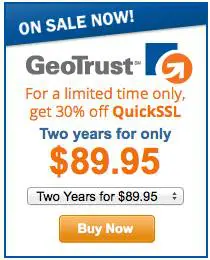
The cost of a secure certificate for your website can cost as little as $89.95 for two years. Dotster is currently offering secure certificates through Geotrust for $89.95 for two years. Godaddy offers certificates for $69.95 per year. I realize that this isn’t very cheap, but if you have an online business, then it’s imperative that you protect it–so moving your entire website to https from http is a good move. Now we have another reason to make this move, which is the potential for better search engine rankings in Google.
How much would it cost you if your website wasn’t secure and it got hacked or your website visitors started seeing rogue ads on your website? It could cost you business, and your site would be trusted less.
Google is offering a new support web page that explain site security and gives you the best practices when setting up HTTPS. In some cases, you may need to move to another web server, one that supports HSTS: “Use a web server that supports HTTP Strict Transport Security (HSTS) and make sure it’s enabled.
This mechanism tells the browser to automatically request pages using HTTPS even when the user enters http in the browser location bar. It also tells Google to serve secure URLs in the search results. All this minimizes the risk of serving unsecured content to your users.”
Bill Hartzer is Globe Runner’s Senior SEO Strategist. Follow him on Google Plus.
GOOGLE PIGEON ALGORITHM UPDATE: WHAT WE KNOW
On July 24, 2014, Google rolled out a new algorithm update that has been dubbed the Google pigeon algorithm update, which affects local search engine rankings. Local search engine rankings refer to search queries that include a city name in the query. Since the update on July 24th, there have been some changes (fluctuations) in the search results, so as of the time of writing this, we still may see some further changes to the search results for certain keyword phases. Here is what we know about the Google pigeon algorithm update.
So far, there is speculation that this latest Google Pigeon update could be a version of the Google Venice algorithm update back in 2012 that included two main local search improvements, as reported by Google:
— “Improvements to ranking for local search results. [launch codename “Venice”] This improvement improves the triggering of Local Universal results by relying more on the ranking of our main search results as a signal.”
— “Improved local results. We launched a new system to find results from a user’s city more reliably. Now we’re better able to detect when both queries and documents are local to the user.”
There has also been further speculation that the Google Pigeon update combines data from the Google My Business database with the knowledge graph database. Frankly, this 2nd speculation seems much more plausible, that the current data from Google’s My Business has been integrated with the knowledge graph. We knew this was coming, and even a few years ago I started recommending the use of Freebase because it is part of the knowledge graph. If you have not listed your company in Freebase, I recommend you do so as soon as possible.
Regardless of whether or not Google has integrated the knowledge graph with the Google’s My Business database, here is what we know so far regarding the Google Pigeon update:
— There are less local listings are displaying in the actual search engine results pages (SERPs). Commonly referred to as the 7 pack, 3 pack, and 1 pack, those local listing callouts don’t show up as much as they used to prior to the Google Pigeon update.
— More review-type websites are showing up in the SERPs. Websites like Yelp.com and other Internet Yellow Pages (IYP) sites seem to have benefitted from this update.
— Some industries have taken ranking hits across the board, with all of the sites in the same industry having been affected.
— Some small businesses are seeing huge search engine ranking increases. It used to be that many multi-location brands were ranking well, but with this update there appears to be some rankings increases for single-location small businesses.
Chris Sanfilippo reported some of his findings, which are in line with what we’re seeing:
1. Some keywords are no longer showing a 7-pack
2. Some keywords that never showed a 7-pack are now showing a 7-pack
3. Some 7-packs are now “3-packs”
4. For “tampa house cleaning”, one website is ranking organic 1 &2, which are above the map listings, they are also ranking in the map position A. (location set to Tampa)
5. KW + city results have changed, and are no longer the same as “keyword” with location set to city.
6. Yelp’s rankings haven’t improved for my niches, it’s actually the opposite.
7. For my niches the Google+ centroid has changed in a major way and the map is zoomed out, showing results much farther away.
Linda Buquet, from the Local Search Forum, is reporting that “Geo searches are different now. In past if you search for City + KW and your location was elsewhere, didn’t matter much. You could change search location that that city and results would be the same. But now they are wildly different. So to do an accurate search you need to reset to location of the query.”
At this point, it does appear that the Google Pigeon update has affected a significant amount of local SEO, but at this point it’s still too early to tell specifically if it will have as much of an impact as other recent Google updates, such as Google Penguin and Google Panda.
I’ll keep you posted, as local search and local SEO has definitely been shaken up a bit by this Google Pigeon update. There are certainly winners and losers in this update.
BRANDING: GLOBE RUNNER UPDATES BRAND MARK, CORPORATE IDENTITY
IN a nod to the times and surging demand for SEO services, Globe Runner unveiled its new logo, part of a branding and corporate identity refreshing exercise that started in May 2014. The new brand was produced by upcoming Texan design shop Steadfast Creative.
The rebranding was prompted by unprecedented demand for strategic SEO services, particularly in the booming DFW market. Globe Runner is poised to meet its 2014 revenue targets by the third quarter of the year. The bump in business, which began in March, has forced the agency to seek larger premises. It will be moving to a new office in Addison, Texas in September.
“It was time,” commented Globe Runner CEO Eric McGehearty about the branding exercise. “Our clients are upping their game, and so should we.” The new logo is a clean orange maze forming a G. “It’s a minimalist play on the globe that is part of our name; at the same time it references our agency’s mission of getting to the heart of clients’ online issues,” said McGehearty.
BEFORE AND AFTER: GLOBE RUNNER’S ORIGINAL LOGO HAD A GRADIENT GLOBE AND THE COMPANY NAME WRAPPING AROUND THE SPHERE. STEADFAST CREATIVE RETAINED THE GRAY AND ORANGE COLOR SCHEME, WHILE CREATING A NEW MAZE-LIKE G AS THE ICON.
The agency is slowly rolling out the different elements of the new identity, starting with its website, social media platforms and business cards. All touch points will carry the new branding by the end of 2014.
Globe Runner was started in 2008 by Eric and Heather McGehearty out of Lewisville, Texas. It has over 60 local, national and international clients in North America, the UK, Brazil and Malaysia. Among Globe Runner’s DFW clients are Sylvie Collection, Terry Costa, Jefferson Dental, Coach Posting, Skylane Autohaus, Old World Stoneworks, AgeWait and NICMAXX Online.
Globe Runner employs 20 full- and part-time staff specializing in SEO, pay-per-click (PPC) advertising, content strategy and development, branding, and social media.
The agency’s core competency is SEO, for which it consistently ranks on page 1 of Google for searches relevant to Dallas. Among Globe Runner’s artillery is Senior SEO Strategist Bill Hartzer, a nationally recognized expert on search engine optimization who has practiced, written about and presented on SEO since 1996.
CHEAT SHEET: SOCIAL MEDIA IMAGE SIZES
Whenever we engage a new client or do a website or marketing makeover for a client, one of the included parts is the social media part, where we review the current social media strategy and our client’s use of the social media websites. After all, social media is very much a part of SEO nowadays, and you need a good social media presence to help with your website’s SEO. To make the most of social, you need great photos and great profile photos as well as great posts. So, here’s our list, er, cheat sheet of social media image sizes.
Ello
Header Photo – 1800 x 1013
Avatar – 340 x 340
Facebook
Cover Photo – 851 x 315
Profile Photo – 180 x 180 (displays as 160 x 160)
Tab 111 x 74
Link Image 1200 x 627
Image 1200 x 1200
Highlighted / Milestone Image 1200 x 717
Twitter
Header 1500 x 500
Profile Photo 400 x 400
Image Display Size 880 x 440 (recommended)
Google Plus
Profile Photo 250 x 250 (visible face required)
Cover Photo 2120 x 1192
Shared Image 800 x 600
YouTube
Profile Photo 800 x 800
Channel Art 2560 x 1224
Custom Video Thumbnail 1280 x 720
LinkedIn
Profile Photo 200 x 200
Cover Photo 646 x 220
Pinterest
Profile Photo 600 x 600
Pinterest Pins 600 x (infinite height)
Board Thumbnail 222 x 150
Instagram
Profile Photo 161 x 161
Image on Desktop (Lightbox) 612 x 612
Image Feed 510 x 510
Foursquare
Foursquare Check-In Photos / Local Updates
Website Activity Feed 346 x 224
iPhone App Check-In/Update Detail 584 x 274
Website Activity Feed 530 x 224
Foursquare Tip Photos
iPhone App Activity Feed 530 x 112
Website Activity Feed 530 x 112
And for those of you who are still stuck on using MySpace, here is all of the dimensions you need to build out your MySpace profile:
MySpace
Photo Requirements (Max size is 20mb):
MySpace Stream Images:
Best Size: Highly subjective
Minimum 1×1
MySpace Cover Images:
Best size 2048×1152 (16×9)
Minimum 800×600 pixels
MySpace Profile Images:
Best size 2048×2048
Minimum 140×140
MySpace Mix Cover Images:
Minimum 1024×768
MySpace Song/Album Images:
Minimum 600×600
MySpace Animated GIFs:
Best Size: Anything over 300×300
10mb Max file size
All of these image sizes are mentioned as Width x Height, and are in Pixels. In our list, I’ve added a few social media websites that aren’t included in lists that others have included. Here are a few other websites that have put together their social media image size cheat sheets. They don’t include Foursquare and MySpace, though.Constant Contact Social Media Image Cheat Sheet

Social Media Sizing Cheat Sheet / 2014

Sprout Social also has an “always up to date” social media image size post, where Kevin posts the current image sizes.
Bill Hartzer is Globe Runner’s Senior SEO Strategist. Follow him on Google Plus. You can also follow him on Twitter as @bhartzer.
HOW TO BEGIN A LOCAL SEO CAMPAIGN IN 3 EASY PHASES
The Necessary Steps to Achieve Rankings Quickly
Starting a local SEO campaign could not be a more exciting, yet important time. Whether you are conducting a campaign for a client or going to take on the effort yourself, there can be an overwhelming number of steps and ‘hidden tips’. Read on, as all is revealed in this guide toward getting ranked quickly in the local pack and generating traffic.
Phase 1: Research and Prep
The very first phase in any successful local SEO campaign is to lock down the NAP (Name, Address, Phone) and other business details. NAP consistency is one of the most critical elements of ranking in local search results. View all the local ranking factors for 2014. Create a spreadsheet, ideally in Google Drive with a sheet for NAP Data. You can share with the business owner and in real time, they can view all the updates.
Name
Use the legal name of the business. For very small and local businesses, make sure they have gone through the steps to register Doing Business As Name (DBA). It’s not surprising to find many businesses that haven’t and some states don’t require it. Using the legal name in citations is important, as several directories will pull data from the DBA or legal name filed with the state.
Don’t add keywords to a business name unless it is the legal name of a business. Although, keywords in business names are one of the top local ranking factors. If you’re building a brand new business and have yet to invest in the brand, consider changing the legal company name or “Doing Business As” and add keywords. The only exception is for multi-location businesses, add south, north, or the city name to the company name to differentiate it from other locations in the same area.
The criteria for one of the most strategic and strict citation sites, Acxiom includes the following:
NOTE: You will need the following documentation to validate your business. We do not accept documents obtained or scanned from Internet sites or W-9 Forms. This documentation must be submitted with account information or your listing will be denied and you will have to reenter the information and resubmit.
*** BUSINESS NAME AND ADDRESS ON DOCUMENTATION MUST MATCH TO YOUR REGISTRATION REQUEST
- Federal Tax License Letter *submit the letter that includes your ID#, name, address and/or phone number of business
- State, County, or City Business License or Sales Tax License
- Doing Business As License
- Fictitious Name Registration
One informative blog post goes over the importance of limiting the length of your business name. That’s right, don’t create a name that generally is longer than 40 characters or you won’t be able to add it to many citation directories, including Acxiom. Abbreviating the name is not an option, as again consistency on every directory is crucial.
Address
Just as crucial is the address of the business. Always check with the USPS for the official address and proper formatting. While it’s been proven that small differences such as STE and #, which both represent suite don’t affect local rankings, larger discrepancies do. Be consistent, by adding the correct address to the spreadsheet you’ll be sure to copy it properly every time.
Phone
Always use a local phone number as the primary, add 1800 numbers or specific department numbers to additional fields available, but always use a local phone number that is truly a business phone. I had a client that told me her main business phone number, when I discovered later the number although local, was a cell phone. Always validate what your clients won’t tell you and check if it’s a business phone.
Other Business Information
In your NAP spreadsheet, also lock down the following (by getting approval on all details)
1. NAP (Name of Business, Address and Phone Number). Also add to the spreadsheet (website URL, social media URL’s, company email address with a domain name such as sa***@*********me.com, and 1800 numbers and other contact details. For a multi-location business, using a location specific URL has a bigger impact. It ensures the data between the multiple locations is unique and does affect rankings.
2. Categories. One of the most important areas of ranking locally is choosing accurate categories for a business. Max out all related categories, usually 5 for most citations. Think of different ways to call your service or work, and start board and go narrow. For example, a real estate brokerage might use the following categories: (Apartment Rental Agency, Real Estate Brokerage, Real Estate Brokers, Condominium Rental Agency, Real Estate Rental Agency, Apartment Finder & Rental Service). Category diversity is also important). You can use a tool to find new categories, I find that throughout a campaign, you’ll find new categories just by using different citation sites. Categories aren’t universal, but realize the more times you use a category in a citation, the more often you are to rank for that category term.
3. Approved Business Hours (Tip on 24/7 hour businesses. Google doesn’t enjoy displaying hours for a business as open 24 hours. A representative told me it can trigger a listing for further review, and even be removed or unverified. Unless a business has an office with a secretary at a desk, 24 hours a day, they prefer you specify normal office hours. Many citations on other sites allow for a checkbox on 24/7 and normal office hours. For Google, just add to the additional detail section)
4. Approved Payment Information
5. All languages spoken by employees
6. Year established. (This may be an area of contention at some businesses. I usually err on the side of the earlier, the better as customers do place trust in more established businesses, but don’t make up an earlier date. Some businesses may choose to take the year of a business they acquired. A business that has a history of opening and closing may also choose the first date they opened their doors.
7. Approved associations (Chambers of commerce, Inc500, local industry chapters)
8. Approved certifications (gather detail on all areas of employees, what certifications to employees have that can boost the credibility of the business?)
9. Short and long description. Write a unique paragraph for a short business description and multiple paragraphs for a long description. Include keywords in the copy, category keywords work well too… On Google + make sure to hyperlink to important areas on your website. For a local business with high competition, rewrite the description for each major citation. Otherwise the content is duplicated and isn’t as valuable.
10. Approved company logo and pictures.. For a service business, get logos of partners, vendors, company logo, the team, the office location. For product based businesses, photos become even more important and easier. Show your product in an engaging way, research has discovered local businesses with pictures get 60% more clicks. Use descriptive and keyword rich file names on images and include alt text.
Phase 2: Cleanup & Build
After gathering the above information in Google Drive, it’s time to begin cleanup. This will be the most time consuming phase of your local SEO campaign. If you’re starting a campaign for a new business (you have zero citations or websites online that reference you or your client’s business location), you’re at a much better starting point. For everyone else, assume the worst. Don’t skim through the search for duplicates, incorrect data, missing information and more. You’re goal is to find and catalog all unique problems (ideally in a spreadsheet). The name, address and phone, any and all deviations, should be recorded. Later you’ll use this list to search for more problems.
Begin with asking the business owner for any and all old phone numbers and location addresses. You should by now have the legal company name as well as any company locations. Don’t use the citation sites for searches. Many are poorly designed and can’t compete with Google. Use Google to find problems in the following ways. For the sake of the example, let’s say my business has the following NAP and I’m looking for problems on yellowpages.com.Pete’s Bakery4321 50th Street#254Chicago, Il 01234325-333-5743
- search for “site: yellowpages.com 325-333-5743”
This will help find businesses that share the same phone number regardless of name or address. They may be misspellings of Pete’s Bakery, duplicates of the address or even a completely unrelated business. Either way, any business that shares your phone number that isn’t the same entity should be resolved. Reach out to the owners if still open, or remove the entry. Sometimes I’ve even claimed a business, only to change the phone number to 111-111-1111.
- search for “site: yellowpages.com Pete’s Bakery Chicago”
This will find problems with the address, duplicates and the phone number. Often it’s an old number, a tracking number or even a 1800 number that is active on a listing.
Go through the list below of the most important local citations and check all for problems and duplicates first. Write down all unique addresses and phone numbers that are related to your business, you’ll use this list to check on all citation directories. Any new addresses, names or phone numbers you find, deserve a search on all existing directories.
You may find that none of the listings closely match the business. As you work through the problems, generally claim one of the listings and update it fully, remove all other duplicates. Although it is far easier to make an update with the original email and password, very rarely will clients have this information. Often speaking on the phone with support achieves a faster turnaround than an email. Review this handy guide for how to delete duplicates on popular directories. Add new listings that aren’t featured on the site, but triple check that they aren’t listed under the wrong name, phone number or address.
When you claim citations, use a generic or branded company Gmail account. It’s ideal to have this email not tied to anyone’s personal account. You will want ongoing access as many citations require email verification before making changes.
Most Important Local Citation Directories
| Citation Directory | Type | How to Claim |
| Google + | Search Engine | Google Places, requires postcard verification |
| Yahoo | Search Engine | Update the data aggregators, over time Yahoo will update. Or pay for an update. |
| Bing | Search Engine | Requires email confirmation, postcard or contact support |
| InfoUSA/Express Update | Data Aggregator | Requires phone verification |
| Neustar/Localeze | Data Aggregator | Create an account, claim and update |
| Acxiom | Data Aggregator | Requires phone and document verification |
| Factual | Data Aggregator | Contact support |
| Yellow Pages | Review Site | Requires phone verification |
| Yelp | Review Site | Difficult process to remove and update without login, contact support |
| Angie’s List | Review Site | Contact support |
| Superpages | Review Site | Contact support for listings already claimed |
| HotFrog | Directory Site | Contact support |
| Manta | Directory Site | Call support |
| CitySearch | Review Site | Requires phone verification |
| Best of the Web | Directory Site | Paid |
| Foursquare | Social Media | Requires voicemail verification |
| Social Media | Contact support | |
| Social Media | Contact support | |
| Social Media | Contact support | |
| Mojopages | Directory Site | Contact support |
| YellowBook 360 (hibu) | Directory Site | Call support |
| Merchant Circle | Review Site | Contact support |
| Yellowbot | Review Site | Requires phone verification |
| BBB.org | Complaint Site | Requires payment |
| dexknows | Review Site | Owns Superpages, but process is still separate. Must call support. |
| Dunn & Bradstreet | Data Aggregator | Requires business owner verification |
| ibegin | Directory Site | Requires phone verification |
Phase 3: Growth and Ranking
After fixing all issues on the most popular directory sites, it’s time to expand to any site that lists the business either correctly or incorrectly. Claim and update and use the techniques listed above to find all mentions of the business. Adding to Google Drive creates an easy way for a business to check in real time and see all the new citations and progress made.
Next, leverage software and there are many options available. I’ve used Whitespark and Brightlocal, but realize there are other solutions. Most do the same or similar functions. They track (although with some inaccuracies) all the citation directories where a business is located with opportunities to increase and add the business to new directories. They also help compare and track over time your competitors ranking in local search with your own business. There are some steps to use this software effectively:
1. Identify the terms that trigger the local pack for your geographic area. As you search for keywords you’ll often find other sites ranking that allow for a citation. Also note which terms are most aligned with your business and the search volume.
2. When looking at a local pack, there are two areas that can influence click through rate. One is position or where a business appears in the local pack. A higher position is better, although a business with reviews can outstrip traffic of higher results. Track using software the position of each keyword. 8th is just shy of appearing in the local pack, 7 is at the end for most terms.
3. Look for new opportunities routinely, especially in regards to competition. Where are they listed and perform and problems in search. Occasionally a data aggregator can receive the wrong information or create duplicate listings which require removal. Monitor and continue to optimize the growth of citations and the increase in rankings.
Review Strategy
With corrected and consistent citations and eventually, rankings, put a review strategy in place to increase CTR. Identify the top sites to receive a review, most of the time it should include Google +, Yelp and an industry specific site. Use software such as customer lobby, which can make reviews easier. Or simply put a process in place that asks every customer to review your business. This could be through stickers and visual reminders at your retail location, a conversation you have in person after completion of a service, or an automated email for an online business.
You can generate several quick reviews by simply sending an email to your marketing database. But for true success, put in place a process and realize it’s important!
Corey Barnett is a Globe Runner Online Marketing Specialist. Follow him on Google Plus. Corey also frequently writes on his blog – cleverlyengaged.com/blog
NICMAXX ONLINE APPOINTS GLOBE RUNNER FOR SEO, CONTENT MARKETING SERVICES
Globe Runner’s client roster has one new addition: Digital retail site NICMAXX Online.
NICMAXX Online conducts e-commerce for NICMAXX, an electronic cigarette brand that has grown in popularity in key consumer markets such as New York, Las Vegas and Florida. Developed over eight years by smokers for smokers, its proprietary blend of ingredients closely replicates the sensory experience generated by traditional cigarettes.
Based in Addison, Texas, NICMAXX Online comprises the retail site https://www.nicmaxxonline.com/, social media accounts for Twitter (@NicMaxxStore), Facebook (@nicmaxxonline)) and other digital assets.
Apart from US customers, NICMAXX Online caters to overseas customers who may not have access to the product. Some countries still forbid the sale of e-cigarettes but do allow for purchase and personal consumption.
In a recent Wall Street Journal story, Wells Fargo valued the e-vapor market at $2.2 billion. NICMAXX Online is seeing strong growth in ecommerce with revenue tripling year-over-year.
“It’s always exciting to work on a challenger brand making ripples in a relatively new category,” said Globe Runner CEO Eric McGehearty. “The opportunities to build NICMAXX Online into a strong brand are tremendous.”
Globe Runner was started in 2008 by McGehearty in Lewisville, Texas. In addition to its core business of search engine optimization (SEO), the agency also offers online advertising, content marketing, branding and social media services.
FILED A GOOGLE DISAVOW? THOSE LINKS ARE STILL IN GOOGLE WEBMASTER TOOLS
A while back, Google gave website owners an advanced link tool called the Disavow Links Tool. It allows us to tell the search engine which links to ignore when they calculate the links to our website. Bing.com has a similar tool, as well, and was actually the first to make the tool available to website owners.
With the Disavow Tool, you simply come up with a list of URLs or domain names that you don’t like and put them in a text file called a “disavow file” and upload that file to Google (and Bing). When the search engine crawls the links again and recalculates the links to your site for search engine ranking purposes, they are supposed to disavow those links (not count them or ignore them). From my experience, I’ve seen a disavow file really help in cases where certain links were super low-quality or “toxic” links. About 5 days after submitting a disavow file, I’ve seen traffic start to go back up. Sometimes it takes a lot longer.
But here is where I’m surprised. When you upload a disavow file and Google accepts that file, they know that you’ve disavowed certain links or certain domain names (all links from that domain name). Why does Google still shows those links in the “links to your site” section of Google Webmaster Tools? Google still shows those links in your list, as if those links still exist–and they do. But why would Google still show them? You’ve disavowed them.
Apparently the disavow file data is not taken into account when they generate the “links to your site” list in Google Webmaster Tools. If Google removed those links from the list (the links that you’ve disavowed) then we would know that Google is taking the disavow file into account when calculating links to the site. That would be very helpful for website owners to know.
Let’s look at a specific example. In January 2014, I disavowed low quality links from the domain name “articlesnatch.com”, which a previous SEO firm created (they submitted hundreds of articles to that site in particular). Now, I personally feel that those are low quality links, just there for “SEO value” and therefore should be disavowed. But 6 months later, after I disavowed all links from that domain name, Google Webmaster Tools still shows links from that website:
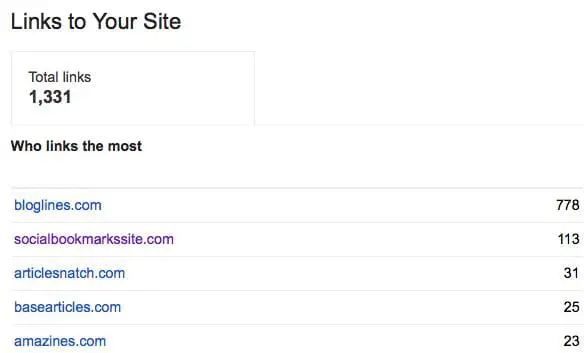
In fact, looking at this particular list of links to this site, I disavowed links to socialbookmarkssite.com, articlesnatch.com, basearticles.com, and amazines.com all back in January 2014, over six months ago. Yet they still appear in Google Webmaster Tools as links to the site. These links were disavowed because the site owners refused to remove the links or we were unsuccessful in getting those links removed. This was part of a reconsideration request because the site had received a manual action for it’s links. The manual action was revoked after we disavowed these links and removed other links to the site.
It would be really helpful if Google, in Google Webmaster Tools, were to remove those links from the list of “links to our site”. I understand it’s a random list of links, but the least they could do is remove the links we’ve disavowed. That would tell us that they’re taking our disavow file into account when they calculate the links to the site. Or, at least mark the links somehow so that we know that they’ve been disavowed. How hard is that to do?
Bill Hartzer is Globe Runner’s Senior SEO Strategist. Connect with him on Google+ or on Twitter as Bhartzer.
GOOGLE ADWORDS ADS, ORGANIC SEARCH, AND THE EBAY SEARCH PENALTY
Google has always maintained that paying for Google AdWords ads doesn’t have any effect on your organic search engine rankings. They just don’t share the same databases, so there’s no way for Google to know if you paid for AdWords ads and relay that information to the organic search team or its algorithm. I have to say that I agree with them–by mixing the two or allowing those two database to essentially “talk to each other”, there would be serious consequences and a lack of overall trust by the public in organic search.
As Google organic search begins to rely more on more “human factors” that are more and more measurable, it’s more likely that Google AdWords ads will come into play and start to have an effect on a site’s organic search engine rankings. For example, when a site starts seeing more visitors from paid search, users tend to initially come from paid search–but then they may go back later and perform some brand searches, which then affects organic search traffic. It’s those same visitors who may share the content and interact with it on the social media sites, which could then effect organic search traffic, as well. Then, finally, one theory I’m toying with is that Google is watching the overall traffic to a site and the level of engagement by humans. The more popular a web page, article, blog post, or site becomes, the better it will perform in organic search. As that traffic fades, so does the site’s organic search engine rankings.
So, when it comes to the correlation between Google AdWords and Google organic search, there may very well be a correlation between the two: but it’s traffic related, not because of the fact that Google AdWords and Google organic search shares the same database or the same data.
But let’s not forget a study that Google did back 2012, called Impact of Organic Ranking on Ad Click Incrementality:
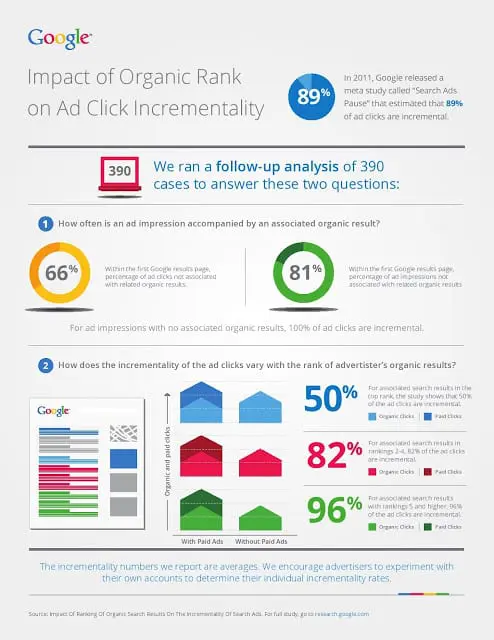
There is a strong correlation between organic search and paid ads when you’re running paid ads. You get clicks on your organic search results. And, guess what? Google tracks the clicks on your organic search listings. The more people who click (and don’t pogostick back to the search results), the better your organic search engine rankings. Or at least Google’s tracking the clicks on organic search and using that data somehow in the organic search algorithm.
It’s not surprising to me that if you stop paying for AdWords ads your visibility in organic search will go down as well.
Recently, there have been some interesting reports and comments regarding eBay and the fact that Google has penalized the popular online auction website in organic search. eBay stopped paying for Google AdWords traffic about a year ago. As a result of not participating in Google AdWords, I can see how eBay’s traffic started going down over time, as they just as visible as they were previously. eBay was recently penalized in Google’s organic search results either by an algorithmic penalty–or with a manual action (or both). eBay nor Google is commenting on what the current situation is. But, nonetheless, it’s clear that the site’s traffic from organic search has gone down.
According to SEMrush.com, eBay has suffered significantly with this last Google organic search update:
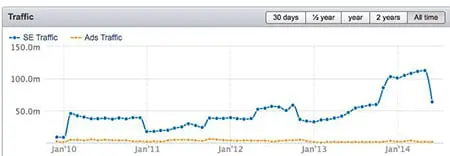
A SearchMetrics report shows that eBay has suffered a 78 percent loss in search traffic.
According to SE Roundtable, conspiracy theories exist around the loss in eBay’s organic search traffic. Apparently there are theories out there that say that this some sort of backlash or penalty for stopping paying for Google AdWords ads. Reports say that eBay spent over a billion dollars in Google AdWords ads. And they’ve stopped advertising in Google AdWords.
Frankly, I personally believe that Google wouldn’t be so bold as to do something like penalize eBay for not paying for Google AdWords ads. They just wouldn’t do that, as it wouldn’t make sense: if it were to be connected in some way, there could be strong repercussions and most likely some sort of legal action would come as a result.
My theory is that Google AdWords ads, and the traffic that it generates, has an effect on a site’s organic search, especially given the fact that “human interaction” with your website is so much more a part of the Google organic search algorithm than it has been before. The fact that Google has been cracking down more and more on low quality, thin content with Google Panda is related. How much unique content really is on eBay? Many sellers upload literally thousands of listings, with all sorts of duplicate content, and that content doesn’t stick around for that long. It eventually goes away when the auction is completed. That has to come into play here.
There’s no evidence that Google has consciously dinged eBay because they stopped paying for AdWords ads. There never will be. But think about it: if you stop getting traffic to the site, there’s less human interaction with your site, people don’t search for your brand as much as they did in the past, and they don’t socialize your site as much as they used to. And that’s what’s going to effect organic search traffic.
Sure, there could also be a Google algorithmic or manual penalty on eBay’s site, as well. Does it really matter? I don’t really care at this point if eBay ranks for a keyword phrase or not: I’m going to straight to eBay to bid and buy. I’m not going there because I found something in Google organic search.
Bill Hartzer is Globe Runner’s Senior SEO Strategist. Connect with him on Google+ or on Twitter as Bhartzer.
- « Previous Page
- 1
- …
- 31
- 32
- 33
- 34
- 35
- …
- 44
- Next Page »