













WHAT IS CALL MEASUREMENT AND HOW CAN IT BENEFIT YOUR BUSINESS?
Your advertising efforts, whether on social media, Paid Search, in the newspaper, on television, or through other media, all represent a large investment on your part. You hope this investment will pay off—after all, advertising is pointless if you don’t get people coming to you—but how can you measure that? There are a number of ways to measure the success of your advertising efforts, and one of those is through call measurement.
Definition of Call Measurement
Call measurement is the process of tracking phone calls to determine the success of specific advertising efforts. This starts with obtaining a separate phone number for each type of advertising you use. For example, suppose you have a Paid Ad online, a commercial on television, and a social media marketing campaign on Facebook. Each of these will have a unique phone number that is linked to your main business number so that you are able to identify which advertisement drove the call.
As people call in, you are able to track which advertising strategy brought them in by the phone number they use, and, with Paid Ads online, you are able to see which keywords drove the phone calls. This data is recorded and then used to determine which methods are worth their investment and which ones might do with some scaling back.
Advantages for Your Business
Call measurement can provide a significant return on your investment by providing valuable insight into your advertising strategies. Specifically, it can help in the following three ways:
- Measure what works: The main advantage of using call measurement is it provides you with a detailed map of how your various advertising investments are paying off. Going back to our example, if you find that your social media campaign is bringing in twice as many calls as your commercials, you will want to alter your expenditures to reflect that.
- Know your audience: Not only can you gain valuable insight from the volume of calls generated by each strategy you use, you are also able to track other information as well. If you are getting more calls from one specific geographical region than others, for example, you may want to focus your efforts on that area. Also, you may wish to alter your efforts in other areas to expand your audience.
- Call recording and Listening: call measurement also enables you to record calls and score them as valid business opportunities. When determining ROI, it’s not about how many calls were received, but, rather, the quality of those calls and how many qualified leads came from them.
Ultimately, call measurement is a tool that helps you optimize your advertising efforts to zero in on what works. It can help you know the efficacy of various efforts, familiarize yourself with your audience, and develop strategies that will enhance your advertising success.
Research is key to developing online marketing strategies. Accelerate Online Marketing uses a variety of techniques to assess your place in the market and determine the best strategies for getting your name out. To learn more about our services, contact Accelerate today!
A CAR DEALERSHIP MOVED TO A .CARS DOMAIN. YOU WON’T BELIEVE WHAT HAPPENED NEXT
When St. Louis Motorcars, a luxury automotive dealership in Missouri, decided to move their existing website from www.STLMotorcars.com to www.STL.CARS, no one knew what would happen. The website’s traffic would be redirected to the new web address, but when it came to the adoption of their new URL on the web, and how the search engines would treat it, was anyone’s guess. In an effort to understand how the internet search engines, such as Google, deals with the new Top Level Domains (TLDs) such as .CARS, .CAR, and .AUTO, Globe Runner looked at several early adopters of the .CARS domain names. Specifically, we did a deep dive on one website in particular, St. Louis Motorcars. When we looked at the data before the move and after the move, you’ll never believe what had happened when they moved.
Since the beginning of the Internet, Americans have primarily used three main Top Level Domains (TLDs) for our websites: .COM, .NET, and .ORG. There are other TLDs that have been introduced that we’re all familiar with, such as .EDU and .GOV. It’s been fairly easy for us to register .COM, .NET, and .ORG domain names. You have to be associated with an educational institution or a government entity to secure a .EDU or a .GOV domain name. And then there’s the others that have been available for quite some time now, such as .INFO, .BIZ, and .TV. Most consumers in the USA are typically used to the top three, .COM, .NET, and .ORG.
In countries outside of the USA, the Country Code Top Level Domains (ccTLDs), are widely accepted and in fact often the default option. Country codes include .co.uk (United Kingdom), .es (Spain), .com.au (Australia), .ca (Canada), and .it (Italy), and are always two letters long. Depending on the location of your business, a ccTLD makes perfect sense as an alternative to .COM. However, since January 2014, there are literally hundreds of new Generic Top Level Domains (New gTLDs) becoming available, and many are already available for registration. A few of the automotive-related New gTLDs are .CARS, .CAR, and .AUTO. The .CARS TLD, for example, allows anyone to register a .CARS domain name, and many good domains are still available.
For domain names, shorter seems to be better. If the .COM version of the domain name you want isn’t available, then the equivalent .CARS domain name may be available. Recently, St. Louis Motorcars chose to move from STLMotorcars.com to STL.Cars, a shorter, “better” domain name, some would argue. If you are not going to be using your Trademark, company name, or Brand as a part of your domain name, a keyword rich domain name is a good choice.
With the recent launch of the .CARS TLD, we wanted to start digging right in and look at the data. We wanted to see if a .CARS domain name is worth the $3,000 purchase price. With the higher price tag, many could consider these domain names more “premium” than other TLDs. We want to know several things:
— Is a domain name on .CARS worth the cost?
— Are there any direct examples of where a business moved their domain name to a .CARS domain?
Being automotive enthusiasts and marketers ourselves, we wanted to know: should a car dealer move their website to a .CARS, .CAR, or .AUTO domain name? We chose .CARS and set to find out the answer.

Globe Runner chose to look in-depth at St. Louis Motorcars, who completely moved their dealership’s website from www.STLMotorcars.com to Stl.Cars. This was done during November 2015. By studying everything from the search engine rankings to the number of visitors on the website, we can determine whether or not a move from a .COM domain name to a .Cars domain name is recommended.
We looked to see if the move of the website was technically done properly, based on SEO best practices. Once we determined that St. Louis Motorcars had moved properly, and data was available from before the move to after the move, we started looking at the results. We certainly had questions about the move, and whether or not it was “worth” moving. Here’s a list of the questions we set out to answer:
– Was it worth the time and effort to move to a .CARS domain name?
– Did the move hurt or help website traffic?
– Were the visitors confused or troubled by the move?
– Was the move better or worse for visitors?
– How did the search engine respond to the move?
– How did Google, in particular, treat the website’s search engine rankings?
– Did the organic search traffic go up or down after the move?
– Was there a loss of traffic to the website during or after the move?
– If there was a loss of traffic to the website, did it recover?
Overall, we wanted to see hard, fast numbers in the data that indicated whether or not the move was good or bad for the business. If there were any indications that businesses should NOT be moving to another domain name, then we wanted to uncover that data. And, likewise, if there were any indications that a business should move to another domain name (such as an automotive dealer move to a .CARS domain), then we wanted to uncover that, too.
Did The Move Help Organic Search Engine Rankings?
We looked at a lot of keyword rankings of the website both when it was on the .COM domain and when after it was moved to the .CARS domain. We found 16 keyword phrases where the website ranked in the first few pages of search results. Of these 16 keyword phrases, 8 got better when it came to search engine rankings. Many of those keywords that didn’t move up in the search engine rankings stayed the same (i.e., the ranking was the same before and after the move).
Organic Search Engine Traffic
Other than actual search engine rankings, we also looked at several different sources that track organic search traffic to websites. We wanted to see, overall, if the data that these other sources have is different than the keyword rankings we reviewed.
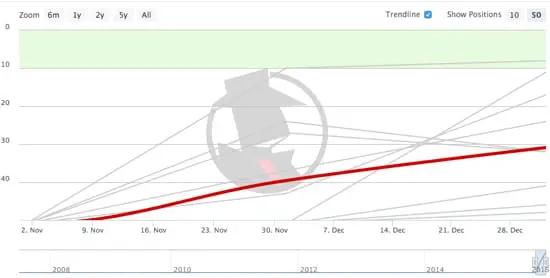
Looking at the inbound clicks from Google on Spyfu, we saw an upward trend in organic search traffic. We also looked at several difference sources to verify the organic traffic from Google, including SearchMetrics. We then looked at the Google Analytics traffic, as well. Google Analytics was installed on the website before the website was moved from StlMotorcars.com to Stl.Cars. We compared the website traffic before and after the move:
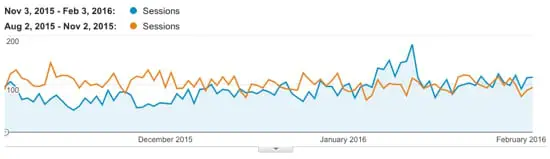
Overall, the percentage of new sessions is up 7.51 percent over the previous domain name, StlMotorcars.com. After the St. Louis Motorcars moved their website from StlMotorcars.com to Stl.Cars, the site’s Social Media and Referral traffic went up. The referral traffic went up 33.67 percent, and the traffic from Social Media websites went up 20.09 percent. Another noteworthy point is that the conversions from organic search went up slightly when the site moved from StlMotorcars.com to Stl.Cars.
Conversion rates going up has been an interesting trend amongst websites that have moved from a .COM to a New gTLD domain name, based on Globe Runner’s data of tracking and watching other websites that have moved from a .COM to a New gTLD domain name.
Google Search Console Data
Another source of data we used to measure the effect of moving from StlMotorcars.com to Stl.Cars was the Google Search Console, formerly called Google Webmaster Tools. We looked at the Search Analytics data within the Google Search Console and compared the data before the move and after the move, as seen below:
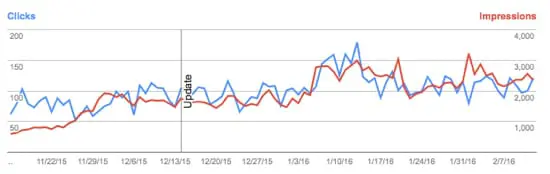
Overall, we can see an upwards trend in total clicks and impressions on Desktop and Mobile, which is good. We don’t see any evidence that the move from the .COM to the .CARS domain has hurt traffic, impressions, or clicks.
Conclusion
Based on our thorough review of the keyword rankings, third party data, Google Analytics data, and Google Search Console data, we have concluded that the site did not suffer anything as a result of the move. We have observed direct evidence that the site’s overall search engine rankings have gone up. The website’s overall traffic is trending upwards since the website was moved from StlMotorcars.com to Stl.Cars. Globe Runner can independently verify that the move from STLMotorcars.com to STL.CARS was beneficial for St. Louis Motorcars as far as organic search traffic is concerned.
Please note: Globe Runner was compensated for their time to review the data collected and produce a report on the findings. In no way did this have an effect on the outcome of the study or Globe Runner’s opinions about the results.
5 REASONS CLAIMED AND CORRECT ONLINE DIRECTORY LISTINGS ARE VITAL
Crucial to your online marketing strategy is the use of online directories. These directories consist of organized listings of websites, and they are managed by human beings rather than automated software. This allows you to get more control over the information available online about your business, ensuring accuracy of information and more precise implementation of online marketing strategies. This means claimed—and correct—online directory listings are not only helpful, but also absolutely vital. Here are 5 reasons why:
1. Ensures consistency: If your business has been around a little while, even if it’s just a month, there is likely a listing of it somewhere on the Internet. In many cases, these records may have inaccurate information, so claiming online directory listings allows you to correct that. This ensures the consistency of information available about your business online, thereby making you easier to find.
2. Proves ownership: Claiming your online listing provides evidence that you are the owner of your business. This allows you to promote your brand on search engines while boosting the security of your listing. When claiming your listing, you will be asked to verify your business, either by phone, mail, or email.
3. Increases online presence: Claimed listings in online directories provide links to your site, making them an excellent source for link building. This helps increase your online presence and will ultimately increase the odds that people will find their way to you when searching online for your services.
4. Increases precision: Online directories are organized by category. When you claim a listing, you will be able to place it in a category that best fits its description. This makes it far easier to find your business online as it matches relevant search criteria on search engines.
5. Boosts rankings: The categorical precision and accuracy of information provided through claiming online directory listings ultimately helps improve your odds of ranking high on search engines. Also, many search engines utilize online directories to find results that match users’ search criteria, making online directory listings absolutely vital to your overall SEO strategy.
Not only will you rank higher on search engines like Google, the consistency of information about your business will ensure that people reach you rather than find themselves awash in muddled, half-accurate data. In addition, claiming your listing will secure your right to promote your business on search engines. This ultimately gives you an edge against other businesses that have not claimed or corrected their online listings.
If you’re not sure where to start with claiming online listings, Accelerate Online Marketing is here to help you. Contact Accelerate today to get started.
CONTACT FORM 7 – 4.4 UPDATE RELEASE IS CONTROVERSIAL
Some news regarding our favorite contact form plugin. You may start seeing new alert messages crawling across wordpress-backends asking to check contact form validation, and settings. Having a second look into what these messages mean for the website, and mean for you could be very important in the next few weeks.

This marks a departure in cf7’s previous programing policies to now attempting to try to help with you entering all the contact form settings properly. Problem is, the community does not think its entirely perfected yet.

The main focus is on email settings. CF7 form fills often fool the server to make the email look like it’s coming from someone else. Example, instead of clients getting an email from wo*******@********in.com, the email looks like its from ji****@***il.com.

CF7 defaults to this method, but also marks through the validator as this is a problem. Weird, huh?They have decided to validate this way to help with client’s spam settings. Making an email look like its from someone other than wo*******@********in.com can flag some spam settings.Problem is, its often really nice to be able to immediately view email, and hit reply knowing the email will go directly to who filled it out. The new method is to copy the email information, and start a new email fresh.Confusing, isn’t it?Work arounds to this are being worked on, and several new blog posts are popping up. This link is beneficial: https://www.wiyre.com/solution-contact-form-7-issues-your-contact-form-has-a-configuration-issue/Nothing is immediately wrong. Just cf7 is trying to start to respond to many of their emails being marked as spammed. Hang tight with this plugin while they make transition, and enable this validator to become more powerful.
HOW TO ANALYZE YOUR LINKS IN GOOGLE SEARCH CONSOLE
Recently I wrote about Negative SEO and the various forms of it. I also wrote about how to combat each form of Negative SEO. Of the several forms that I identified, many were related to links. Because the Google algorithm relies so much on links and anchor text still, it’s important to keep track of the links to your website on a regular basis. Unfortunately, Google doesn’t give you a whole lot to work with, though. Google Search Console allows you to download your links, but from there you have to figure out what to do, how to analyze them, and decide which, if any, you need to disavow. Let’s take a look at the links in Google Search Console and analyze them a bit further.
First, let’s figure out where we need to go to see the links in Google Search Console.

Once you’ve verified your site in Google Search Console (formerly called Google Webmaster Tools), navigate to the “Links to Your Site” page as shown above.
In the screen capture above, you’ll see several areas. The first area, “Who links the most” is what you’ll want to look at. Click on the “More »” link to get to the second page, as shown below:
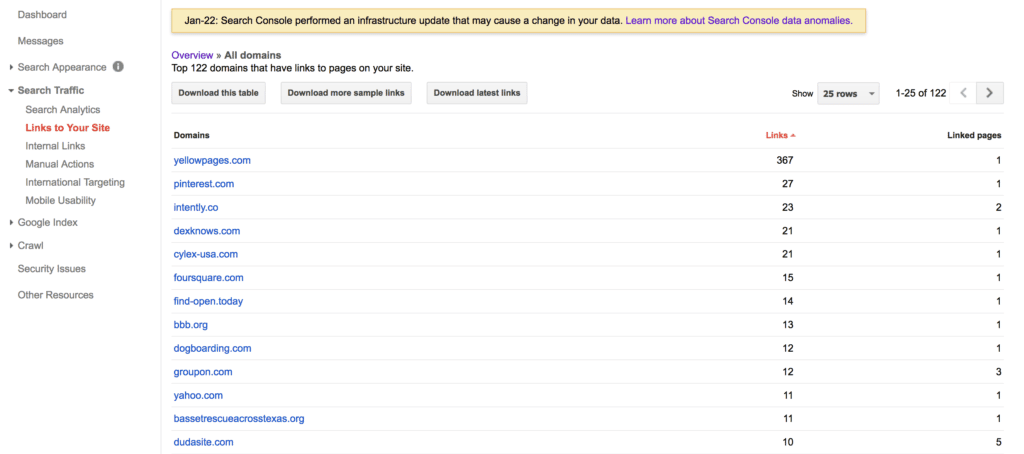
There are three separate options here to download your site’s links. The “download this table” in our case is not very helpful, so you can just ignore it. Click on the two other ones, “Download more sample links” and “Download latest links”.
Open both of these up in Microsoft Excel, which is my preferred spreadsheet application. You can certainly use Google Docs and use the Google spreadsheet app there, as well.
Once you’ve downloaded the list of links, I recommend copying and pasting one of the lists and combining that list with the other one. This way you’ll have one large list of URLs. Then, don’t forget to remove the duplicates.
At this point, you have a few options. First, you can start looking through the list of links. After sorting them alphabetically, I usually look at the URLs to see if there are any from the same website. For example, you might come across a list of 1,000 or more links from the same website. You may find that they’re a sitewide link, or the same link on a lot of web pages of one website. If you recognize the site and it’s a useful, authoritative website than fine–you may want to leave those alone. But, if they’re not useful, you may want to put them on a separate list–of links to disavow or get removed.
The next step in analyzing all of these links is to crawl the links yourself. While Google is saying that there is a link to your website, the link may no longer be valid, the site may be down, or they page may have been removed from the site that’s linking to you. So, you’ll need to crawl the list of links yourself to check them.
To crawl the links yourself, I recommend using a crawler such as the Screaming Frog SEO Spider. Screaming Frog’s SEO Spider will allow you to specify a list of links and crawl them. You should be able to learn more about each page that’s linking to you, such as the page’s title tag. If you’re savvy, you can even use the custom option to check if the link to your website still exists.

If you’d like to investigate all of these links even further, I recommend using the Majestic.com Bulk Backlinks Tool, as shown above. By uploading a list of the Google Search Console URLs, you’ll be able to focus specifically on the ones that Google is telling you about. You would want to do this for several reasons:
— If your website has a link penalty, all of the links that Google cares about will be listed here. In order to remove the penalty, you’ll need to analyze each link, get rid of the offending ones, and file a reconsideration request.
— You can look at other metrics, such as Trust Flow and Citation Flow for each link.
— You can clearly see the topics of the sites that are linking to you.
I cannot specifically tell you how to review each link and which are good links and which are bad links because every link and every link profile is different. What I can tell you, though, is that the more often you download the links to your site in Google Search Console the more often Google will refresh that data. So, download often, on a regular basis, and save the lists of links for later when you’re doing your next link analysis.
8 FORMS OF NEGATIVE SEO AND HOW TO COMBAT IT
Recently, I talked with someone who is, undoubtedly, what you could call a Black Hat SEO. We were talking about various SEO techniques, and how the techniques used have changed over the years. One comment that they made, though, was pretty interesting to me. The comment was “the new SEO is not working on your own site and making it better. It’s actually making your competitors rank worse then they are.” So, essentially, this person’s view of SEO now is not about marketing your own website and getting more links, for example. It’s doing things (legally and illegally) to hurt your competitors. In other words, it’s negative SEO.
Unfortunately, for those of us who are actively marketing our businesses, creating great content and sharing it socially, and optimizing our websites, we have to deal with negative search engine optimization. It’s here, and here to stay. There is a good chance that you’ve had to deal with it already or don’t even realize that someone is doing it to your website right now. I thought that I would outline a lot of the ways that someone can do negative SEO to your website, and how to combat each of them.
Comment Spam, Forum Spam Links
They create all sorts of links to your website, usually linking to your site with various “adult keywords”, pills, or drug names, nothing related to your website. There are literally thousands upon thousands of comments made, all using scripts or other tools to blast the comments and links to your website. The comments and links are left anywhere they can, mostly by filling out comments on abandoned blogs and abandoned forum message boards. Even those links are sometimes “nofollow” links, they still are annoying and negative.
How to Deal with Comment Spam, Forum Spam Links
There really are only a few ways to deal with these. Download the links to your site from Google Webmaster Tools on a regular basis, review the links, and disavow the domains where these links appear. Use a tool like Majestic.com or Ahrefs.com to review the anchor text of all your links. In most cases it’s easy to identify the bad anchor text, and disavow the links. You can also attempt to get those links removed, as well. I prefer to use a tool such as Rmoov.com to send out the emails to the site owners, attempting to get the links removed.
Profile Spam Links
They use profiles in order to create links to your website. The person doing negative SEO on your site will create all sorts of profiles on forums, message boards, and on social media sites and create a link back to your website. Typically these will include names of people you’ve never heard of, and don’t work for your company. The anchor text of links may include someone’s name, but it can also include adult keywords, pills or drug names or other miscellaneous words not related to your business.
How to Deal with Profile Spam Links
Typically dealing with these links requires the same technique(s) as dealing with comment spam and forum spam links, which is to identify, disavow, and remove the links. In this case, I would tend to favor the removal technique, as the site owners will, in fact, actually take the time to remove the profiles completely in many cases if you ask them.
Hacked Sites
Someone creating negative SEO links will hack into a website and make hidden text links to your website, again with “adult keyword” or pills names or drug names. They will get access to WordPress sites through various vulnerabilities, and then they’ll add the links they want. It can also include old WordPress plugins, as well. I cleaned up a client’s link profile once who had all sorts of links from hacked sites pointing to their site. I typically just contacted the site owners and told them their site was hacked. In many cases, they didn’t know their site was hacked. The hacker took time to cover their tracks, so to speak; when the site owner viewed their site they didn’t see the links because they were logged into WordPress. But when they were not logged in, the links were there. I even had to argue with site owners, telling them their site was hacked and showing them, just to get links to my client’s site removed.
How to Deal with Links from Hacked Sites
There’s not much you can do to stop someone else’s website from getting hacked. You can, though, identify the links and see that it’s happening to your site. I would immediately start notifying those sites, using a tool such as rmoov.com to send out the notices via email to those sites. It may help to file a disavow in this case, but ideally you want to get those links removed. To make sure your WordPress site isn’t hacked, I recommend using the WordFence plugin on the website.
Denial of Service Attacks or Slow Website
A denial of service attack may, in fact, be a denial of service (the attacker sends so much traffic to your website that it goes down). But, in many cases the negative SEO attacker will not want to take your site down. They will want to slow it down so much that it’s still in the search engine listings, but Google wouldn’t want to show it that much since it’s a slow site. One technique would be for the negative SEO attacker to buy ads from shady ad networks or ad networks that allow JavaScript in their ad code. Each time one of their ads is displayed, it makes a bunch of calls to your website, slowing it down. This is a distributed denial of service attack, but not in the traditional sense.
How to Deal with Denial of Service Attacks or Slow Website
First, you need to identify that this is happening to your website. I would keep up with what Google is saying in Google Analytics… look at the overall page speed. You can set up your website so that it uses a CDN (Content Delivery Network) such as CloudFlare.com, which does a good job to identify “bad traffic” so it doesn’t get to your website in the first place. The “slow website” negative SEO attack is difficult to identify, if the one doing it to your website is technically savvy so to speak. You’ll need a really advanced SEO to identify this, and it usually involves analyzing your website’s log files. If you suspect this is happening, you’ll want to make sure your site’s log files are turned on and recording every visit to your website. Then, you’ll need to hire an advanced SEO to look at the data.
Duplicate Content Negative SEO
One way that negative SEO can be done that I’ve seen involves duplicate content. Essentially, the one doing negative SEO to your site will create copies of your content and copies of your site. Then, those copies will start to appear on all sorts of other websites. Not only will they create new websites or buy expired domain names and put up the content, they’ll use other sites. I’ve seen negative SEO involve duplicate content put up on “free” or anonymous FTP sites, where they will copy your content and start FTPing it to anywhere they can. Sometimes those free FTP sites are on educational (.edu) or government (.gov) sites that will have a higher Domain Authority than your site, and can end up causing issues.
How to Deal with Duplicate Content Negative SEO
In this case, the most difficult part is identifying that it’s happening. Certainly you can search for phrases that appear on your site and see if it shows up on other sites. Sometimes you’ll just come across it randomly in the search results. There are services out there that will “watch” for duplicate copies of your site. Sites like Copyscape.com can help identify the duplicate content. To get the duplicate content taken down, you’ll need to file DMCA requests, which can be time consuming. There are sites and services that will do this in an automated fashion, but I haven’t used any of them and cannot specifically recommend any of them.
Reviews and Fake Reviews Negative SEO
Negative reviews posted about your site or your business can be annoying, but can also hurt your business. It is against the law in some jurisdictions to pay for positive reviews of your business, but I’ve seen the opposite. I’ve seen businesses pay for negative reviews of their competitors and even just post fake negative reviews.
How to Deal with Fake or Negative Reviews
Depending on where the reviews are left, you’ll need to address them. If they’re posted on Yelp or on Google, you’ll need to flag those reviews and explain why you think they should be flagged. Hopefully if it’s a pattern of negative reviews or a pattern of fake reviews they will be able to see that and remove them. So, definitely flag or report any reviews that you feel are not right. A quick response to each review, though, shows that you as a business are on top of it, and will address any complaints.
Local Negative SEO
I have seen a cases where one competitor started posting more local listings for their competitor–but the data was wrong. For example, one case had their competitor’s listings but the listing had their phone number. They started getting their competitor’s calls, which obviously benefitted them. A wrong phone number, suite number, or other garbled data on local listings can be difficult or time consuming to correct. It can, in most cases, confuse the search engines and lead to a loss of search engine rankings.
How to Deal with Local Negative SEO
The difficult part of this is to identify that it’s happening, which may in fact not be that difficult. There are services that will help you clean up your local listings and fix inaccuracies, or you can do it yourself, which is time consuming. You’ll want to identify all of the mistakes, and you can do that by simply searching for the (wrong) phone number or address and try to correct it on each site where it’s listed. Many websites simply pull in the data from another source, so you’ll need to get it corrected at the source.
Low Quality Directory Negative SEO
Several years ago the trend in SEO was to get as many links to your site as possible. Directories allowed you to get lots of links very quickly for a small fee (or for free). But, in the past few years those directories (typically copies of the DMOZ.org directory) quickly became “low quality” and not somewhere you want to be listed. Someone doing negative SEO on your website will get lots of low quality directory links to your site, usually with anchor text links not related to your website.
How to Deal with Low Quality Directory Negative SEO
Like the comment spam and forum spam links, you’ll want to identify all of these links and disavow them. I also prefer to use a service such as rmoov.com to get them removed, as well. In many cases it’s the same person who owns a lot of the same sites, and they will usually ask you to pay to get the links removed. You can pay to get them removed, but that’s totally up to you. I usually don’t pay a ransom like this.
Certainly this is not an exhaustive list of all of the ways someone can do negative SEO to your website. Those doing negative SEO are, in fact, always coming up with ways to hurt their competitors’ rankings, and it’s always evolving. As the search engines introduce more “factors” that help or hurt search engine rankings, those doing negative SEO will adapt as necessary.
Do you know of any other negative SEO techniques that I didn’t mention? Let me know in the comments so others can be aware of it.
TRULY USEFUL LINKS ABOUT LOCAL SEO IN ONE HANDY LIST
If jumping into and mastering local search engine optimization (local SEO) is your New Year’s resolution, look no further for a curated list of useful links, blogs, and other resources on the topic. We made sure to gather information that was published in the last 12 months. So bookmark this page, you’ll be referring to it frequently!
LOCAL SEO: IT’S NOT ABOUT SIZE; IT’S ABOUT GETTING FOUND.
Local SEO Tools
Every list about local SEO tools should start with the platforms that provide listing management services. These platforms partner with data aggregators to build citations — mentions of your firm on third party websites — as well as build links to your site via a plethora of directories (you may want to know those that offer follow links if this is of interest). Citations help your business rank higher for local search (see the blog section if you have a boss who needs convincing).
Perhaps the biggest benefit of using a local SEO platform is the convenience. As an entrepreneur your time is best spent building your business and selling to customers, not faffing about with manual, piecemeal submissions of your company information to directories. If you ever move, change phone numbers, rebrand, etc you will not have the nightmare of submitting 100 corrections to 100 different entities as a good platform will ensure that all changes can be centralized or, at the very minimum, reduced.
There are five local SEO platforms that are perhaps the best known in the US:
- Yext has one of the broadest service portfolios, including business pages and beacons.
- BrightLocal has over 1,600 sites in its network.
- Moz Local is an affordable investment at $84 a year if marketing budgets are very tight.
- WhiteSpark covers 42 countries which is a fantastic detail if you have a presence internationally.
- LocalEze is one of the three data aggregators supplying information to directories and search engines, and is generally credited with having the best distribution.
There are as many opinions about the best local SEO platform as there are directories to submit to — our humble opinion is, it depends on your needs, objectives and budget. Some information to check out for due diligence:
- LocalSEOChecklist displays the major players in a handy grid.
- Reddit’s SEO subreddit is worth joining, if only to lurk around discussions like this. Or this. Candid conversations and reviews by actual users: Priceless.
- SIM Partners’ white paper, Local SEO Platforms Buyer’s Guide, has a handy checklist of questions to narrow down vendor choices. (The company has its own local marketing automation platform which, to their credit, they didn’t flog in their guide.)
Local SEO Hacks and Guides
So you’re all pumped up to start. The following are pretty substantive sources that can offer a good macro view of the entire process or just one part, provide comprehensive advice to a specific sticking point, or just even serve up a local SEO topic that hasn’t been discussed before.
- Normally, pieces that advertise themselves as being ‘definitive’ fall disappointingly short, but The Site Edge’s Brian Niebler stays true to his word with Local SEO: The Definitive Guide 2016. It is a beast. Must-read!
- To demonstrate how their enterprise platform helps track rankings, SERPs also wrote a pretty meaty local SEO guide.
- Want to go totally DIY? Phil Rozek’s excellent site, Local Visibility System, has a list of local search citations that he’s collected over the past four years. He has lists for the US, UK, Canada and Australia.
- Another one for the DIYer: N.A.P. Hunter is a Chrome extension that sniffs out citations for deduplication and cleaning.
Keyword research is essential in order to create a solid foundation for your local SEO efforts. Again, there are a thousand and one opinions on the usefulness of keyword tools, but Globe Runner uses these on a daily basis:
- SEM Rush and SpyFu to find out competitors’ keywords and how they rank for these terms.
- Google Keyword Planner to determine search volumes and competition.
- Moz’s Keyword Difficulty Tool to compare/contrast their competitive figures with those of Google’s Keyword Planner — the differences can be striking and Moz has its theories on why.
- Keyword Tool to find long-tail phrases and questions people type into their browser while searching.
- Authority Labs to monitor keyword rankings for our clients and their competitors.
Local SEO Blogs to Follow
Your inbox will be nice and full everyday with these great resources on local search. And you can pick out factoids that will convince your boss that local SEO is the way to go in 2016.
- Phil Rozek’s blog on Local Visibility System is chock-a-block all about local SEO.
- The Local Search Association shares member news, statistics, industry developments and analysis pertinent to local search. Subscribe to it for excellent information such as this infographic on the top 142 categories consumers search for.
- MediaPost’s Search Marketing Daily has a roundup of the day’s SEO news from all around the web, including local SEO-focused pieces.
- Search Engine Land is always among the first to report any Google activity that could potentially impact local SEO.
- Often confused with the previously mentioned site, Search Engine Watch also has a local SEO section, albeit less frequently updated.
- Rand Fishkin’s blog on Moz is not specifically focused on the subject, but most of his marketing posts have implications for local SEO practitioners. Like this post on 2015’s keyword research tool universe or this one on Google Suggest.
Local SEO Events to Attend
You’ve read some but want to learn more about local SEO by attending conferences or meetups with fellow enthusiasts. Or you’re looking for more advanced information. Just three among the national events about local SEO to catch:
- MozCon Local 2016. The creators of Moz Local should have lots of useful information to share. February 18-19 in Seattle, WA.
- LocalU Advanced. For more experienced practitioners, here’s a conference to learn the latest on local search, mobile, analytics, web design and more. March 5 in Williamsburg, VA.
- SMX Advanced. The Local Search Advantage Workshop is a full-day dive into various advanced topics such as driving and tracking online-to-offline conversions. June 21 in Seattle, WA.
Find more national and international SEO events on this thread over at Inbound.org.
Closer to Dallas Fort Worth, Globe Runner’s home, Loco For Local will be held January 27 at La Hacienda Ranch in Grapevine. This local SEO workshop was organized for local businesses in Fort Worth, but non-FW businesses are more than welcome to drop by and exchange notes. Bill Hartzer will talk about local SEO best practices, useful tips and insider secrets.
Got any more to add? List them in the comments section.
NAVIGATING THE .WINE AND .VIN NEW GTLD DOMAIN NAMES
Since the beginning of the Internet, Americans have primarily used three main Top Level Domains (TLDs) for our websites: .COM, .NET, and .ORG. There are other TLDs that have been introduced that we’re all familiar with, such as .EDU and .GOV. It’s been fairly easy for us to register .COM, .NET, and .ORG domain names. You have to be associated with an educational institution or a government entity to secure a .EDU or a .GOV domain name. And then there’s the others that have been available for quite some time now, such as .INFO, .BIZ, and .TV. Most consumers in the USA are typically are used to the top three, .COM, .NET, and .ORG.
In countries outside of the USA, the Country Code Top Level Domains (ccTLDs), are widely accepted and in fact often the default option. Country codes include .co.uk (United Kingdom), .es (Spain), .com.au (Australia), .ca (Canada), and .it (Italy), and are always two letters long.
Depending on the location of your business, a ccTLD makes perfect sense as an alternative to .com. Since January 2014, there are literally hundreds of new Generic Top Level Domains (New gTLDs) becoming available, and many are already available for registration.
Keyword Rich Domain Names
It is widely thought that one way to potentially gain some search engine marketing advantage is to buy a keyword rich domain name that includes the TLD as one of the main keywords. This strategy has been said to not matter when it comes to search engine ranking advantages in Google, though. In March, 2012, Matt Cutts, a representative from Google, addressed a myth about the new gTLDs. Specifically, he said:
“Google has a lot of experience in returning relevant web pages, regardless of the top-level domain (TLD). Google will attempt to rank new TLDs appropriately, but I don’t expect a new TLD to get any kind of initial preference over .com, and I wouldn’t bet on that happening in the long-term either. If you want to register an entirely new TLD for other reasons, that’s your choice, but you shouldn’t register a TLD in the mistaken belief that you’ll get some sort of boost in search engine rankings.”
So, buying a keyword-rich new gTLD domain name apparently does not carry any extra weight when it comes to actual search engine rankings, at least not in Google’s organic search results. However, at Globe Runner, as Search Engine Optimization experts, we have seen many cases where keyword rich domain names that include the keyword in the extension. They appear to help a website’s SEO and overall search engine visibility.
Based on our ongoing research study, using a keyword rich new gTLD domain name in a Google AdWords Pay Per Click campaign has its benefits.
.WINE and .VIN New gTLDs
Two new domain name extensions that are becoming available to wine enthusiasts and the wine industry are the .WINE and .VIN TLDs. Domain names in these extensions will be available for registration by the public starting at the end of January 2016.
Important .WINE and .VIN Dates

Globe Runner has teamed up with the Wine Guy, Chris Campbell, and created the definitive guide to the .Wine and .Vin new gTLD domain names. Our guide, titled “Navigating the .WINE and .VIN New gTLD Domain Names”, includes everything you need to know about Early Access, What Trademark holders need to know, and what Brand owners need to know. We also cover issues like how to choose a .WINE or .VIN domain name, and include a checklist for moving your existing website to a .WINE or .VIN domain name.
Here is the table of contents of our guide to navigating the .WINE and .VIN new gTLD domain names:
What’s Inside
About the Authors
Introduction: New gTLD Domain Names
.WINE and .VIN
Keyword Rich Domain Names
Application Process and Key Dates
Important .WINE and .VIN Dates
.WINE and .VIN Early Access Program Registration Fees
Domain Pricing Examples
Brand Owners: What You Need to Know
ICANN and the Trademark Clearinghouse
The Central Registry
Contention Over .WINE and .VIN TLDs
Regulatory Climate
Intellectual Property
Uses of .WINE and .VIN
Choosing a .WINE or .VIN Domain Name
Google Analytics
Online Keyword Research Tools
Moving to a .WINE or .VIN Domain Name
Checklist for Moving to a New gTLD Domain Name
Pre-Move
Pre-Planning
On Moving Day:
After Moving Day
Conclusions
Resources
Whether you’re a brand owner, a trademark owner, a domain name investor, or simply someone who enjoys a great glass of wine, you’ll want to download this guide.
WHAT EVERYONE OUGHT TO KNOW ABOUT REPUTATION MANAGEMENT
by Jenna Yoder
Have any of the below happened to you?
- You or your business have scathing reviews on sites like Yelp or TripAdvisor
- Your business or product are the recipients of fake Amazon, Facebook or Google reviews
- When someone searches your name, all the links that come up on page 1 are from negative articles
These are just three instances where online reputation management (ORM) comes into play. You can think of ORM as a specialist subset of SEO that deals with the strategic handling of negative search results.
Not all agencies offer this service, so it’s critical that anyone shopping for it knows what’s involved. Below are some key facts about the process that everyone should be aware of:
1. Reputation management can’t remove negative links
What a good ORM program does is push negative content down to less frequented search pages by creating positive content optimized to rank higher than the negative links. Studies on search behavior, such as this one from GoFish Digital, show that 50% of searchers don’t go beyond page 1 of search engine result pages (SERPs) while only 36% venture onto page 2 or 3.

FINDINGS FROM A 2015 GOFISH DIGITAL STUDY SHOW THAT ONLY 13% OF SEARCHERS MAKE IT TO PAGE 4 AND BEYOND.
However just creating content, any content, and throwing it up on the Internet will not automatically push bad content to page 3 when someone searches. A good ORM partner will sit down with you, determine the extent of the damage, and design a campaign that incorporates the best types of content for your needs.
At the onset, your partner should create a spreadsheet of all links that turn up on SERPs. Highlighting these links green for positive, red for negative and neutral links yellow will ensure that you are on the same page about what should be pushed down, what should be retained and whether the links are moving week to week.
2. Reputation management takes time
Be ready to invest a significant amount of time in addressing reputation management issues. At a webinar on how to bury a Ripoff Report review, ORL old hands BrandYourself said it can take from 9 to 12 months to start seeing solid results, a time frame that Globe Runner finds accurate. Any vendor who tells you that it can be done faster is either overly optimistic or unfamiliar with the amount of work involved.
The content creation alone takes a lot of time. Most reputation management campaigns will require setting up strategic microsites, social media accounts and other properties that carry or link to positive content. The infrastructure and keyword strategy will need tweaking as links start showing movement. Like good SEO, there are no short cuts.
3. Reputation management is not always about maintaining an open dialogue
We’ve all been taught to address negative comments the minute they surface. Social media is rife with examples of how businesses or individuals ignored unflattering remarks online only to face a veritable tsunami of bad publicity when they woke up the next day. Nipping a situation in the bud and engaging with complainers is generally a good social media policy.
In reputation management, exceptions are made for protracted dialogues with a party intent on destroying reputations, not resolving the issue. This is especially true for Ripoff Report complaints which are notoriously hard to remove. If you suspect that a competitor, disgruntled employee or the like are behind a Ripoff Report complaint that is patently untrue, avoid getting embroiled in an all-out flame war.
Instead, take the advice of Ripoff Report’s lawyer, Maria Crimi Speth: Consult your public relations and legal advisers before jumping into the fray. Aim for arbitration instead of a prolonged social media brawl. And don’t discount the benefits that a structured online reputation management campaign brings. As Speth said, “Redouble your efforts in legitimate and positive PR. Robust and favorable content about your business will be especially valuable when a bad issue strikes.”
Jenna Yoder is an account manager for Globe Runner specializing in online reputation management. Photo by Max Mayorov on Flickr.
- « Previous Page
- 1
- …
- 25
- 26
- 27
- 28
- 29
- …
- 44
- Next Page »