










HOW TO BEGIN A LOCAL SEO CAMPAIGN IN 3 EASY PHASES
The Necessary Steps to Achieve Rankings Quickly
Starting a local SEO campaign could not be a more exciting, yet important time. Whether you are conducting a campaign for a client or going to take on the effort yourself, there can be an overwhelming number of steps and ‘hidden tips’. Read on, as all is revealed in this guide toward getting ranked quickly in the local pack and generating traffic.
Phase 1: Research and Prep
The very first phase in any successful local SEO campaign is to lock down the NAP (Name, Address, Phone) and other business details. NAP consistency is one of the most critical elements of ranking in local search results. View all the local ranking factors for 2014. Create a spreadsheet, ideally in Google Drive with a sheet for NAP Data. You can share with the business owner and in real time, they can view all the updates.
Name
Use the legal name of the business. For very small and local businesses, make sure they have gone through the steps to register Doing Business As Name (DBA). It’s not surprising to find many businesses that haven’t and some states don’t require it. Using the legal name in citations is important, as several directories will pull data from the DBA or legal name filed with the state.
Don’t add keywords to a business name unless it is the legal name of a business. Although, keywords in business names are one of the top local ranking factors. If you’re building a brand new business and have yet to invest in the brand, consider changing the legal company name or “Doing Business As” and add keywords. The only exception is for multi-location businesses, add south, north, or the city name to the company name to differentiate it from other locations in the same area.
The criteria for one of the most strategic and strict citation sites, Acxiom includes the following:
NOTE: You will need the following documentation to validate your business. We do not accept documents obtained or scanned from Internet sites or W-9 Forms. This documentation must be submitted with account information or your listing will be denied and you will have to reenter the information and resubmit.
*** BUSINESS NAME AND ADDRESS ON DOCUMENTATION MUST MATCH TO YOUR REGISTRATION REQUEST
- Federal Tax License Letter *submit the letter that includes your ID#, name, address and/or phone number of business
- State, County, or City Business License or Sales Tax License
- Doing Business As License
- Fictitious Name Registration
One informative blog post goes over the importance of limiting the length of your business name. That’s right, don’t create a name that generally is longer than 40 characters or you won’t be able to add it to many citation directories, including Acxiom. Abbreviating the name is not an option, as again consistency on every directory is crucial.
Address
Just as crucial is the address of the business. Always check with the USPS for the official address and proper formatting. While it’s been proven that small differences such as STE and #, which both represent suite don’t affect local rankings, larger discrepancies do. Be consistent, by adding the correct address to the spreadsheet you’ll be sure to copy it properly every time.
Phone
Always use a local phone number as the primary, add 1800 numbers or specific department numbers to additional fields available, but always use a local phone number that is truly a business phone. I had a client that told me her main business phone number, when I discovered later the number although local, was a cell phone. Always validate what your clients won’t tell you and check if it’s a business phone.
Other Business Information
In your NAP spreadsheet, also lock down the following (by getting approval on all details)
1. NAP (Name of Business, Address and Phone Number). Also add to the spreadsheet (website URL, social media URL’s, company email address with a domain name such as sa***@*********me.com, and 1800 numbers and other contact details. For a multi-location business, using a location specific URL has a bigger impact. It ensures the data between the multiple locations is unique and does affect rankings.
2. Categories. One of the most important areas of ranking locally is choosing accurate categories for a business. Max out all related categories, usually 5 for most citations. Think of different ways to call your service or work, and start board and go narrow. For example, a real estate brokerage might use the following categories: (Apartment Rental Agency, Real Estate Brokerage, Real Estate Brokers, Condominium Rental Agency, Real Estate Rental Agency, Apartment Finder & Rental Service). Category diversity is also important). You can use a tool to find new categories, I find that throughout a campaign, you’ll find new categories just by using different citation sites. Categories aren’t universal, but realize the more times you use a category in a citation, the more often you are to rank for that category term.
3. Approved Business Hours (Tip on 24/7 hour businesses. Google doesn’t enjoy displaying hours for a business as open 24 hours. A representative told me it can trigger a listing for further review, and even be removed or unverified. Unless a business has an office with a secretary at a desk, 24 hours a day, they prefer you specify normal office hours. Many citations on other sites allow for a checkbox on 24/7 and normal office hours. For Google, just add to the additional detail section)
4. Approved Payment Information
5. All languages spoken by employees
6. Year established. (This may be an area of contention at some businesses. I usually err on the side of the earlier, the better as customers do place trust in more established businesses, but don’t make up an earlier date. Some businesses may choose to take the year of a business they acquired. A business that has a history of opening and closing may also choose the first date they opened their doors.
7. Approved associations (Chambers of commerce, Inc500, local industry chapters)
8. Approved certifications (gather detail on all areas of employees, what certifications to employees have that can boost the credibility of the business?)
9. Short and long description. Write a unique paragraph for a short business description and multiple paragraphs for a long description. Include keywords in the copy, category keywords work well too… On Google + make sure to hyperlink to important areas on your website. For a local business with high competition, rewrite the description for each major citation. Otherwise the content is duplicated and isn’t as valuable.
10. Approved company logo and pictures.. For a service business, get logos of partners, vendors, company logo, the team, the office location. For product based businesses, photos become even more important and easier. Show your product in an engaging way, research has discovered local businesses with pictures get 60% more clicks. Use descriptive and keyword rich file names on images and include alt text.
Phase 2: Cleanup & Build
After gathering the above information in Google Drive, it’s time to begin cleanup. This will be the most time consuming phase of your local SEO campaign. If you’re starting a campaign for a new business (you have zero citations or websites online that reference you or your client’s business location), you’re at a much better starting point. For everyone else, assume the worst. Don’t skim through the search for duplicates, incorrect data, missing information and more. You’re goal is to find and catalog all unique problems (ideally in a spreadsheet). The name, address and phone, any and all deviations, should be recorded. Later you’ll use this list to search for more problems.
Begin with asking the business owner for any and all old phone numbers and location addresses. You should by now have the legal company name as well as any company locations. Don’t use the citation sites for searches. Many are poorly designed and can’t compete with Google. Use Google to find problems in the following ways. For the sake of the example, let’s say my business has the following NAP and I’m looking for problems on yellowpages.com.Pete’s Bakery4321 50th Street#254Chicago, Il 01234325-333-5743
- search for “site: yellowpages.com 325-333-5743”
This will help find businesses that share the same phone number regardless of name or address. They may be misspellings of Pete’s Bakery, duplicates of the address or even a completely unrelated business. Either way, any business that shares your phone number that isn’t the same entity should be resolved. Reach out to the owners if still open, or remove the entry. Sometimes I’ve even claimed a business, only to change the phone number to 111-111-1111.
- search for “site: yellowpages.com Pete’s Bakery Chicago”
This will find problems with the address, duplicates and the phone number. Often it’s an old number, a tracking number or even a 1800 number that is active on a listing.
Go through the list below of the most important local citations and check all for problems and duplicates first. Write down all unique addresses and phone numbers that are related to your business, you’ll use this list to check on all citation directories. Any new addresses, names or phone numbers you find, deserve a search on all existing directories.
You may find that none of the listings closely match the business. As you work through the problems, generally claim one of the listings and update it fully, remove all other duplicates. Although it is far easier to make an update with the original email and password, very rarely will clients have this information. Often speaking on the phone with support achieves a faster turnaround than an email. Review this handy guide for how to delete duplicates on popular directories. Add new listings that aren’t featured on the site, but triple check that they aren’t listed under the wrong name, phone number or address.
When you claim citations, use a generic or branded company Gmail account. It’s ideal to have this email not tied to anyone’s personal account. You will want ongoing access as many citations require email verification before making changes.
Most Important Local Citation Directories
| Citation Directory | Type | How to Claim |
| Google + | Search Engine | Google Places, requires postcard verification |
| Yahoo | Search Engine | Update the data aggregators, over time Yahoo will update. Or pay for an update. |
| Bing | Search Engine | Requires email confirmation, postcard or contact support |
| InfoUSA/Express Update | Data Aggregator | Requires phone verification |
| Neustar/Localeze | Data Aggregator | Create an account, claim and update |
| Acxiom | Data Aggregator | Requires phone and document verification |
| Factual | Data Aggregator | Contact support |
| Yellow Pages | Review Site | Requires phone verification |
| Yelp | Review Site | Difficult process to remove and update without login, contact support |
| Angie’s List | Review Site | Contact support |
| Superpages | Review Site | Contact support for listings already claimed |
| HotFrog | Directory Site | Contact support |
| Manta | Directory Site | Call support |
| CitySearch | Review Site | Requires phone verification |
| Best of the Web | Directory Site | Paid |
| Foursquare | Social Media | Requires voicemail verification |
| Social Media | Contact support | |
| Social Media | Contact support | |
| Social Media | Contact support | |
| Mojopages | Directory Site | Contact support |
| YellowBook 360 (hibu) | Directory Site | Call support |
| Merchant Circle | Review Site | Contact support |
| Yellowbot | Review Site | Requires phone verification |
| BBB.org | Complaint Site | Requires payment |
| dexknows | Review Site | Owns Superpages, but process is still separate. Must call support. |
| Dunn & Bradstreet | Data Aggregator | Requires business owner verification |
| ibegin | Directory Site | Requires phone verification |
Phase 3: Growth and Ranking
After fixing all issues on the most popular directory sites, it’s time to expand to any site that lists the business either correctly or incorrectly. Claim and update and use the techniques listed above to find all mentions of the business. Adding to Google Drive creates an easy way for a business to check in real time and see all the new citations and progress made.
Next, leverage software and there are many options available. I’ve used Whitespark and Brightlocal, but realize there are other solutions. Most do the same or similar functions. They track (although with some inaccuracies) all the citation directories where a business is located with opportunities to increase and add the business to new directories. They also help compare and track over time your competitors ranking in local search with your own business. There are some steps to use this software effectively:
1. Identify the terms that trigger the local pack for your geographic area. As you search for keywords you’ll often find other sites ranking that allow for a citation. Also note which terms are most aligned with your business and the search volume.
2. When looking at a local pack, there are two areas that can influence click through rate. One is position or where a business appears in the local pack. A higher position is better, although a business with reviews can outstrip traffic of higher results. Track using software the position of each keyword. 8th is just shy of appearing in the local pack, 7 is at the end for most terms.
3. Look for new opportunities routinely, especially in regards to competition. Where are they listed and perform and problems in search. Occasionally a data aggregator can receive the wrong information or create duplicate listings which require removal. Monitor and continue to optimize the growth of citations and the increase in rankings.
Review Strategy
With corrected and consistent citations and eventually, rankings, put a review strategy in place to increase CTR. Identify the top sites to receive a review, most of the time it should include Google +, Yelp and an industry specific site. Use software such as customer lobby, which can make reviews easier. Or simply put a process in place that asks every customer to review your business. This could be through stickers and visual reminders at your retail location, a conversation you have in person after completion of a service, or an automated email for an online business.
You can generate several quick reviews by simply sending an email to your marketing database. But for true success, put in place a process and realize it’s important!
Corey Barnett is a Globe Runner Online Marketing Specialist. Follow him on Google Plus. Corey also frequently writes on his blog – cleverlyengaged.com/blog
NICMAXX ONLINE APPOINTS GLOBE RUNNER FOR SEO, CONTENT MARKETING SERVICES
Globe Runner’s client roster has one new addition: Digital retail site NICMAXX Online.
NICMAXX Online conducts e-commerce for NICMAXX, an electronic cigarette brand that has grown in popularity in key consumer markets such as New York, Las Vegas and Florida. Developed over eight years by smokers for smokers, its proprietary blend of ingredients closely replicates the sensory experience generated by traditional cigarettes.
Based in Addison, Texas, NICMAXX Online comprises the retail site https://www.nicmaxxonline.com/, social media accounts for Twitter (@NicMaxxStore), Facebook (@nicmaxxonline)) and other digital assets.
Apart from US customers, NICMAXX Online caters to overseas customers who may not have access to the product. Some countries still forbid the sale of e-cigarettes but do allow for purchase and personal consumption.
In a recent Wall Street Journal story, Wells Fargo valued the e-vapor market at $2.2 billion. NICMAXX Online is seeing strong growth in ecommerce with revenue tripling year-over-year.
“It’s always exciting to work on a challenger brand making ripples in a relatively new category,” said Globe Runner CEO Eric McGehearty. “The opportunities to build NICMAXX Online into a strong brand are tremendous.”
Globe Runner was started in 2008 by McGehearty in Lewisville, Texas. In addition to its core business of search engine optimization (SEO), the agency also offers online advertising, content marketing, branding and social media services.
FILED A GOOGLE DISAVOW? THOSE LINKS ARE STILL IN GOOGLE WEBMASTER TOOLS
A while back, Google gave website owners an advanced link tool called the Disavow Links Tool. It allows us to tell the search engine which links to ignore when they calculate the links to our website. Bing.com has a similar tool, as well, and was actually the first to make the tool available to website owners.
With the Disavow Tool, you simply come up with a list of URLs or domain names that you don’t like and put them in a text file called a “disavow file” and upload that file to Google (and Bing). When the search engine crawls the links again and recalculates the links to your site for search engine ranking purposes, they are supposed to disavow those links (not count them or ignore them). From my experience, I’ve seen a disavow file really help in cases where certain links were super low-quality or “toxic” links. About 5 days after submitting a disavow file, I’ve seen traffic start to go back up. Sometimes it takes a lot longer.
But here is where I’m surprised. When you upload a disavow file and Google accepts that file, they know that you’ve disavowed certain links or certain domain names (all links from that domain name). Why does Google still shows those links in the “links to your site” section of Google Webmaster Tools? Google still shows those links in your list, as if those links still exist–and they do. But why would Google still show them? You’ve disavowed them.
Apparently the disavow file data is not taken into account when they generate the “links to your site” list in Google Webmaster Tools. If Google removed those links from the list (the links that you’ve disavowed) then we would know that Google is taking the disavow file into account when calculating links to the site. That would be very helpful for website owners to know.
Let’s look at a specific example. In January 2014, I disavowed low quality links from the domain name “articlesnatch.com”, which a previous SEO firm created (they submitted hundreds of articles to that site in particular). Now, I personally feel that those are low quality links, just there for “SEO value” and therefore should be disavowed. But 6 months later, after I disavowed all links from that domain name, Google Webmaster Tools still shows links from that website:
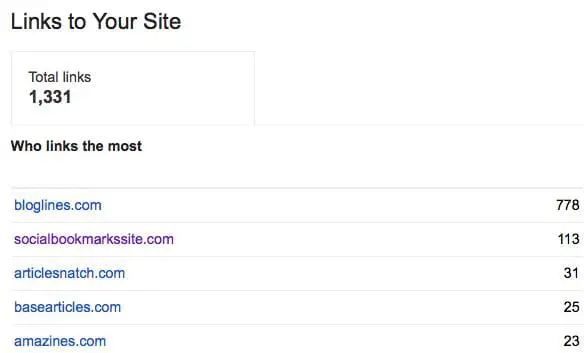
In fact, looking at this particular list of links to this site, I disavowed links to socialbookmarkssite.com, articlesnatch.com, basearticles.com, and amazines.com all back in January 2014, over six months ago. Yet they still appear in Google Webmaster Tools as links to the site. These links were disavowed because the site owners refused to remove the links or we were unsuccessful in getting those links removed. This was part of a reconsideration request because the site had received a manual action for it’s links. The manual action was revoked after we disavowed these links and removed other links to the site.
It would be really helpful if Google, in Google Webmaster Tools, were to remove those links from the list of “links to our site”. I understand it’s a random list of links, but the least they could do is remove the links we’ve disavowed. That would tell us that they’re taking our disavow file into account when they calculate the links to the site. Or, at least mark the links somehow so that we know that they’ve been disavowed. How hard is that to do?
Bill Hartzer is Globe Runner’s Senior SEO Strategist. Connect with him on Google+ or on Twitter as Bhartzer.
GOOGLE ADWORDS ADS, ORGANIC SEARCH, AND THE EBAY SEARCH PENALTY
Google has always maintained that paying for Google AdWords ads doesn’t have any effect on your organic search engine rankings. They just don’t share the same databases, so there’s no way for Google to know if you paid for AdWords ads and relay that information to the organic search team or its algorithm. I have to say that I agree with them–by mixing the two or allowing those two database to essentially “talk to each other”, there would be serious consequences and a lack of overall trust by the public in organic search.
As Google organic search begins to rely more on more “human factors” that are more and more measurable, it’s more likely that Google AdWords ads will come into play and start to have an effect on a site’s organic search engine rankings. For example, when a site starts seeing more visitors from paid search, users tend to initially come from paid search–but then they may go back later and perform some brand searches, which then affects organic search traffic. It’s those same visitors who may share the content and interact with it on the social media sites, which could then effect organic search traffic, as well. Then, finally, one theory I’m toying with is that Google is watching the overall traffic to a site and the level of engagement by humans. The more popular a web page, article, blog post, or site becomes, the better it will perform in organic search. As that traffic fades, so does the site’s organic search engine rankings.
So, when it comes to the correlation between Google AdWords and Google organic search, there may very well be a correlation between the two: but it’s traffic related, not because of the fact that Google AdWords and Google organic search shares the same database or the same data.
But let’s not forget a study that Google did back 2012, called Impact of Organic Ranking on Ad Click Incrementality:
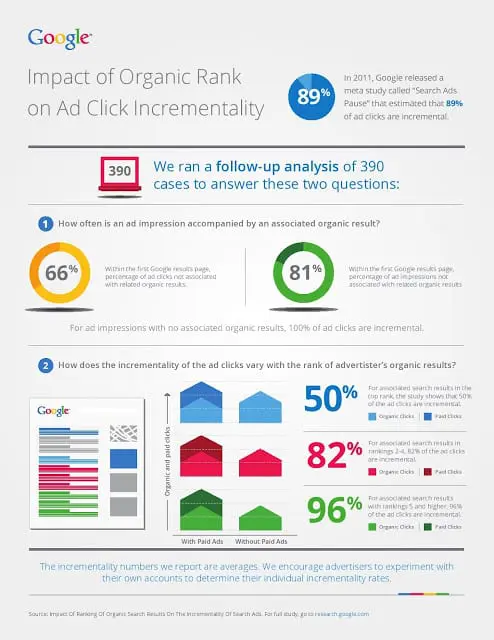
There is a strong correlation between organic search and paid ads when you’re running paid ads. You get clicks on your organic search results. And, guess what? Google tracks the clicks on your organic search listings. The more people who click (and don’t pogostick back to the search results), the better your organic search engine rankings. Or at least Google’s tracking the clicks on organic search and using that data somehow in the organic search algorithm.
It’s not surprising to me that if you stop paying for AdWords ads your visibility in organic search will go down as well.
Recently, there have been some interesting reports and comments regarding eBay and the fact that Google has penalized the popular online auction website in organic search. eBay stopped paying for Google AdWords traffic about a year ago. As a result of not participating in Google AdWords, I can see how eBay’s traffic started going down over time, as they just as visible as they were previously. eBay was recently penalized in Google’s organic search results either by an algorithmic penalty–or with a manual action (or both). eBay nor Google is commenting on what the current situation is. But, nonetheless, it’s clear that the site’s traffic from organic search has gone down.
According to SEMrush.com, eBay has suffered significantly with this last Google organic search update:
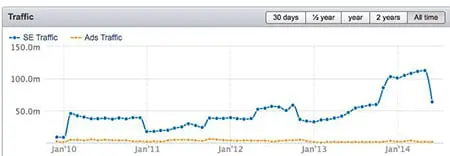
A SearchMetrics report shows that eBay has suffered a 78 percent loss in search traffic.
According to SE Roundtable, conspiracy theories exist around the loss in eBay’s organic search traffic. Apparently there are theories out there that say that this some sort of backlash or penalty for stopping paying for Google AdWords ads. Reports say that eBay spent over a billion dollars in Google AdWords ads. And they’ve stopped advertising in Google AdWords.
Frankly, I personally believe that Google wouldn’t be so bold as to do something like penalize eBay for not paying for Google AdWords ads. They just wouldn’t do that, as it wouldn’t make sense: if it were to be connected in some way, there could be strong repercussions and most likely some sort of legal action would come as a result.
My theory is that Google AdWords ads, and the traffic that it generates, has an effect on a site’s organic search, especially given the fact that “human interaction” with your website is so much more a part of the Google organic search algorithm than it has been before. The fact that Google has been cracking down more and more on low quality, thin content with Google Panda is related. How much unique content really is on eBay? Many sellers upload literally thousands of listings, with all sorts of duplicate content, and that content doesn’t stick around for that long. It eventually goes away when the auction is completed. That has to come into play here.
There’s no evidence that Google has consciously dinged eBay because they stopped paying for AdWords ads. There never will be. But think about it: if you stop getting traffic to the site, there’s less human interaction with your site, people don’t search for your brand as much as they did in the past, and they don’t socialize your site as much as they used to. And that’s what’s going to effect organic search traffic.
Sure, there could also be a Google algorithmic or manual penalty on eBay’s site, as well. Does it really matter? I don’t really care at this point if eBay ranks for a keyword phrase or not: I’m going to straight to eBay to bid and buy. I’m not going there because I found something in Google organic search.
Bill Hartzer is Globe Runner’s Senior SEO Strategist. Connect with him on Google+ or on Twitter as Bhartzer.
LINK BUILDING IS DEAD
Yes, there, I said it. Link building is dead. Link building for SEO purposes started getting really sick when Danny Sullivan went on his rant about link building back in June 2012. Well, here we are now, almost two years later, and we now have official confirmation that link building is dead, from Duane Forrester of Bing:
You should never know in advance a link is coming, or where it’s coming from. If you do, that’s the wrong path.
If you are building links, doing link building in the “traditional”, old-style ala 2003 link building, then you’re doing it wrong. What Duane is saying is that if you ask for a link, and you know ahead of time that you are going to get a link on X site, then guess what? You’re not doing it the right way or in any that’s acceptable, according to Bing and, (I’m going out on a limb here) Google.
You should be earning your links, and not building links. Link Building is Dead.
It’s now link earning, not link building.
So how do you earn your links? One way would be to start focusing on being a content marketer. A content creator. Someone who is not doing old-style SEO, but doing Public Relations. Reach out to the media. Reach out to bloggers. Don’t worry about where your links will be placed, and don’t worry about whether or not those links are going to be “nofollow” links or not.
One reason I mentioned HARO last week and the low quality, inorganic, unnatural links that Google flagged during a reconsideration request last night, is that typically Help a Reporter Out is not a source of low quality, spammy links. It’s a source that allows you to connect with real reporters/journalists/media outlets who will mention you, your company, or even your client if there is a fit. They’re after information or quotes that they can use in real content. And that real content is where you want to be mentioned, not some fake, low quality article or blog post that no one will read.
So how could the search engine determine whether or not a link is natural, and organic? There certainly are several ways, and obviously Bing and Google have algorithms to deal with these sorts of things. When I say that they can tell, they can tell. But let’s speculate on one simple way:
If a link is added after-the-fact, meaning that the URL was crawled by the search engine and a link was not there, and suddenly appears in content at a later date and time (after the initial crawl from an initial discovery of the URL), then there is a chance that it’s an inorganic link. To be honest with you, as a blogger I typically don’t go back to older articles and place links. I may add internal links to other pages on the same site, but that’s different. If a link appears several months later in an older blog post, then why was it added? Most likely it’s an inorganic link.
The search engines could be counting URL mentions and brand mentions as “links”. I’m speculating, but what if the search engines are now counting brand mentions just as if they were a link and passing on some sort of value (not PageRank) but something else, let’s call it “BrandRank”. What if a brand mention in Forbes or on CNN.com was just as good as getting a link from one of those sites? It’s possible, and probable in the future if Google is going to put less value on links in the future.
So, now we have “official” confirmation that traditional link building is dead. Great. That only means that what I am doing to build brand awareness for clients, and what Globe Runner as an agency is doing, is right on track: we’re brand builders, content marketers, and that’s how we do SEO now.
Yep, link building is dead. RIP link building. I sure won’t miss it.
Bill Hartzer is Globe Runner’s Senior SEO Strategist. Connect with him on Google+ or on Twitter as Bhartzer.
GOOGLE FLAGS HELP A REPORTER OUT, PRESS RELEASE LINKS AS BAD LINKS
As you probably know by now, Google has been on the prowl lately, flagging and penalizing links from directories, paid and sponsored links, links in guest blog posts, and, now you can add Help a Reporter Out links to this list that you should be cautious about.
In the response to a recent Google Reconsideration Request (I’m in the process of cleaning up a client’s links and getting rid of their Google manual penalty), Google gave three example links that “violate their guidelines”. Their response was something like this:

Now, I realize that this particular website does have inorganic links pointing to the website. And I’ve been working hard to clean up the organic links pointing to the website, mainly done by a previous SEO working on this particular website. However, the links that Google points out as examples in their response to our reconsideration request are like this:
– two links from Help A Reporter Out.
– one link from a media outlet who picked up a press release we distributed via a newswire.
The first two links provided as “inorganic” links by Google are, in fact, where the owner of this particular business was quoted in an article. In BOTH cases of the first two URLs, we had used the Help A Report Out service to respond to a request for a quote from a business (which was in a particular industry). As far as we knew, the reporter or journalist was writing an article and needed a legitimate quote from a business owner. Not only was the business owner quoted properly, we’ve seen traffic from these articles to the website. And, oh yeah, for those who care, the “anchor text” of the links are “branded” (i.e., the anchor text is the company’s name) and NOT a keyword-rich anchor text links.
The second link that Google flagged as being inorganic was, in fact, where a site picked up a press release that was put out on a popular press release distribution service. The news that was being reported in the press release was that this particular business was an official Toys for Tots drop-off location. Even the Toys for Tots website lists this business as an official drop-off location.
So, at this point, it is my impression that Google now doesn’t like links obtained from using Help A Reporter Out, and they don’t like links that are from websites who pick up stories from popular press release distribution services. Why?
Well, a Google manual review from a reconsideration request flagged those links as being inorganic links. In other words, the website is still manually penalized because of links obtained from Help a Reporter Out and a popular press release distribution service. If Google isn’t targeting Help A Reporter Out specifically, then perhaps HARO needs to do some more “policing” of the reporters who are using their services, as the last thing we need is for things like this to happen. There’s not much we can do about popular press release distribution services, though, as the popular press release distribution services really can’t do much about low quality websites picking up your press release. They are, though, being a lot “pickier” when it comes to the press releases that you submit to them, as they really do, in fact, need to be news.
Bill Hartzer is Globe Runner’s Senior SEO Strategist. Connect with him on Google+ or on Twitter as Bhartzer.
UPDATE: I want to clarify a few things that have come up regarding this. First off, I can tell you that in the case of the HARO articles, these were from legitimate HARO requests. In fact, we responded to requests for quotes from HARO. Just like we have done in the past with great success. The sites where the articles appear seem to be legitimate news sites or media sites. However, upon further investigation, it appears that the sites in particular where our links appear are “doing fishy or spammy things” in regards to inter-linking and duplicating of the content/articles. So, I believe that our client is “caught up” in this, and being innocently penalized because we innocently responded to a HARO request for a quote.
In no way are we, nor our client, involved in the “fishy or spammy” things that these websites/media outlets are doing. So, I still am recommending that you be very cautious in what you respond to when HARO is involved.
Update 2 I’ve updated the title of this post so that it is clear that Google has only flagged links that were a result of responses to HARO requests as being inorganic, unnatural links. I do not want anyone to get the impression that Google is targeting HARO in any way other than flagging inorganic links.
GOOGLE ADDS KNOWLEDGE GRAPH DROP-DOWN WITH COMPANY DATA TO SEARCH LISTINGS
Google has recently added a drop-down to the search results listings that include Knowledge Graph data when you click the drop-down. Here’s an example of the new drop-down:

Previously I have only seen Knowledge Graph data included in the right sidebar when you search for a company name or brand. But, now there is a small drop-down next to the site’s URL, as shown above. When you click the drop-down, it looks like this:
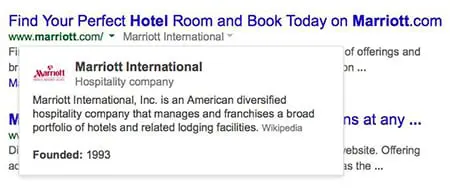
The data is clearly from the Knowledge Graph, although for the Marriott Hotels example above there is no source shown. I was able to see that for another query, related to software outsourcing, the data comes from Wikipedia:
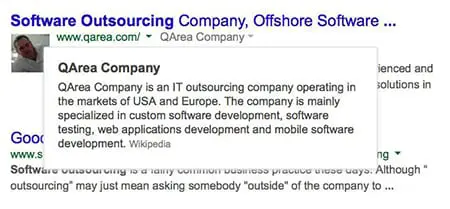
The good news here, I suppose, is that it’s not huge major brands like Marriott that this is showing up for–it’s other companies that are now being included with this new Knowledge Graph drop-down in the search results. So, there’s a chance that if your company is included in the Knowledge Graph (like being in Wikipedia or Freebase.com), then there’s a chance that your site will get a drop-down like this, as well.
Google announced they were testing this back in January, but I’m personally seeing this much more now, so perhaps it’s now being rolled out to more sites’ search listings now.
ARE SITES OUTRANKING YOU WITH YOUR OWN CONTENT?
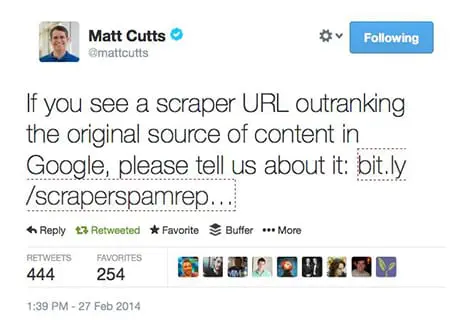
If you answer yes to this question, then you have a potential search engine ranking problem on your hands. But the good news is that it can be fixed. If you are seeing other websites outrank (or show up higher in the search results than your site) and they appear to have copied your website content, there definitely is a problem. Here is what you need to do in order to fix this situation.
Google has released a new form that allows sites to report scrapers.
To make sure that you’re really experiencing someone who is copying your content and using it without your permission, we first need to check.
1. First, you need to see if someone has truly copied your content. Take one of the URLs that you suspect it’s happening to (a page on your site) and run it through CopyScape.com. This will show you if any of the pages they find on the web are copying your content. If the site outranking your content shows up in this list, then there’s a good chance you have an issue.
2. Next, you need to take the title of one of your pages. I prefer to use the title tag, but it could be a very unique headline (such as the title of a blog post) and put it in quotes and search for it in Google, like this:
"Link Removals: Sometimes Websites Get Taken Down"
That’s the title of my last blog post here on this blog, so I thought that I would go ahead and use it as an example. When you search for the title in quotes (hopefully it’s unique) then you should only see your page or your blog post. But, if something else shows up in the search results, then:
- The phrase in quotes you searched for might not be unique enough. Try a sentence from your page.
- You might have shared the post on social media sites like Google+, Twitter, or your Facebook page. That’s okay.
- The content that’s stolen or copied from your site might be showing up
If it’s the last case, that your content appears to have been taken or copied, then there are generally a few reasons why:
- Your site is not as trusted as the other site. Unfortunately, sometimes if you have a fairly new site or a site with Google Penguin issues then the other site (the site scraping/copying/stealing your content) is going to rank better.
- The other site has higher PageRank than your site, and has more links or more trusted links than your site.
This last issue can be a problem. Because the other site has higher PageRank, it gets crawled and its content gets indexed faster than your site’s content get crawled and indexed. Therefore, the way Google’s duplicate content filter works is that whatever page or site gets crawled first, that’s the originator of the content. Then, if Google finds other copies, then those won’t rank as well as your site’s content.
One good way to deal with a situation like this is to get more trust and authority for your website. I know that can take time, and it involves getting new trusted and authoritative links to your website. It’s not an easy fix.
Another way to deal with this, though, is something that you can do RIGHT NOW. Whenever you add new content to your site, like a new page or a new blog post, you must immediately go over to Twitter and/or Google+ and post something about it. Include the original URL of the page, and not just a “tiny url”. It needs to be the full URL if possible. Twitter will change it to a tiny URL, and that’s okay. Google Plus is also important, as well. When you post, Google finds the new URL and will crawl it. This will minimize the chances that the other site will get your content posted and crawled.
If you are using WordPress, and you make a blog post, there are settings in WordPress that will cause your site to send a “ping” to Google (and other search engines and sites) to notify them of an update. It will send them the new URL. This also will help cause Google to crawl your new page.
Another way to deal with copied content that’s outranking you is to file a DMCA takedown request. Find out more about the Digital Millennium Copyright Act, which, when filed properly with Google and the site’s web host, will cause that content to be taken down. Google will remove the page for their search results and the site’s web host usually complies by removing the content, as well. They might even remove the entire website.
Finally, if you are having trouble with Google search engine rankings of your content and there is a scraper site involved (someone copying your content and outranking your site) then you can use Google’s new Scraper Tool to notify them of the problem. This doesn’t mean that they’re going to do something about it right away, but they may use that information in a few possible ways:
- Google may use the data to program a new part of their algorithm. Very likely.
- Google may use the data to remove the other site from their search results. Highly unlikely.
Whatever the situation, Google will use the information you give them somehow. I would first deal with the situation by doing several or all of the tasks I mentioned above. But then you might want to report it. That might, at a minimum, just give you a “warm and fuzzy feeling” that you reported it to Google.
Bill Hartzer is Globe Runner’s Senior SEO Strategist. Connect with him on Google+ or on Twitter as Bhartzer.
LINK REMOVALS: SOMETIMES WEBSITES GET TAKEN DOWN
One of the services we provide here at GlobeRunner is a process of cleaning up a website’s links. Due to the recent Google Penguin algorithm updates in the past year or so, a lot of sites have suffered dramatic search engine ranking losses and have had severe hits to their site traffic. One thing that we do very well here at Globe Runner is get a site’s traffic back due to Google penalties.
The Google Penguin algorithm update determines whether or not you have low quality links or “questionable” links pointing to your website that attempted to manipulate your site search engine rankings. If you have low quality links pointing to your website, you need to get those links removed. Not only do you need those links removed, you can also disavow the links.
During the link removal process that we go through, which is extremely thorough, we come across some pretty strange situations. In fact, in some extreme cases, we may not mean to get a website banned or taken down by the site’s web host. But, sometimes that happens. One such situation occurred, and now, when you go to the site, you see this message:
Well, I guess we got the link removed, ya think?
Bill Hartzer is Globe Runner’s Senior SEO Strategist. Connect with him on Google+ or on Twitter as Bhartzer.
- « Previous Page
- 1
- …
- 6
- 7
- 8
- 9
- 10
- …
- 12
- Next Page »