








ARE SITES OUTRANKING YOU WITH YOUR OWN CONTENT?
If you answer yes to this question, then you have a potential search engine ranking problem on your hands. But the good news is that it can be fixed. If you are seeing other websites outrank (or show up higher in the search results than your site) and they appear to have copied your website content, there definitely is a problem. Here is what you need to do in order to fix this situation.
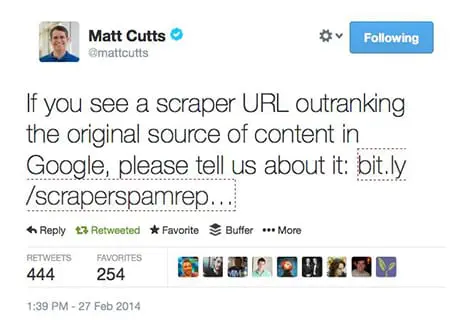
Google has released a new form that allows sites to report scrapers.
To make sure that you’re really experiencing someone who is copying your content and using it without your permission, we first need to check.
1. First, you need to see if someone has truly copied your content. Take one of the URLs that you suspect it’s happening to (a page on your site) and run it through CopyScape.com. This will show you if any of the pages they find on the web are copying your content. If the site outranking your content shows up in this list, then there’s a good chance you have an issue.
2. Next, you need to take the title of one of your pages. I prefer to use the title tag, but it could be a very unique headline (such as the title of a blog post) and put it in quotes and search for it in Google, like this:
"Link Removals: Sometimes Websites Get Taken Down"
That’s the title of my last blog post here on this blog, so I thought that I would go ahead and use it as an example. When you search for the title in quotes (hopefully it’s unique) then you should only see your page or your blog post. But, if something else shows up in the search results, then:
- The phrase in quotes you searched for might not be unique enough. Try a sentence from your page.
- You might have shared the post on social media sites like Google+, Twitter, or your Facebook page. That’s okay.
- The content that’s stolen or copied from your site might be showing up
If it’s the last case, that your content appears to have been taken or copied, then there are generally a few reasons why:
- Your site is not as trusted as the other site. Unfortunately, sometimes if you have a fairly new site or a site with Google Penguin issues then the other site (the site scraping/copying/stealing your content) is going to rank better.
- The other site has higher PageRank than your site, and has more links or more trusted links than your site.
This last issue can be a problem. Because the other site has higher PageRank, it gets crawled and its content gets indexed faster than your site’s content get crawled and indexed. Therefore, the way Google’s duplicate content filter works is that whatever page or site gets crawled first, that’s the originator of the content. Then, if Google finds other copies, then those won’t rank as well as your site’s content.
One good way to deal with a situation like this is to get more trust and authority for your website. I know that can take time, and it involves getting new trusted and authoritative links to your website. It’s not an easy fix.
Another way to deal with this, though, is something that you can do RIGHT NOW. Whenever you add new content to your site, like a new page or a new blog post, you must immediately go over to Twitter and/or Google+ and post something about it. Include the original URL of the page, and not just a “tiny url”. It needs to be the full URL if possible. Twitter will change it to a tiny URL, and that’s okay. Google Plus is also important, as well. When you post, Google finds the new URL and will crawl it. This will minimize the chances that the other site will get your content posted and crawled.
If you are using WordPress, and you make a blog post, there are settings in WordPress that will cause your site to send a “ping” to Google (and other search engines and sites) to notify them of an update. It will send them the new URL. This also will help cause Google to crawl your new page.
Another way to deal with copied content that’s outranking you is to file a DMCA takedown request. Find out more about the Digital Millennium Copyright Act, which, when filed properly with Google and the site’s web host, will cause that content to be taken down. Google will remove the page for their search results and the site’s web host usually complies by removing the content, as well. They might even remove the entire website.
Finally, if you are having trouble with Google search engine rankings of your content and there is a scraper site involved (someone copying your content and outranking your site) then you can use Google’s new Scraper Tool to notify them of the problem. This doesn’t mean that they’re going to do something about it right away, but they may use that information in a few possible ways:
- Google may use the data to program a new part of their algorithm. Very likely.
- Google may use the data to remove the other site from their search results. Highly unlikely.
Whatever the situation, Google will use the information you give them somehow. I would first deal with the situation by doing several or all of the tasks I mentioned above. But then you might want to report it. That might, at a minimum, just give you a “warm and fuzzy feeling” that you reported it to Google.
Bill Hartzer is Globe Runner’s Senior SEO Strategist. Connect with him on Google+ or on Twitter as Bhartzer.
LINK REMOVALS: SOMETIMES WEBSITES GET TAKEN DOWN
One of the services we provide here at GlobeRunner is a process of cleaning up a website’s links. Due to the recent Google Penguin algorithm updates in the past year or so, a lot of sites have suffered dramatic search engine ranking losses and have had severe hits to their site traffic. One thing that we do very well here at Globe Runner is get a site’s traffic back due to Google penalties.
The Google Penguin algorithm update determines whether or not you have low quality links or “questionable” links pointing to your website that attempted to manipulate your site search engine rankings. If you have low quality links pointing to your website, you need to get those links removed. Not only do you need those links removed, you can also disavow the links.
During the link removal process that we go through, which is extremely thorough, we come across some pretty strange situations. In fact, in some extreme cases, we may not mean to get a website banned or taken down by the site’s web host. But, sometimes that happens. One such situation occurred, and now, when you go to the site, you see this message:
Well, I guess we got the link removed, ya think?
Bill Hartzer is Globe Runner’s Senior SEO Strategist. Connect with him on Google+ or on Twitter as Bhartzer.
HOW TO KNOW IF A WEBSITE HAS DISAVOWED LINKS
By now, you probably have heard that if you do not like the websites that are linking to your website, you can tell Google (and Bing.com) that you don’t like them. You can upload a file with a list of domain names or URLs of sites that they should not take into account when considering the links to your website. Google has extensive information about the disavow links process here.
Keep in mind, though, that it is impossible to know if a website that you do not own has disavowed links or not.
But how do you know if your website has disavowed links already? I know that can sound a bit weird, but to be honest with you it’s not a weird question. In fact, with so many different people working on websites nowadays, and companies hiring various search engine marketing and switching SEO companies all the time, it’s sometimes not an easy question to answer. Sometimes you don’t actually know if a disavow file has been uploaded in Google Webmaster Tools. And even if someone “thinks” or “knows” that they uploaded one, there’s no telling what domains or links were disavowed.
So, it can be confusing, but there is a really easy way to figure out:
– if a disavow file was uploaded
– what the file looks like
It’s also helpful, for example (or mandatory) that you have the actual disavow file that was uploaded, especially if you are going to analyze the links again and possibly submit a new disavow file. Usually I just add on to the current file after removing the duplicates. But again, you have to have the last disavow file that was uploaded.
Here’s how to find out if your site has disavowed links.
First, go to the disavow links tool. On that page, you’ll see a list of websites that you’ve verified in Google Webmaster Tools. The following is a screen capture of what it looks like, for my personal blog/website:
Select your site’s URL and then click “DISAVOW LINKS”.
Then, click the disavow links button again:
Once you click that button, you’ll be taken to a page where you’ll be notified when you last uploaded a disavow file, as shown below. If there a file has been uploaded, then great: you’ll see a download button, as shown below:
If you don’t see a date and time and a download link, then the site does NOT have a disavow on file with Google.
By the way, have I mentioned that we’re experts in dealing with disavow files and helping websites recover from Google linking penalties? Feel free to contact us if you have questions about the process or need help. Remember, if it’s not done right you can easily hurt your site’s rankings even worse than they are now.
Bill Hartzer is Globe Runner’s Senior SEO Strategist. Connect with him on Google+ or on Twitter as Bhartzer.
FURTHER PROOF GOOGLE LIKES QUALITY LINKS OVER QUANTITY?
We have all heard it before from someone else in the SEO industry, or even read about it on Search Engine Land, Search Engine Watch, or heard it discussed. But really, how do we know that Google really does like quality links to your website over quantity? In a recent review of several posts that I’ve made here on the Globe Runner blog, I’ve noticed something very interesting: Google Authorship Photo Snippets appear in search results based on quality of links, not necessarily on the quantity of links.
I took a look at 6 blog posts I’ve made here on the Globe Runner blog. Yes, I know this isn’t a very large or statistically relevant sampling, but it’s what I’ve got. And there happens to be some interesting findings if you look at all of these posts and the data that I gathered.
When I first starting gathering all of the data, I wanted to see why certain blog posts of mine are showing the Google Authorship photo snippet, which Mark Traphagen and I have talked about and reviewed on an earlier post. That post is an interesting read, and Mark’s comments are worth reading, as well.
But that’s not what I ended up finding in my quick research regarding these posts. Let’s take a look at all of the information I gathered. Again, it’s not a lot of info, but preliminarily there is one post that stands out: the one that has the most links. But, interestingly enough, there is no Google Authorship photo snippet in the search results.
Google Authorship Photo Snippet Appears
Is Google Authorship Photo Snippet Query Dependent, Not Content Quality or Author Dependent?
https://globerunner.com/google-authorship-photo-snippet-query-dependent-content-quality-author-dependent
Links to G+ custom URL
49 results in Google for Title in quotes
Majestic: 24 links from 12 domains
Open Site Explorer: 0 backlinks
Ahrefs: 7 backlinks, 6 domains
Listed in SEL searchcap
7 Tweets
15 G +1s
1 Page Authority
Google Authorship Photo Snippet Appears
Google Gives Webmasters Better Search Query Data in Webmaster Tools
https://globerunner.com/google-gives-webmasters-better-search-query-data-webmaster-tools
Links to G+ custom URL
34 results in Google for Title in quotes
Majestic: 0 backlinks
Open Site Explorer: 0 backlinks
Ahrefs: 0 backlinks
1 tweet
61 G +1s
1 page Authority
No Google Authorship Photo Snippet
How To: Add Do Follow Links on LinkedIn
https://globerunner.com/add-follow-links-linkedin
Post linked to old G+ Url, not the new one with custom URL.
229 results in Google for Title in quotes
Majestic: 22 backlinks, 10 domains
Open Site Explorer: 9 links, 4 domains
Ahrefs: 17 Links, 7 domains
Mostly social bookmark links, no quality links
28 Tweets
36 G +1s
38 Page Authority
No Google Authorship Photo Snippet
Google Authorship Photo Snippet in Search Results Not Author Dependent
https://globerunner.com/google-authorship-photo-snippet-search-results
Post didn’t have authorship verified. Now fixed. We’ll see if it eventually shows photo snippet.
32 results in Google for Title in quotes
Majestic: 24 backlinks, 7 domains
Open Site Explorer: 0 links, 0 domains
Ahrefs: 4 backlinks, 1 domain
Mostly social bookmarks, no quality links
3 Tweets
12 G +1s
1 Page Authority
Google Authorship Photo Snippet Appears
10 SEO Posts that Shaped 2013
https://globerunner.com/10-seo-posts-shaped-2013
Post links to old G+ profile, NOT the new custom URL for G+ profile
235 results in Google for Title in quotes
Majestic: 19 links, 8 domains
Open Site Explorer: 3 links, 1 domain
Ahrefs: 20 backlinks, 8 domains
Mostly social bookmarks, no quality links
30 Tweets
15 G +1s
27 Page Authority
Google Authorship Photo Snippet Appears
New Contributor To A Blog? Here’s What You Need to Do
https://globerunner.com/new-contributor-blog-heres-need
34 results in Google for Title in Quotes
Majestic: 3 links, 2 domains
Open Site Explorer: 1 link, 1 domain
Ahrefs: 2 links, 2 domains
1 link from an authority site.
44 Tweets
8 G +1s
24 page Authority
So, with all of these posts, I checked the following information:
– whether or not the post has my Google Authorship photo snippet appear
– the title of the post
– the URL of the post
– the number of results in Google for a search with that post title in quotes
– Number of Majestic SEO links to the post
– Number of Open Site Explorer links to the post
– Number of Ahrefs.com links to the post
– whether or not there are any “good” or authority links to the post
– how many Tweets to the post
– how many Google +1s on the post
– the page authority of the post
There was one post in particular, the one about dofollow links to LinkedIn, that has the most links. Yet it still has a low Page Authority after several weeks of being posted. There are really not a lot of quality links to the post. I couldn’t find any links from authority sites to the post. Mainly lower quality social bookmarks to the post (feel free to check the links yourself).
But, what’s interesting to note here is the fact that the Google Authorship Photo Snippet shows up for certain posts and NOT the post that has the most links (by far). In fact, there is a post where the photo snippet appears with only 3 links! One of those links is from an “authority” site or domain Technorati. And, of course, the post that got linked from Search Engine Land also has its Google Authorship Photo Snippet appear in the search results.
So, could this be preliminarily the Google “Author Rank” at work that we’ve all heard about? Perhaps. But from what I can tell, Google shows the photo snippet from Google Authorship with posts when that post has links from sites that have authority and that are trusted. It’s a good thing to have your photo appear in search results: so why not tie that with posts that have good links.
What do you think? Is this proof that you need quality links over a large quantity of links? I personally think so. In fact, whether or not your photo appears in search results can be dependent on ONE link.
Bill Hartzer is Globe Runner’s Senior SEO Strategist. Follow him on Google Plus.
GOOGLE QUIETLY UPDATES LINK QUALITY GUIDELINES FOR WIDGETS
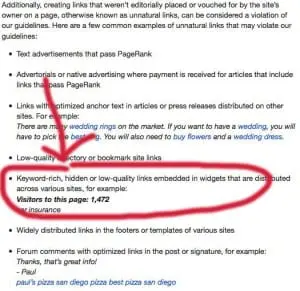
Google has quietly updated their link quality guidelines for widgets. More specifically, in Google’s Acceptable Webmaster Guidelines (in Google Webmaster Tools), they have changed the wording in the link schemes section.
I took a look at the archive.org update for that page on January 9th, and it appears that the change was not there. But today, January 10, 2014, the section on widgets has been update to read:
Keyword-rich, hidden or low-quality links embedded in widgets that are distributed across various sites, for example:
Visitors to this page: 1,472
car insurance
Previously, the text on the page said this:
Links embedded in widgets that are distributed across various sites, for example:
Visitors to this page: 1,472
car insurance
This is actually a very interesting update on Google’s front. They actually now are more lenient when it comes to links within widgets. They previously said that all links embedded in widgets would hurt search engine rankings. But now, they realize that there are some links in widgets that can be helpful. Or at least that’s the impression that they’re giving me.
I only hope that they continue to re-evaluate their link policies in the future like this and realize that there are cases where links are actually helpful to surfers.
So, what does this change mean? Google has a problem with widgets being used as a link tactic, especially when the intent of the link embedded in the widget is not a quality link. In other words, I personally interpret this new change as meaning that it’s now “okay” to embed links in widgets. However, if you use a keyword-rich anchor text link, a hidden link, or a low quality link (perhaps a link that’s off-topic to the subject of the widget), then you could get penalized for those links in the widgets. I would go as far as saying that you probably should not sell links in your widgets.
But, I also interpret this to meaning that if you created the widget and distribute it, then it’s okay for you to include a link back to the site if you are the owner of the widget and you want people to know how to get the widget, for example. If you embed a link in a widget, I recommend using a branded link or your company name as the anchor text to make sure there is no confusion (and you don’t get penalized).
One example of a ‘widget’ that would fall into this category would be infographics. As long as you include a branded anchor text link (your company name or website name) in the link code, when people embed the infographic in their site those links would be okay. If it were to be a keyword-rich link then Google would have an issue with those links.
h/t to Barry Schwartz and Kenichi Suzuki for noticing this change.
Bill Hartzer is Globe Runner’s Senior SEO Strategist. You can follow him on Google Plus.
GOOGLE AUTHORSHIP PHOTO SNIPPET IN SEARCH RESULTS NOT AUTHOR DEPENDENT
I recently wrote about the Google Authorship photo snippet not being author-dependent, but rather it’s search query dependent. In that post, I showed two examples of the same exact URL in the search results: one search query showed the Google Authorship photo snippet, and another search query showed the same URL (same blog post) without the photo snippet.
I can now, with confidence, say that the Google Authorship photo snippet is most likely not related to the actual author who wrote the content. Just because a certain author wrote an article on your site (and properly verified Google Authorship), doesn’t mean that their photo will appear in the search results when someone searches in Google and that article appears in the search results.
Have a good, quality author that’s Google Authorship verified on your site does NOT mean that their photo will appear in the search results for all (or even some) queries.
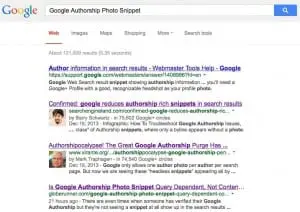
Let’s look at a specific example. I have verified my authorship with Google on this site and my authorship is not showing in the search results:
For the search query “Google Authorship Photo Snippet“, here is the search results as I see it:
I have verified Google Authorship on this site, and the Rich Snippets Testing Tool shows that Google Authorship is working:

But, for this particular search query, Google is choosing not to show the Google Authorship Photo Snippet in the search results. Not only that, they’re choosing not to show that Authorship has been verified, which is one of the “classes” of Authorship:
1. The Google search result shows the verified author’s photo and name in the search result, like the one below:
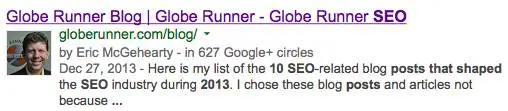
2. The Google search result shows the verified author’s name, but no photo, like the one below:

3. The Google search result does not show the verified author’s name or photo in the search results.
There are reports that Google is working on author authority but that “has not officially been rolled out yet.”
So, what is definitely a given is that this is definitely going to change in the future. Expect changes to the Google Authorship Photo Snippets in the search results, as it’s a fluid situation that’s going to change as Google eventually rolls out “author authority”.
Bill Hartzer is Globe Runner’s Senior SEO Strategist. Follow him on Google Plus.
10 SEO POSTS THAT SHAPED 2013
A lot happened in the search engine optimization industry during 2013. There were changes that happened that will forever change the way SEOs do their jobs–and how we market websites in the future. Many of these changes were predicted by many, and then there were changes that we didn’t expect. Here is my list of the 10 SEO-related blog posts that shaped the SEO industry during 2013. I chose these blog posts and articles not because the articles themselves did the shaping: but the topic they covered shaped the industry. However, in the case of Moz, I think that posts speaks for itself.
FTC Sets Sights on Native Advertising, But Outcome Unclear – It’s not just Google that has issues with Advertorials. I have seen a lot of sites get manual penalties from Google in 2013 because of Advertorials and not being compliant with the FTC guidelines for disclosure. This was a very big issue during 2013 and I fully expect it to be even a bigger issue during 2014.
SEO’s Dilemma – Link Building vs. Content Marketing – Whiteboard Friday – This Whiteboard Friday details a really big issue that online marketers, SEOs, and web marketers had to deal with in 2013. Link building, link earning, or Content Marketing? I saw a lot of SEOs jump from link building to content marketing during 2013. Maybe those still offering article submissions will finally jump to content marketing during 2014. What do you think?
Goodbye SEOmoz, Hello Moz. Yes, way back in 2011 I predicted it and during 2013 they finally rebranded. This was not only a big deal for Moz, but a big deal for the industry. Could a company such as SEOmoz pull off such a major brand change? Absolutely. And they did it in style during 2013.
Penguin 2.0 rolled out today – May 22nd, 2013 was a big day for many sites. Not because of the traffic they received that day–but that was about the last day that they’ve seen lots of traffic to their site. Google Penguin hit quite a lot of sites during 2013 and many sites still have yet to recover. Definitely a topic that everyone in the SEO industry will remember for 2013. Lucky for some SEOs who help sites recover from Google Penguin, such as Globe Runner. But 2013 was very unlucky for those sites who suffered as a result of Google Penguin.
Google Humminbgird FAQ by Search Engine Land – Google Hummingbird was announced in September 2013. Sites weren’t really affected too much that they knew about–but this new algorithm will shape the future of Google’s organic search. Definitely worth mentioning in 2013.
Why Google’s New Hummingbird Algorithm is Good News for Serious Content Creators – Hummingbird is good news for those of us who create content. Here’s why. Eric Enge, posting on Copyblogger.com, nails it this time.
Want to Rank in Google? Build Author Rank Now – 2013 is also the year of Author Rank. If you have not already started paying attention to Google Author Rank, you need to in 2014. This is a great post by Eric Enge that does a great job of explaining why verified authors are going to be important.
Study Shows No Clear Evidence That Google+ Drives Ranking – 2013 is not only the year of Google Plus, Authorship, and Author Rank, it’s also the “Year of Enge”. That’s Eric Enge, mind you. During 2013, Mr. Enge’s Stone Temple Consulting put together a study showing that Google Plus doesn’t drive search engine rankings in Google organic search. Well, even though apparently Google Plus isn’t a driver of rankings, 2013 is definitely the year of Google Plus and the year that we’re starting to see more SEOs embrace it as a social network. I personally saw more SEOs start posting regularly during 2013 on Google Plus than they did previously.
Optimized Links in Press Releases & Guest Posts Can Harm Your SEO, Says Google – Another big story was the fact that Optimized Anchor Text in press releases was targeted by Google. One major SEO tactic for a lot of SEO firms in the past had been writing press releases for PRWeb and other “press release sites”, and adding optimized anchor text. Google shut down that pretty quickly during 2013, and the press release services such as PRWeb.com started adding the nofollow attribute to all links in press releases.
Google Warns Against Large-Scale Guest Posting, Advertorials & “Optimized Anchor Text” In Press Releases – Not only did Google shake up the Press Release industry for SEOs, Google also took aim at guest posts and advertorials, as I previously mentioned. 2013 is the year that Google changed some of the link strategies of some SEO firms, and many of their clients got penalized as a result.
So, not only was 2013 a year of Google updates, but those updates changed forever how the SEO industry builds links to client sites. I have to admit, though, that it was a long time coming. Those SEO firms who were relying on press releases, advertorials, and guest posts for rankings were relying on unnatural link building. And not the content marketing and link earning that all of us should be doing.
Bill Hartzer is Globe Runner’s Senior SEO Strategist. Follow him on Google Plus.
FEBRUARY-MARCH MONTHLY SUMMARY
SEO Updates
Experts in the search marketing world have been watching the last major manual Panda Refresh the past three days. This was the 25th and final announced and published update to Panda, Google’s anti-web spam algorithm. Google has stated that “Panda is becoming more of a ‘rolling’ update.” Google Distinguished Engineer, Matt Cutts, is quoted at SMX saying:
Rather than having some huge change that happens on a given day. You are more likely in the future to see Panda deployed gradually as we rebuild the index. So you are less likely to see these large scale sorts of changes.
This is encouraging to us at Globe Runner, we are monitoring all of our clients’ sites and have not been hit by the major Panda updates and with only small tweaks coming in the future, we are confident that we can keep doing what we are doing to rank well. Google is recognizing our clients’ quality sites.
Social News
Pinterest has finally announced an analytics tool! The analytics will show verified website owners the information they have been waiting for since Pinterest began: the number of people who have pinned items from the site, the items/images that are the most popular to pinners, how many people have visited your site from Pinterest, and even the most popular repins. For businesses looking to quantify the value or traffic coming from Pinterest to their site, the process just became much easier. At Globe Runner, we are encouraging our clients to contact us if they have questions about their Pinterest strategy or would like to begin using Pinterest.
Google+
There were also a few updates to Google+ this month. The three main updates are a new local reviews tab, an easier interface to update your information, and a new aspect ratio for cover images. The new aspect ratio is enormous. Photos can now be 2120 x 1192 pixels, this means your cover photo can now cover the entire screen “above the fold” of the Google+ page.
Globe Runner Internal Update
Our CEO Eric McGehearty was featured February 28 in the Upstart Business Journal for an article he authored on why young entrepreneurs are “too dumb to fail.” The article tells Eric’s story from artist to entrepreneur two times over before the age of 30. Read the full article.
Just for Fun
If you have ever wondered how Google Search works and did not want to engage in a long and involved technical conversation with an algorithm engineer, Google has released a website entitled How Search Works. The site is interactive and allows you to follow a search query through the process to the results. Google’s Inside Search blog describes the content as including:
- An interactive, graphical explanation of Google Search
- A view into major search algorithms and features
- A 43-page document explaining how we evaluate our results
- A live slideshow of spam as we remove it
- Graphs illustrating the spam problem and how we fight it
- A list of policies that explain when we’ll remove content
Resources
https://www.seroundtable.com/google-panda-update-rolling-16495.html
http://www.webpronews.com/google-panda-update-is-rolling-out-report-2013-03/
JANUARY-FEBRUARY MONTHLY SUMMARY
Globe Runner SEO Updates
Meet the newest member of the Globe Runner team, Claire Elizabeth McGehearty! She joined the team in Lewisville, Texas on February 15, 2013. She is by far the smallest member at only 7lbs 9oz and 21 inches long. She and her three big brothers keep founders Eric and Heather very busy!
CLAIRE ELIZABETH MCGEHEARTY
PPC Update
This month Google announced Enhanced PPC Campaigns. These campaigns will be “smarter” and multi-device friendly. A single campaign will now support different locations and devices, thus replacing the old system of creating duplicate campaigns for each location and device for which you want your ad to run. Within an Enhanced PPC campaign, you will be able to customize your ads and bids based on the time, device, and location of the customer. Enhanced campaigns will also offer advanced reporting that will allow comparisons between different types of conversions; for example, app downloads vs. phone calls lasting longer than 60secs. All of these changes are geared towards reducing the number of campaigns and the complexity of your Adwords account.
Google plans to roll out the Enhanced campaigns slowly by first giving advertisers the option to switch some of the campaigns to the Enhanced version to test out the new system. At Globe Runner, we are excited for this change and have already switched a couple of accounts to play with the new system and prepare for every account to be Enhanced. By the middle of this year, Google plans to upgrade every account.
Social News
The most famous adverting day of the year, the Super Bowl was this month. This year’s Super Bowl ads sold for $3.8 million per 30 sec spot. However, the now infamous 34 minute blackout opened up a unique opportunity for real time marketing. The brands that were able to react quickly to the black out with relevant and creative content have been praised by the social media industry. Social media is the ideal real-time marketing platform.
By far, the most praised real time marketing and social media “win” during the Super Bowl blackout was Oreo’s tweet, “You can still dunk in the dark.” This tweet was a win because it highlighted a current event in a non-disparaging way and tied it into the brand’s message in a creative way.
A great social media strategy incorporates current events that can be easily tied to a brand’s message in a way that makes sense and provides a positive feeling about the brand. The brand’s message should not be lost in the “noise” of the surrounding issue. Only a few brands have done this well, and Oreo is the most recent example.
Just for Fun
The high price tag of a Super Bowl ad spot had those of us in the digital space talking about how much further that $4 million would go if used on internet marketing. A few examples of this are an 8 day homepage ad on YouTube (which is one of the top five most visited pages on the web), 200 pieces of Buzzfeed-sponsored content (which is a personal favorite and highly shared site for those of us Globe Runner), and a spot on Twitter’s Promoted Trending Topic every day for a month! For more on what $4 million can buy online, see https://digiday.com/marketing/what-a-4-mil-superbowl-ad-could-buy-in-digital/.
Resources
- « Previous Page
- 1
- …
- 7
- 8
- 9
- 10
- 11
- 12
- Next Page »