













HOW TO ANALYZE YOUR LINKS IN GOOGLE SEARCH CONSOLE
Recently I wrote about Negative SEO and the various forms of it. I also wrote about how to combat each form of Negative SEO. Of the several forms that I identified, many were related to links. Because the Google algorithm relies so much on links and anchor text still, it’s important to keep track of the links to your website on a regular basis. Unfortunately, Google doesn’t give you a whole lot to work with, though. Google Search Console allows you to download your links, but from there you have to figure out what to do, how to analyze them, and decide which, if any, you need to disavow. Let’s take a look at the links in Google Search Console and analyze them a bit further.
First, let’s figure out where we need to go to see the links in Google Search Console.

Once you’ve verified your site in Google Search Console (formerly called Google Webmaster Tools), navigate to the “Links to Your Site” page as shown above.
In the screen capture above, you’ll see several areas. The first area, “Who links the most” is what you’ll want to look at. Click on the “More »” link to get to the second page, as shown below:
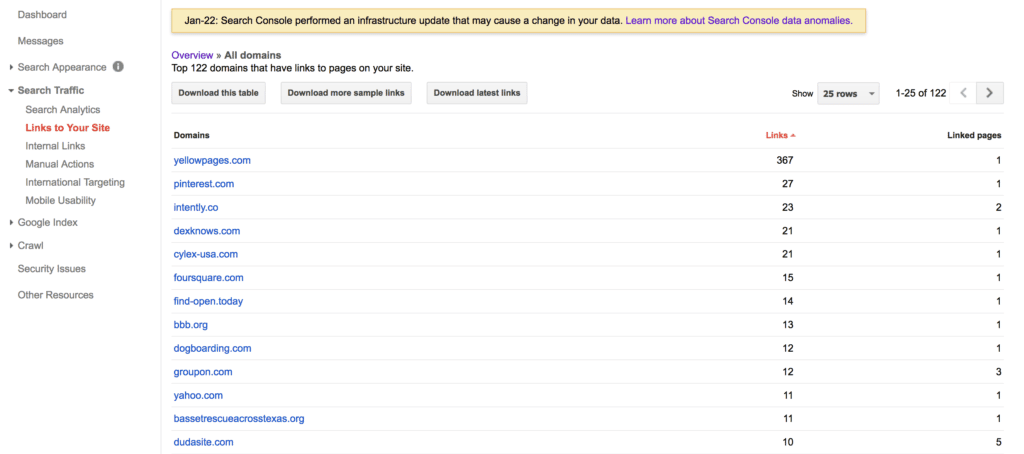
There are three separate options here to download your site’s links. The “download this table” in our case is not very helpful, so you can just ignore it. Click on the two other ones, “Download more sample links” and “Download latest links”.
Open both of these up in Microsoft Excel, which is my preferred spreadsheet application. You can certainly use Google Docs and use the Google spreadsheet app there, as well.
Once you’ve downloaded the list of links, I recommend copying and pasting one of the lists and combining that list with the other one. This way you’ll have one large list of URLs. Then, don’t forget to remove the duplicates.
At this point, you have a few options. First, you can start looking through the list of links. After sorting them alphabetically, I usually look at the URLs to see if there are any from the same website. For example, you might come across a list of 1,000 or more links from the same website. You may find that they’re a sitewide link, or the same link on a lot of web pages of one website. If you recognize the site and it’s a useful, authoritative website than fine–you may want to leave those alone. But, if they’re not useful, you may want to put them on a separate list–of links to disavow or get removed.
The next step in analyzing all of these links is to crawl the links yourself. While Google is saying that there is a link to your website, the link may no longer be valid, the site may be down, or they page may have been removed from the site that’s linking to you. So, you’ll need to crawl the list of links yourself to check them.
To crawl the links yourself, I recommend using a crawler such as the Screaming Frog SEO Spider. Screaming Frog’s SEO Spider will allow you to specify a list of links and crawl them. You should be able to learn more about each page that’s linking to you, such as the page’s title tag. If you’re savvy, you can even use the custom option to check if the link to your website still exists.

If you’d like to investigate all of these links even further, I recommend using the Majestic.com Bulk Backlinks Tool, as shown above. By uploading a list of the Google Search Console URLs, you’ll be able to focus specifically on the ones that Google is telling you about. You would want to do this for several reasons:
— If your website has a link penalty, all of the links that Google cares about will be listed here. In order to remove the penalty, you’ll need to analyze each link, get rid of the offending ones, and file a reconsideration request.
— You can look at other metrics, such as Trust Flow and Citation Flow for each link.
— You can clearly see the topics of the sites that are linking to you.
I cannot specifically tell you how to review each link and which are good links and which are bad links because every link and every link profile is different. What I can tell you, though, is that the more often you download the links to your site in Google Search Console the more often Google will refresh that data. So, download often, on a regular basis, and save the lists of links for later when you’re doing your next link analysis.
8 FORMS OF NEGATIVE SEO AND HOW TO COMBAT IT
Recently, I talked with someone who is, undoubtedly, what you could call a Black Hat SEO. We were talking about various SEO techniques, and how the techniques used have changed over the years. One comment that they made, though, was pretty interesting to me. The comment was “the new SEO is not working on your own site and making it better. It’s actually making your competitors rank worse then they are.” So, essentially, this person’s view of SEO now is not about marketing your own website and getting more links, for example. It’s doing things (legally and illegally) to hurt your competitors. In other words, it’s negative SEO.
Unfortunately, for those of us who are actively marketing our businesses, creating great content and sharing it socially, and optimizing our websites, we have to deal with negative search engine optimization. It’s here, and here to stay. There is a good chance that you’ve had to deal with it already or don’t even realize that someone is doing it to your website right now. I thought that I would outline a lot of the ways that someone can do negative SEO to your website, and how to combat each of them.
Comment Spam, Forum Spam Links
They create all sorts of links to your website, usually linking to your site with various “adult keywords”, pills, or drug names, nothing related to your website. There are literally thousands upon thousands of comments made, all using scripts or other tools to blast the comments and links to your website. The comments and links are left anywhere they can, mostly by filling out comments on abandoned blogs and abandoned forum message boards. Even those links are sometimes “nofollow” links, they still are annoying and negative.
How to Deal with Comment Spam, Forum Spam Links
There really are only a few ways to deal with these. Download the links to your site from Google Webmaster Tools on a regular basis, review the links, and disavow the domains where these links appear. Use a tool like Majestic.com or Ahrefs.com to review the anchor text of all your links. In most cases it’s easy to identify the bad anchor text, and disavow the links. You can also attempt to get those links removed, as well. I prefer to use a tool such as Rmoov.com to send out the emails to the site owners, attempting to get the links removed.
Profile Spam Links
They use profiles in order to create links to your website. The person doing negative SEO on your site will create all sorts of profiles on forums, message boards, and on social media sites and create a link back to your website. Typically these will include names of people you’ve never heard of, and don’t work for your company. The anchor text of links may include someone’s name, but it can also include adult keywords, pills or drug names or other miscellaneous words not related to your business.
How to Deal with Profile Spam Links
Typically dealing with these links requires the same technique(s) as dealing with comment spam and forum spam links, which is to identify, disavow, and remove the links. In this case, I would tend to favor the removal technique, as the site owners will, in fact, actually take the time to remove the profiles completely in many cases if you ask them.
Hacked Sites
Someone creating negative SEO links will hack into a website and make hidden text links to your website, again with “adult keyword” or pills names or drug names. They will get access to WordPress sites through various vulnerabilities, and then they’ll add the links they want. It can also include old WordPress plugins, as well. I cleaned up a client’s link profile once who had all sorts of links from hacked sites pointing to their site. I typically just contacted the site owners and told them their site was hacked. In many cases, they didn’t know their site was hacked. The hacker took time to cover their tracks, so to speak; when the site owner viewed their site they didn’t see the links because they were logged into WordPress. But when they were not logged in, the links were there. I even had to argue with site owners, telling them their site was hacked and showing them, just to get links to my client’s site removed.
How to Deal with Links from Hacked Sites
There’s not much you can do to stop someone else’s website from getting hacked. You can, though, identify the links and see that it’s happening to your site. I would immediately start notifying those sites, using a tool such as rmoov.com to send out the notices via email to those sites. It may help to file a disavow in this case, but ideally you want to get those links removed. To make sure your WordPress site isn’t hacked, I recommend using the WordFence plugin on the website.
Denial of Service Attacks or Slow Website
A denial of service attack may, in fact, be a denial of service (the attacker sends so much traffic to your website that it goes down). But, in many cases the negative SEO attacker will not want to take your site down. They will want to slow it down so much that it’s still in the search engine listings, but Google wouldn’t want to show it that much since it’s a slow site. One technique would be for the negative SEO attacker to buy ads from shady ad networks or ad networks that allow JavaScript in their ad code. Each time one of their ads is displayed, it makes a bunch of calls to your website, slowing it down. This is a distributed denial of service attack, but not in the traditional sense.
How to Deal with Denial of Service Attacks or Slow Website
First, you need to identify that this is happening to your website. I would keep up with what Google is saying in Google Analytics… look at the overall page speed. You can set up your website so that it uses a CDN (Content Delivery Network) such as CloudFlare.com, which does a good job to identify “bad traffic” so it doesn’t get to your website in the first place. The “slow website” negative SEO attack is difficult to identify, if the one doing it to your website is technically savvy so to speak. You’ll need a really advanced SEO to identify this, and it usually involves analyzing your website’s log files. If you suspect this is happening, you’ll want to make sure your site’s log files are turned on and recording every visit to your website. Then, you’ll need to hire an advanced SEO to look at the data.
Duplicate Content Negative SEO
One way that negative SEO can be done that I’ve seen involves duplicate content. Essentially, the one doing negative SEO to your site will create copies of your content and copies of your site. Then, those copies will start to appear on all sorts of other websites. Not only will they create new websites or buy expired domain names and put up the content, they’ll use other sites. I’ve seen negative SEO involve duplicate content put up on “free” or anonymous FTP sites, where they will copy your content and start FTPing it to anywhere they can. Sometimes those free FTP sites are on educational (.edu) or government (.gov) sites that will have a higher Domain Authority than your site, and can end up causing issues.
How to Deal with Duplicate Content Negative SEO
In this case, the most difficult part is identifying that it’s happening. Certainly you can search for phrases that appear on your site and see if it shows up on other sites. Sometimes you’ll just come across it randomly in the search results. There are services out there that will “watch” for duplicate copies of your site. Sites like Copyscape.com can help identify the duplicate content. To get the duplicate content taken down, you’ll need to file DMCA requests, which can be time consuming. There are sites and services that will do this in an automated fashion, but I haven’t used any of them and cannot specifically recommend any of them.
Reviews and Fake Reviews Negative SEO
Negative reviews posted about your site or your business can be annoying, but can also hurt your business. It is against the law in some jurisdictions to pay for positive reviews of your business, but I’ve seen the opposite. I’ve seen businesses pay for negative reviews of their competitors and even just post fake negative reviews.
How to Deal with Fake or Negative Reviews
Depending on where the reviews are left, you’ll need to address them. If they’re posted on Yelp or on Google, you’ll need to flag those reviews and explain why you think they should be flagged. Hopefully if it’s a pattern of negative reviews or a pattern of fake reviews they will be able to see that and remove them. So, definitely flag or report any reviews that you feel are not right. A quick response to each review, though, shows that you as a business are on top of it, and will address any complaints.
Local Negative SEO
I have seen a cases where one competitor started posting more local listings for their competitor–but the data was wrong. For example, one case had their competitor’s listings but the listing had their phone number. They started getting their competitor’s calls, which obviously benefitted them. A wrong phone number, suite number, or other garbled data on local listings can be difficult or time consuming to correct. It can, in most cases, confuse the search engines and lead to a loss of search engine rankings.
How to Deal with Local Negative SEO
The difficult part of this is to identify that it’s happening, which may in fact not be that difficult. There are services that will help you clean up your local listings and fix inaccuracies, or you can do it yourself, which is time consuming. You’ll want to identify all of the mistakes, and you can do that by simply searching for the (wrong) phone number or address and try to correct it on each site where it’s listed. Many websites simply pull in the data from another source, so you’ll need to get it corrected at the source.
Low Quality Directory Negative SEO
Several years ago the trend in SEO was to get as many links to your site as possible. Directories allowed you to get lots of links very quickly for a small fee (or for free). But, in the past few years those directories (typically copies of the DMOZ.org directory) quickly became “low quality” and not somewhere you want to be listed. Someone doing negative SEO on your website will get lots of low quality directory links to your site, usually with anchor text links not related to your website.
How to Deal with Low Quality Directory Negative SEO
Like the comment spam and forum spam links, you’ll want to identify all of these links and disavow them. I also prefer to use a service such as rmoov.com to get them removed, as well. In many cases it’s the same person who owns a lot of the same sites, and they will usually ask you to pay to get the links removed. You can pay to get them removed, but that’s totally up to you. I usually don’t pay a ransom like this.
Certainly this is not an exhaustive list of all of the ways someone can do negative SEO to your website. Those doing negative SEO are, in fact, always coming up with ways to hurt their competitors’ rankings, and it’s always evolving. As the search engines introduce more “factors” that help or hurt search engine rankings, those doing negative SEO will adapt as necessary.
Do you know of any other negative SEO techniques that I didn’t mention? Let me know in the comments so others can be aware of it.
TRULY USEFUL LINKS ABOUT LOCAL SEO IN ONE HANDY LIST
If jumping into and mastering local search engine optimization (local SEO) is your New Year’s resolution, look no further for a curated list of useful links, blogs, and other resources on the topic. We made sure to gather information that was published in the last 12 months. So bookmark this page, you’ll be referring to it frequently!
LOCAL SEO: IT’S NOT ABOUT SIZE; IT’S ABOUT GETTING FOUND.
Local SEO Tools
Every list about local SEO tools should start with the platforms that provide listing management services. These platforms partner with data aggregators to build citations — mentions of your firm on third party websites — as well as build links to your site via a plethora of directories (you may want to know those that offer follow links if this is of interest). Citations help your business rank higher for local search (see the blog section if you have a boss who needs convincing).
Perhaps the biggest benefit of using a local SEO platform is the convenience. As an entrepreneur your time is best spent building your business and selling to customers, not faffing about with manual, piecemeal submissions of your company information to directories. If you ever move, change phone numbers, rebrand, etc you will not have the nightmare of submitting 100 corrections to 100 different entities as a good platform will ensure that all changes can be centralized or, at the very minimum, reduced.
There are five local SEO platforms that are perhaps the best known in the US:
- Yext has one of the broadest service portfolios, including business pages and beacons.
- BrightLocal has over 1,600 sites in its network.
- Moz Local is an affordable investment at $84 a year if marketing budgets are very tight.
- WhiteSpark covers 42 countries which is a fantastic detail if you have a presence internationally.
- LocalEze is one of the three data aggregators supplying information to directories and search engines, and is generally credited with having the best distribution.
There are as many opinions about the best local SEO platform as there are directories to submit to — our humble opinion is, it depends on your needs, objectives and budget. Some information to check out for due diligence:
- LocalSEOChecklist displays the major players in a handy grid.
- Reddit’s SEO subreddit is worth joining, if only to lurk around discussions like this. Or this. Candid conversations and reviews by actual users: Priceless.
- SIM Partners’ white paper, Local SEO Platforms Buyer’s Guide, has a handy checklist of questions to narrow down vendor choices. (The company has its own local marketing automation platform which, to their credit, they didn’t flog in their guide.)
Local SEO Hacks and Guides
So you’re all pumped up to start. The following are pretty substantive sources that can offer a good macro view of the entire process or just one part, provide comprehensive advice to a specific sticking point, or just even serve up a local SEO topic that hasn’t been discussed before.
- Normally, pieces that advertise themselves as being ‘definitive’ fall disappointingly short, but The Site Edge’s Brian Niebler stays true to his word with Local SEO: The Definitive Guide 2016. It is a beast. Must-read!
- To demonstrate how their enterprise platform helps track rankings, SERPs also wrote a pretty meaty local SEO guide.
- Want to go totally DIY? Phil Rozek’s excellent site, Local Visibility System, has a list of local search citations that he’s collected over the past four years. He has lists for the US, UK, Canada and Australia.
- Another one for the DIYer: N.A.P. Hunter is a Chrome extension that sniffs out citations for deduplication and cleaning.
Keyword research is essential in order to create a solid foundation for your local SEO efforts. Again, there are a thousand and one opinions on the usefulness of keyword tools, but Globe Runner uses these on a daily basis:
- SEM Rush and SpyFu to find out competitors’ keywords and how they rank for these terms.
- Google Keyword Planner to determine search volumes and competition.
- Moz’s Keyword Difficulty Tool to compare/contrast their competitive figures with those of Google’s Keyword Planner — the differences can be striking and Moz has its theories on why.
- Keyword Tool to find long-tail phrases and questions people type into their browser while searching.
- Authority Labs to monitor keyword rankings for our clients and their competitors.
Local SEO Blogs to Follow
Your inbox will be nice and full everyday with these great resources on local search. And you can pick out factoids that will convince your boss that local SEO is the way to go in 2016.
- Phil Rozek’s blog on Local Visibility System is chock-a-block all about local SEO.
- The Local Search Association shares member news, statistics, industry developments and analysis pertinent to local search. Subscribe to it for excellent information such as this infographic on the top 142 categories consumers search for.
- MediaPost’s Search Marketing Daily has a roundup of the day’s SEO news from all around the web, including local SEO-focused pieces.
- Search Engine Land is always among the first to report any Google activity that could potentially impact local SEO.
- Often confused with the previously mentioned site, Search Engine Watch also has a local SEO section, albeit less frequently updated.
- Rand Fishkin’s blog on Moz is not specifically focused on the subject, but most of his marketing posts have implications for local SEO practitioners. Like this post on 2015’s keyword research tool universe or this one on Google Suggest.
Local SEO Events to Attend
You’ve read some but want to learn more about local SEO by attending conferences or meetups with fellow enthusiasts. Or you’re looking for more advanced information. Just three among the national events about local SEO to catch:
- MozCon Local 2016. The creators of Moz Local should have lots of useful information to share. February 18-19 in Seattle, WA.
- LocalU Advanced. For more experienced practitioners, here’s a conference to learn the latest on local search, mobile, analytics, web design and more. March 5 in Williamsburg, VA.
- SMX Advanced. The Local Search Advantage Workshop is a full-day dive into various advanced topics such as driving and tracking online-to-offline conversions. June 21 in Seattle, WA.
Find more national and international SEO events on this thread over at Inbound.org.
Closer to Dallas Fort Worth, Globe Runner’s home, Loco For Local will be held January 27 at La Hacienda Ranch in Grapevine. This local SEO workshop was organized for local businesses in Fort Worth, but non-FW businesses are more than welcome to drop by and exchange notes. Bill Hartzer will talk about local SEO best practices, useful tips and insider secrets.
Got any more to add? List them in the comments section.
NAVIGATING THE .WINE AND .VIN NEW GTLD DOMAIN NAMES
Since the beginning of the Internet, Americans have primarily used three main Top Level Domains (TLDs) for our websites: .COM, .NET, and .ORG. There are other TLDs that have been introduced that we’re all familiar with, such as .EDU and .GOV. It’s been fairly easy for us to register .COM, .NET, and .ORG domain names. You have to be associated with an educational institution or a government entity to secure a .EDU or a .GOV domain name. And then there’s the others that have been available for quite some time now, such as .INFO, .BIZ, and .TV. Most consumers in the USA are typically are used to the top three, .COM, .NET, and .ORG.
In countries outside of the USA, the Country Code Top Level Domains (ccTLDs), are widely accepted and in fact often the default option. Country codes include .co.uk (United Kingdom), .es (Spain), .com.au (Australia), .ca (Canada), and .it (Italy), and are always two letters long.
Depending on the location of your business, a ccTLD makes perfect sense as an alternative to .com. Since January 2014, there are literally hundreds of new Generic Top Level Domains (New gTLDs) becoming available, and many are already available for registration.
Keyword Rich Domain Names
It is widely thought that one way to potentially gain some search engine marketing advantage is to buy a keyword rich domain name that includes the TLD as one of the main keywords. This strategy has been said to not matter when it comes to search engine ranking advantages in Google, though. In March, 2012, Matt Cutts, a representative from Google, addressed a myth about the new gTLDs. Specifically, he said:
“Google has a lot of experience in returning relevant web pages, regardless of the top-level domain (TLD). Google will attempt to rank new TLDs appropriately, but I don’t expect a new TLD to get any kind of initial preference over .com, and I wouldn’t bet on that happening in the long-term either. If you want to register an entirely new TLD for other reasons, that’s your choice, but you shouldn’t register a TLD in the mistaken belief that you’ll get some sort of boost in search engine rankings.”
So, buying a keyword-rich new gTLD domain name apparently does not carry any extra weight when it comes to actual search engine rankings, at least not in Google’s organic search results. However, at Globe Runner, as Search Engine Optimization experts, we have seen many cases where keyword rich domain names that include the keyword in the extension. They appear to help a website’s SEO and overall search engine visibility.
Based on our ongoing research study, using a keyword rich new gTLD domain name in a Google AdWords Pay Per Click campaign has its benefits.
.WINE and .VIN New gTLDs
Two new domain name extensions that are becoming available to wine enthusiasts and the wine industry are the .WINE and .VIN TLDs. Domain names in these extensions will be available for registration by the public starting at the end of January 2016.
Important .WINE and .VIN Dates

Globe Runner has teamed up with the Wine Guy, Chris Campbell, and created the definitive guide to the .Wine and .Vin new gTLD domain names. Our guide, titled “Navigating the .WINE and .VIN New gTLD Domain Names”, includes everything you need to know about Early Access, What Trademark holders need to know, and what Brand owners need to know. We also cover issues like how to choose a .WINE or .VIN domain name, and include a checklist for moving your existing website to a .WINE or .VIN domain name.
Here is the table of contents of our guide to navigating the .WINE and .VIN new gTLD domain names:
What’s Inside
About the Authors
Introduction: New gTLD Domain Names
.WINE and .VIN
Keyword Rich Domain Names
Application Process and Key Dates
Important .WINE and .VIN Dates
.WINE and .VIN Early Access Program Registration Fees
Domain Pricing Examples
Brand Owners: What You Need to Know
ICANN and the Trademark Clearinghouse
The Central Registry
Contention Over .WINE and .VIN TLDs
Regulatory Climate
Intellectual Property
Uses of .WINE and .VIN
Choosing a .WINE or .VIN Domain Name
Google Analytics
Online Keyword Research Tools
Moving to a .WINE or .VIN Domain Name
Checklist for Moving to a New gTLD Domain Name
Pre-Move
Pre-Planning
On Moving Day:
After Moving Day
Conclusions
Resources
Whether you’re a brand owner, a trademark owner, a domain name investor, or simply someone who enjoys a great glass of wine, you’ll want to download this guide.
WHAT EVERYONE OUGHT TO KNOW ABOUT REPUTATION MANAGEMENT
by Jenna Yoder
Have any of the below happened to you?
- You or your business have scathing reviews on sites like Yelp or TripAdvisor
- Your business or product are the recipients of fake Amazon, Facebook or Google reviews
- When someone searches your name, all the links that come up on page 1 are from negative articles
These are just three instances where online reputation management (ORM) comes into play. You can think of ORM as a specialist subset of SEO that deals with the strategic handling of negative search results.
Not all agencies offer this service, so it’s critical that anyone shopping for it knows what’s involved. Below are some key facts about the process that everyone should be aware of:
1. Reputation management can’t remove negative links
What a good ORM program does is push negative content down to less frequented search pages by creating positive content optimized to rank higher than the negative links. Studies on search behavior, such as this one from GoFish Digital, show that 50% of searchers don’t go beyond page 1 of search engine result pages (SERPs) while only 36% venture onto page 2 or 3.

FINDINGS FROM A 2015 GOFISH DIGITAL STUDY SHOW THAT ONLY 13% OF SEARCHERS MAKE IT TO PAGE 4 AND BEYOND.
However just creating content, any content, and throwing it up on the Internet will not automatically push bad content to page 3 when someone searches. A good ORM partner will sit down with you, determine the extent of the damage, and design a campaign that incorporates the best types of content for your needs.
At the onset, your partner should create a spreadsheet of all links that turn up on SERPs. Highlighting these links green for positive, red for negative and neutral links yellow will ensure that you are on the same page about what should be pushed down, what should be retained and whether the links are moving week to week.
2. Reputation management takes time
Be ready to invest a significant amount of time in addressing reputation management issues. At a webinar on how to bury a Ripoff Report review, ORL old hands BrandYourself said it can take from 9 to 12 months to start seeing solid results, a time frame that Globe Runner finds accurate. Any vendor who tells you that it can be done faster is either overly optimistic or unfamiliar with the amount of work involved.
The content creation alone takes a lot of time. Most reputation management campaigns will require setting up strategic microsites, social media accounts and other properties that carry or link to positive content. The infrastructure and keyword strategy will need tweaking as links start showing movement. Like good SEO, there are no short cuts.
3. Reputation management is not always about maintaining an open dialogue
We’ve all been taught to address negative comments the minute they surface. Social media is rife with examples of how businesses or individuals ignored unflattering remarks online only to face a veritable tsunami of bad publicity when they woke up the next day. Nipping a situation in the bud and engaging with complainers is generally a good social media policy.
In reputation management, exceptions are made for protracted dialogues with a party intent on destroying reputations, not resolving the issue. This is especially true for Ripoff Report complaints which are notoriously hard to remove. If you suspect that a competitor, disgruntled employee or the like are behind a Ripoff Report complaint that is patently untrue, avoid getting embroiled in an all-out flame war.
Instead, take the advice of Ripoff Report’s lawyer, Maria Crimi Speth: Consult your public relations and legal advisers before jumping into the fray. Aim for arbitration instead of a prolonged social media brawl. And don’t discount the benefits that a structured online reputation management campaign brings. As Speth said, “Redouble your efforts in legitimate and positive PR. Robust and favorable content about your business will be especially valuable when a bad issue strikes.”
Jenna Yoder is an account manager for Globe Runner specializing in online reputation management. Photo by Max Mayorov on Flickr.
RANKBRAIN: GOOGLE’S AI ALGORITHM
On October 26, 2015, Google unveiled its newest algorithm, RankBrain.
What is RankBrain?
RankBrain is an artificial intelligence (AI) system that sorts through Google’s indexed content and provides the most relevant websites for particular queries. RankBrain is one of many algorithms that make up Google Hummingbird. Hummingbird is Google’s overall search algorithm that consists of Panda, Penguin, RankBrain and others.
How does RankBrain work?
RankBrain is just one component of Google’s search algorithm, but its goal is to answer unique queries that Google has never seen before.
Now, according to Danny Sullivan, Google answers 100 billion searches per month. That equates to over 3 billion searches a day. On top of that, roughly 18% of daily search queries have never been asked before.
Therefore, 500+ million searches/day have never been seen before. Answering those queries has been a difficult process, but this is RankBrain’s strength.
RankBrain’s purpose is to interpret queries that may not contain the exact words/phrases that the searcher is looking for. Essentially, it attempts to re-route misguided searches.
How important is RankBrain?
According to Greg Corrado, a senior research scientist at Google, RankBrain is the third-most important ranking signal contributing to the result of a search query. That’s huge!
Google has over 200 hundred rankings signals, all of which are unknown, but highly speculated. For a Google employee to say outright that it’s the 3rd most important ranking signal is big news.
SOCIAL MEDIA ROI: HOW TO TELL IF IT DRIVES TRAFFIC TO YOUR WEBSITE
by Claire Parker
The subject of social media ROI is a vast, complex area that we won’t get into — there are far more substantive sources out there on the topic.
What we do want to share is how you can tell if your social media posts are driving traffic to your website. It will however require viewing Google Analytics. If Analytics hasn’t been deployed on your site, make sure it is so you can follow along.
(These would be the most straightforward instructions for creating a Google Analytics account and installing it, with pictures of the process for all of you visual learners out there.)
Let’s say you shared a blog post via social media. On the left-hand menu, go to Behavior –> Behavior Flow –> Site Content –> Landing Pages. Cut and paste the URL path name of the blog post into the search field, then enter.
So for example, we want to see whether our social media shares of https://globerunner.com/a-free-customizable-content-calendar-for-2016/ were effective. You will only paste /a-free-customizable-content-calendar-for-2016/ into the search field. The table that shows up will show the number of visits attributed to this blog post. In this example, we see that the content calendar post was the source of 1,113 visits.
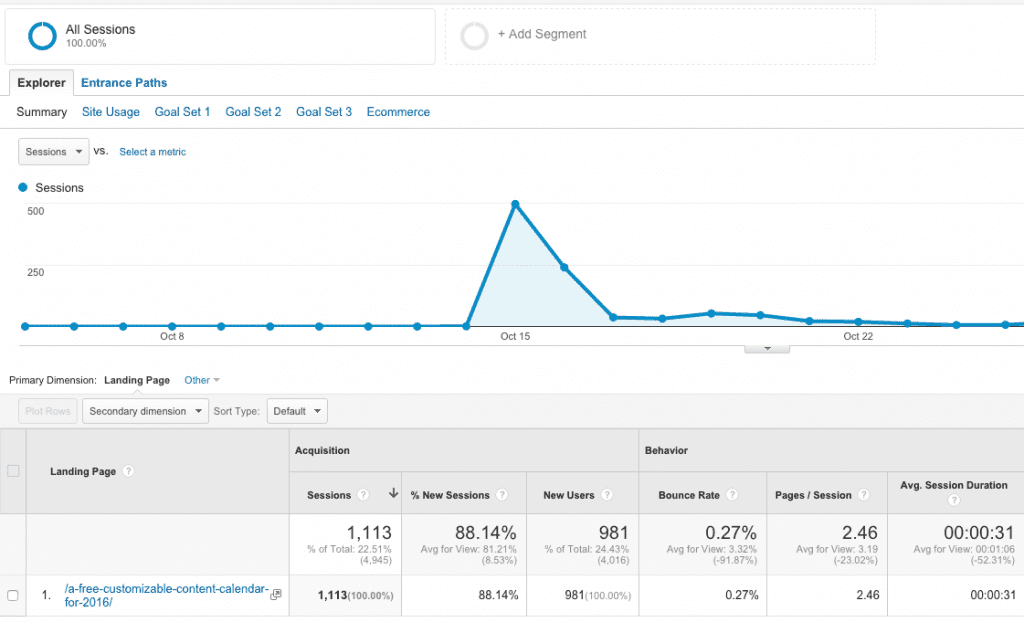
To find out which social media platforms were behind the visits, click on the Secondary dimension drop down menu on the menu bar. Select Social –> Social Network to see the specific platform. In our example, the top network was Reddit, followed — rather distantly — by Facebook.

What is ‘(not set)’? Good question. According to Google, there could be many reasons for getting this value, but it’s generally due to a session having no page or screen views. Other reasons could be bot traffic or the visitor not allowing a cookie to be placed.
One way to get more clarity is to click on the Secondary dimension drop down menu again and choose Acquisition –> Source/Medium. Source would be the originator of the traffic and medium is the method. You should see some social media platforms among the sources.

This appears to be a more substantive view in that you can see visits via mobile which are identified by the ‘m’ before the platform.
Having said that, it’s better to be pro-active rather than reactive.You must’ve noticed that when you share newsletter content that arrives in your inbox that the URL contains UTMs? These were created using Google’s URL builder. Use this tool to generate URLs for your social media posts that will show up in the Campaigns section. The generator will create a unique URL for you showing the source, medium and name of the campaign.
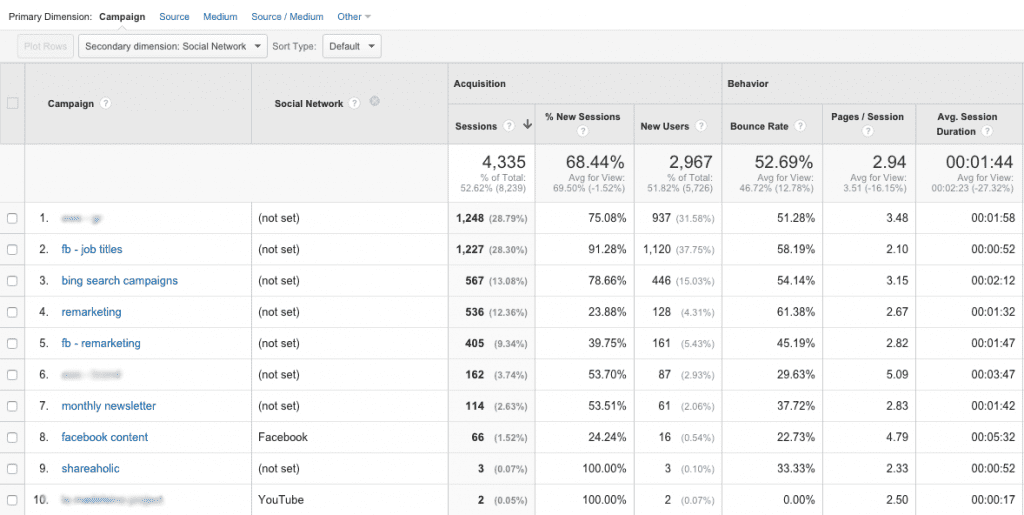
In this example from a client’s campaigns, you will see that Facebook posts drove 66 visits to the website while a video on YouTube resulted in two visits. Identifying these social-sourced visits in a campaign allows you to find richer data along their customer journeys, whether that be downloading a gated piece of content, filling in a contact form or, in the case of e-commerce, ending in a purchase.
Claire Parker is Globe Runner’s account manager for small- and medium-sized businesses (SMB). Determining whether your social media efforts result in site visits is just one metric that SEO can teach social media or public relations practitioners. Read more about what SEO can teach PR and vice-versa.
13 MUST-HAVE MARKETING TOOLS
At Globe Runner, we’re constantly presented with marketing tools to review and hopefully adopt. As we soon discovered, there are hundreds of marketing tools for every conceivable purpose but only a select few are the ones that we just can’t live without. Following are the marketing tools that Globe Runner has perpetually open on browser tabs:
AdWords Editor
PPC Lead Stephanie Bradam says AdWords Editor is “constantly open” on her browser. The tool allows users to make changes in bulk and across multiple accounts, even offline. Apart from the convenience, it’s free — instant brownie points.
Asana
This task management tool is perpetually up on our screens. Asana acts as the central nervous system for the agency, the platform from which we assign tasks, determine work capacity and record time. “It’s great for listing and tracking tasks as well as figuring out what’s going on,” said account manager Jenna Yoder. One fun feature of Asana is the occasional unicorn that appears when a task is checked off.
Canva
“Just about the easiest way to whip up banners, collages, social media headers and what-have-you” is how director of brand strategy Alicia Kan described Canva. The platform offers excellent pre-sized templates, easy drag-and-drop functionality and, if you’re lacking pictures, the option to buy good looking visuals for $1.
CODA2, Dreamweaver and Atom
Our web developers Daniel Edwards, Johnny Rodriguez and Jeff Baker use these “integrated development environments” (their words) on a daily basis. “All of them are like multiple programs rolled into one,” said Johnny. “It’s just a matter of preference on which tool to use. Since a visual interface is easier for me, I tend to use Dreamweaver.”
Google Analytics
Given that Globe Runner’s core competency is SEO, Google Analytics is always one of the first tools we check everyday to look at the status of clients’ websites. Their performance on Google Analytics tells us whether the strategies and tactics we’re employing are working, whether that be visitors to the blog or sales from e-commerce. Installing Google Analytics on a client’s site is always the first priority whenever we onboard a client, in order for us to work from a common baseline and to provide tangible metrics going forward.
Google Sheets
Sorry Bill Gates, but the sharing capabilities of Google Sheets give it the edge over Excel. “You can share [files] in real-time, with hardly any need to send emails back and forth,” said Ashley Bonner, quality manager. We’ve used Google Sheets for various purposes, from silo documents to content calendars like this one we made for 2016.
Hootsuite
According to Globe Runner’s head of content Zain Haidar, one of Hootsuite‘s main benefits is the functionality for planning and rescheduling social media posts across multiple accounts. “You can plan posts weeks in advance which is great,” he said. (Now if only Hootsuite could improve a rather clunky interface, our joy would be immeasurable.)
Moz.com

Apart from having various tools for 0nline marketing, Moz has an excellent video series we follow called Whiteboard Friday (usually over a Friday team lunch, like the one we’re having in the picture). Topics covered in the videos range from the latest ranking trends to male programmer dress tips.
Moz’s Beginner’s Guide to SEO is still one of the best introductions to the field to be found. Which is why Globe Runner staff are tasked with reading this guide as part of their onboarding.
PandaDoc
A fairly recent addition to our favorite marketing tools list, PandaDoc eliminates the drudgery and hours involved in proposal writing. The tool allows users to create a library of commonly used content, create templates and automate sending. “It makes it easy for me to collaborate [with others] on a proposal,” explained Globe Runner CEO Eric McGehearty. “It also organizes my sales pipeline.”
Passpack
Before Passpack, we were like every other business: Storing passwords in a common file that could be accessed by multiple internal users. After one too many ‘who changed the password!?’ conversations, we settled on Passpack to be the official repository. “Whenever I forget a password, it’s Passpack to the rescue,” said digital strategist Donnie Hanes. Not only is it convenient, but Passpack’s two-step login gives us an additional, reassuring layer of security.
RGB to Hex
Ever had to recommend colors for websites? Recreate palettes using online logos? Using Pantone colors as a guide is great for print but when it comes to websites, hex codes rule. So if you and your developer can’t agree on the exact shade of blue, use hex codes as a common basis for discussion. RGB to Hex is a simple calculator where you enter the RGB values and it spits out the hex code.
Screaming Frog
Screaming Frog is an SEO tool that crawls websites for data such as title tags, meta descriptions and external links. The data is served up in spreadsheet form so a user can easily find errors and issues at a glance instead of manually combing through a site. It’s especially useful for larger sites with hundreds of pages. Screaming Frog is an essential part of every SEO audit we do for clients.
SEM Rush
A must-have for any SEO, SEM Rush shows a site’s organic and paid traffic, keywords it’s ranking for, backlinks, competitive set and more. “It’s invaluable in researching keywords and identifying keyword opportunities,” said quality team lead Brian Meller. SEM Rush also allows domain comparison for up to three properties for quick top-level competitive analyses.
What marketing tools are must-haves in your position? Share them below as a comment.
SEARCH MARKETING STUDY: HOW NEW GTLDS ARE BEATING .COM
SEARCH MARKETING STUDY: HOW NEW GTLDS ARE BEATING .COM
Since May 2014, Globe Runner has been actively researching and studying the Search Engine Marketing (PPC) effects that the New gTLD domain name extensions are having on the industry. The results of our first initial deep dive into real-world data was released back in September 2014. We then provided an update 8 months later. Originally, the .COM beat out a new gTLD domain name when it came to quality traffic: but .COM traffic was more expensive. However, one year and four months later, the tide has changed.
New gTLDs convert much higher than .COM. Conversions on .COM continue to deteriorate.
Back in May 2014, we found that domains of new extensions were converting at about 34 percent, and .COMs were converting at about 52 percent. It cost more to advertise using a .COM than a new domain extension. However, over a year and a half later, that has all changed. New domain extensions are converting at about the same rate–but .COM domains are converting now at a record low, of nearly 20 percent. It still costs more to advertise using a .COM domain name than using a new domain extension. Here are some quick stats from our updated research:
Results: Average CPC
3Carat.Diamonds: $.77 Sept. 2015 vs $.69 in Jan 2015 vs. $.77 in May 2014
3CaratDiamonds.com: $.83 Sept 2015 vs $.82 (vs. $.81 in May 2014)
Conclusions:
23% Conversion Rate on .COM, 35% on .Diamonds in September 2015.
Previously, January 2015: 31.76% Conversion Rate on .COM, 29.11% on .Diamonds
Previously, May 2014: 52% Conversion Rate on .COM, 36% on .Diamonds
New gTLDs convert much higher than .COM. Conversions on .COM continue to deteriorate.
According to our re-running of the testing during January 2015, the conversion rate of the .COM was very close to what the conversion rate on the .diamonds was–only a 2 percent difference between the two. Back in May 2014 the .COM converted a lot better. But that wasn’t the case in January 2015. The New gTLD domain name was converting the same as a comparable .COM domain name.
In September 2015, however, the conversion rate of the .COM has continued to go down. It’s now at an all-time low. Yet the conversion rate on the .Diamonds domain name has remained about the same (it’s actually up 2 percent over May 2014’s data).
Our overall goal when setting up these tests was ultimately to determine whether using a .Com domain name or a new gTLD domain name is better when it comes to search engine marketing and Google AdWords. Back in January 2015 we were not totally convinced that one is necessarily “better” than the other. However, our view of this, after over a year and a half of looking at the data and running test, we have changed our tune.
Ultimately, if we had to decide whether to use a New gTLD domain name extension or a .COM domain name for our Google AdWords campaigns, we would choose to use a New gTLD domain. The prices for clicks (CPC) haven’t changed much over time. They remain fairly consistent. However, it appears that the overall relevance for the .Diamonds TLD has gotten better: we’re seeing a better Average Position than what we did back in May 2014: an 18 percent increase! This could be because Google has ‘tweaked’ something in the back-end that makes .Diamonds domains more relevant because the keyword is in the domain name extension, but we can only speculate.
Globe Runner’s goal is to be totally transparent with the results our Search Engine Marketing research, so we have included all of the data, as well as our detailed analysis, in a white paper. Use the form below to download the latest results of our testing.
- « Previous Page
- 1
- …
- 26
- 27
- 28
- 29
- 30
- …
- 45
- Next Page »