













LINKEDIN IS THE NEW PREFERRED SOCIAL SHARING NETWORK: HERE’S HOW TO TAKE ADVANTAGE
Over the years, I’ve seen many social sharing networks come and go. I remember the good old days when Digg, Delicious, and Reddit were popular social sharing websites, and if you want content like a new blog post promoted, you just went over to Digg, submitted it, and hopefully it would get enough up votes to hit the site’s home page. Google Plus gained some popularity at the beginning, still can send social traffic to a site, but not like it used to. From what I’m seeing now, though, LinkedIn has quickly become my preferred social sharing network. For new content, evergreen content, and especially new blog posts, LinkedIn is the new preferred social sharing network. Here’s what you need to know to take advantage of it.
LinkedIn has traditionally been thought of as a website to network with others in order to get a job or further your career. However, because LinkedIn’s home page (when you’re logged in) is essentially a list of what your network has shared, it’s become a social sharing site. If you have enough connections in your network. you’ll see all of those updates that others in your network have shared. Here’s a sample of what I see when I’m logged in:

As you can see, there are plenty of updates posted by those who I’m connected with–all 14,000+ of them. You can Like, Comment, and Share these posts. Since I’m connected with over 14,000+ people on LinkedIN, anything that I Share, Comment, or Like will then appear on 14,000+ others’ home pages, so they can see it as well. Here’s an example of new content (a recent blog post of mine) that I’m sharing on LinkedIn:

Notice that when I post, I am leaving the full URL of the blog post in the description. When you do that, you’ll see that the URL does NOT have the “nofollow” link attribute on it. While it is a shortened URL as seen below, it’s still a good link to have:

So, sharing on LinkedIN will get you links, but it will also get you views. Let’s take, for example, this photo which I posted recently using the BloomSky app (I have a BloomSky device that captures live weather data):

Just on this one photo that’s shared from my BloomSky device, there are over 1,000 views of the photo–there are some Likes, and it’s even popular enough to warrant some spam comments. Incidentally, you know the post is doing well whenever you get some spam comments, as people see it as a post worthy enough of spamming it. Ha!
Being Active Pays Off
Since I’ve been social networking and using social media for over 10 years now, I’ve learned that it pays to be active. And, if you’re active enough on any social network, you’re going to build up followers and contacts. In fact, if you have enough followers I’ve learned that just about anything you post will get lots of views and shares. It’s just a numbers game, really in a lot of cases.
In order to get your network large enough so that you get views and shares, you have to be active. Don’t just expect to go over to LInkedIn, post something, and get 1,000 views on a weather picture. And you don’t build up 14,000+ connections overnight. It’s taken years to do that–although I have been more active in the past few months than I ever have, and it’s paid off tremendously.
There are several things that you can do to keep up a good presence on LinkedIn, here are a few things to consider:
– Consider spending a few minutes every single day visiting the site.
– Add connections on a regular basis. There are limits to the number you can add every day, so I wouldn’t go crazy with this. But adding more each day will help.
– Get into the habit of Liking, Commenting, and Sharing posts of people in your network. When people notice that you’re liking and commenting, they’ll notice it. Even better if you’re sharing posts from time to time.
– Use the My Network/Connections page to connect with others, but also send congrats and wish your connections a Happy Birthday whenever it’s their Birthday. LinkedIn makes it fairly easy to do this, and it does make a difference.
– Respond to Pending Invitations in a timely manner. If they’ve sent you an invitation, decide whether or not you’ll connect with them.
– Import your contacts and connect with others. There are tools in order to import your contacts from Gmail, Yahoo! Mail, Hotmail, AOL, and you can even import a file with contacts.
– Export your connections from LinkedIn, as you’ll want to save that data, as well. I prefer to export them into a file and import the file into my Google contacts.
– Connect other services that will automatically post to LinkedIn. Sites like Buffer.com will allow you to schedule posts, or you can share posts on Buffer that will post on several social networks all at once. Many different sharing services will do this, and there are even WordPress plugins that will post your latest blog post on LinkedIn, as well. Be sure to set these up and link up your social networks with LinkedIn.
– A while back LinkedIn allowed you to publish full length articles on LinkedIn, which is great. Not only can you share links to posts or other URLs, you can also post directly on LinkedIn and get those articles Linked, Shared, and Commented on as well. LinkedIn posts, if done right, can get a lot of traction. Check out Larry Kim’s Moz post titled 3 Unusual Hacks to Dramatically Up Your Game.
Spending the 5 or 10 minutes every day to add contacts, Like, Share, and Comment on posts helps build your LInkedIn network. LinkedIn can, in fact, send a lot of traffic to websites, and you can take advantage of this if you have a large network. Rather than think of LinkedIn just as a network that’s all about jobs, lately it’s become the preferred social sharing network of choice.
4 TIPS TO GET THE MOST OUT OF REPUTATION MANAGEMENT
In a world where smart phones and wireless internet exists, people are finding more and more avenues to share their ideas, experiences, and opinions. Whether it’s through social media, on your website review form, or any other of the various business pages where you brand is represented, people have ample opportunity to talk about their experience with your products or services. Of course, no one gets upset when something good is being said, but when it comes to maintaining the integrity of your brand and reputation of your business, it’s important to know how to address and manage anything negative that might be said.
Negative feedback is never easy to swallow, but you want to stay involved in the conversations that are going on about your business. Here are 4 tips for managing the online reputation of your business.
Tip 1: Claim Your Business Listings and Pages
By claiming your business listings and business pages, you can keep your business and contact information accurate, consistent, and up to date. You also will stay notified on when a review has been posted. Another important reason to claim your business listings and pages is to make sure that you are in control at all times of how your business and brand is being represented.
Tip 2: Listen
Nothing is perfect, and there is always room for improvement. Whether the feedback is good or bad, listening to the feedback will help you better understand, and meet, the needs and expectations of your ideal customer.
Tip 3: Represent Your Brand
Remember your reviewers are customers talking about your business. Don’t take it personally–be kind, say thank you, and, most importantly, apologize! After all, we aren’t trying to drive them away! Make sure you are prompt when you answer any inquiries or address any negative feedback. Responding quickly and appropriately will increase the likelihood that the reviewer will either take down their bad review and end up leaving a good one.
Even if they don’t take down their negative review, you still are given the opportunity to show others who are researching your business products that you care about your customers and are willing to go the extra mile to make sure that your customers are satisfied and right any wrong that might have left someone upset.
Tip 4: Invest in Reputation Management and Social Media Marketing
Doing it yourself can be overwhelming and time consuming. After all, there are so many different places where your business name could be mentioned and talked about. Even more so, you spend all day running your business—now you have to defend it and represent it online? There just simply isn’t enough time in the day.
Hiring a company that provides reputation management services will alleviate this time consuming, but vital, task. Companies like Accelerate Online Marketing can work on your behalf to respond and stay involved in the conversations that are happening about your business. For more information, contact the digital marketing experts at Accelerate Online Marketing Today!
31 REASONS WHY THE GOOGLE PENGUIN ALGORITHM HASN’T UPDATED YET
As you probably are aware, Google hasn’t updated their Google Penguin algorithm update in quite some time. In fact, it’s been so long since we have seen an update related to links that we’ve even seen small businesses literally shut their doors as a result. Certainly that’s not Google’s fault at all, but the lack of a Google Penguin update has become quite the joke and frustration for many in the search community.
Back in January 2016, Search Engine Journal reported that Google’s Next Penguin update “to happen within weeks”. Well, as of this post, it’s now been months, not weeks. Google was “aiming for launching penguin this quarter, but we don’t have a more precise timeframe”, according to Gary Illyes.

While we wait for another update, there are a few things that you can still do. We’ve detailed them here on our blog.
Here at Globe Runner, we decided that we would help Google out and list excuses why their Google Penguin algorithm hasn’t launched yet. Here are 31 reasons why the Google Penguin algorithm hasn’t been launched yet.
1. We missed the opportunity to turn it on during World Penguin Day, so we’ll have to wait another year.
2. We need to hire a few more PR (public relations) people to handle all the questions from the media that we’ll get once it launches.
3. The Quality Raters aren’t done testing it.
4. We’re still trying to figure out how to stop relying so heavily on links as a part of our algorithm. Then we won’t even need a Google Penguin update.
5. We’re waiting for Matt Cutts to come back. Wait. Did he ever leave?
6. There are browser compatibility issues that we haven’t been able to figure out yet.
7. Our lead developer is on vacation.
8. It’s all due to global warming. It’s just not cold enough for the Penguin to return.
9. There’s a bug in the code.
10. If everyone would just stop building links for just one day, we’d have enough time to catch up.
11. There’s not enough data for us to review, we need more bad links to review.
12. We haven’t received enough link spam reports, so we don’t have enough data.
13. The Quality Raters aren’t ready reviewing and rating all of the links.
14. It worked perfectly when we first ran it.
15. We’re still working on the quality of our code.
16. The junior level developers aren’t done documenting all of the changes in the code.
17. Larry asked us to add a feature that wasn’t originally in the scope.
18. There were too many developers working on it, and we had to reassign some to another project with a higher priority.
19. There are other, more high priority development projects that we are working on.
20. We’re working on the rest of the Alphabet code first.
21. There’s just not enough time in the day to get it done.
22. There’s really no such thing as a bad link. Just disavow it or nofollow it.
23. It’s taking longer than we expected for the AI to learn how to determine a bad link from a good link.
24. Rank Brain.
25. We just figured out that all along we were collecting the wrong link data. So we have to restart.
26. We were analyzing the wrong link data, but we’re all good now.
27. We forgot to commit the code that incorporates Google Penguin into the algorithm.
28. We’re waiting for y’all to stop searching, just for a few minutes, so we can turn it on.
29. Google Penguin hasn’t been integrated into the real-time algorithm yet.
30. We found a previously known bug in the code, but the project manager said not to work on it yet.
31. Gary Illyes said it isn’t ready yet.
Have any more excuses that you’d like to add to our list? Feel free to list them in the comments.
A LAWYER MOVED HIS WEBSITE TO A .ATTORNEY DOMAIN NAME. HERE’S WHAT HAPPENED.
Eric Block is a personal injury attorney in Jacksonville, Florida. While he’s handled many cases and clients expertly, he was having trouble getting the word out about his law practice. The market for legal services in Northeast Florida is highly competitive; other attorneys and firms were spending millions of dollars a year in ads. How would he compete without massive radio and television spends? Eric decided to take an innovative online marketing approach by relaunching his website under www.Jacksonville.Attorney, which led to impressive returns at a fraction of the cost of a major advertising campaign.
Globe Runner was hired by Rightside, the registry behind the new gTLD domain extension .ATTORNEY, to review Mr. Block’s website migration from his former website and domain name, www.EricBlockLaw.com, to his new website and domain name, www.Jacksonville.Attorney. We reviewed the results, and reported it all in a case study. You can learn more about it on Rightside’s blog titled Domains vs. pay per click: Do new TLDs work?, or download the PDF file at the end of this post.
Marketing legal services is extremely competitive, and costs are often high as a result. An October 2015 U.S. Chamber Institute of Legal Reform report on trial lawyer marketing stated that:
“[l]egal advertising and marketing communications are a multi-prong, highly sophisticated undertaking by trial lawyers that spans broadcast and digital venues. This is not a resource-starved, grassroots effort but a very much well-funded and coordinated endeavor.” They went on to say that “online legal key word advertising is among the most expensive in America.”
Nine of the top 10 and 23 of the top 25 most expensive Google keywords are related to legal services. Furthermore, most of the search terms are tied to lawyers in specific states. An attorney might use Google AdWords to bid on keywords such as “accident” and “personal injury” along with a combination of state names, state abbreviations, and specific city names.
Rather than spend thousands every month to drive traffic to his website via PPC, Mr. Block listed his services on FindLaw and Avvo, popular attorney-listing websites. He worked with New York-based Momentum Names, a reseller of Rightside’s new generic Top Level Domains (TLDs) such as .LAWYER and .ATTORNEY.
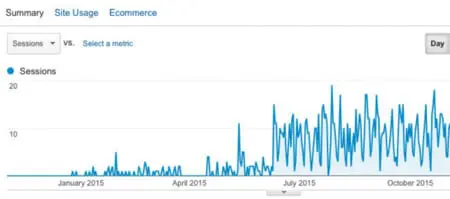
Eric decided to move to www.Jacksonville.Attorney, and launched the new website in March of 2015. As you can see from the Google Analytics’ graph show above, the move to the .ATTORNEY domain name was a success.
While no data can serve as 100-percent proof that moving from EricBlockLaw.com to Jacksonville.Attorney caused Eric’s website to go to in the top of the search results, the uptick in organic traffic is certainly striking. Jacksonville.Attorney is now ranked for more than 300 keyword phrases according to SEMrush.com. Within one month of launching, the new website showed up on the first page of search results for “Jacksonville Attorney.” Jacksonville.Attorney appears higher than other competitors despite lower-quality in-bound links (Majestic.com Trust Flow) and a shorter history, both of which are key search engine ranking factors.
5 PRACTICAL REASONS TO DO PPC IN 2018
When it comes to promoting your brand online, one of the most powerful tools at your disposal is pay-per-click advertising. There are several very practical reasons for incorporating PPC into your overall online marketing strategy, five of which are explained below.
Reason 1: You Only Pay When Your Ad Is Clicked On
Perhaps one of the most obvious advantages of PPC is that you only pay when someone clicks on the ad. This provides a far more streamlined usage of your funds than traditional advertising, in which you throw money into your ads without really knowing whether or not they will yield you a profit.
Reason 2: High ROAS
When it comes to short-term yields, PPC provides a higher Return On Ad Spend (ROAS) than SEO. PPC brings in traffic much more quickly than organic search optimization, and while SEO is important for overall volume in the long run, sponsored ads are far more efficient over the short term. In addition, people who click on sponsored ads tend to have a higher intent to buy, meaning that for every click you get on an ad, you are more likely to turn a profit.
Reason 3: PPC Gives You Immediate Traffic
Pay-per-click campaigns have higher click-through rates than organic SEO, and since it’s so direct, you can see results immediately. When your ads are targeted at the right audience in the right place at the right time, traffic comes swiftly, making it very useful for short-term promotions or quickly jump-starting your business.
Reason 4: Gives You Insight to What Is and Isn’t Working on Your Site
The speed and directness of PPC can help you see how your overall online marketing strategies are panning out. With a paid ad, it’s easy to see who clicks on what and how those clicks are converting into revenue for your brand.
Reason 5: Build Your Brand as It Sells Its Offerings
When used well, PPC puts your brand out where your audience is likely to see it and click on it. This makes it a very powerful method for building your brand identity, all while selling its offerings. Right after SEO, PPC is among the most powerful tools you have for building your brand online.
Of course, in order to be effective, PPC must be implemented with a sound knowledge of your audience and the overall online marketplace as a whole. This is where online marketing experts come in. Contact the Digital Rockstars at Accelerate Online Marketing today to implement PPC in your 2018 marketing strategy.
WHAT IS CALL MEASUREMENT AND HOW CAN IT BENEFIT YOUR BUSINESS?
Your advertising efforts, whether on social media, Paid Search, in the newspaper, on television, or through other media, all represent a large investment on your part. You hope this investment will pay off—after all, advertising is pointless if you don’t get people coming to you—but how can you measure that? There are a number of ways to measure the success of your advertising efforts, and one of those is through call measurement.
Definition of Call Measurement
Call measurement is the process of tracking phone calls to determine the success of specific advertising efforts. This starts with obtaining a separate phone number for each type of advertising you use. For example, suppose you have a Paid Ad online, a commercial on television, and a social media marketing campaign on Facebook. Each of these will have a unique phone number that is linked to your main business number so that you are able to identify which advertisement drove the call.
As people call in, you are able to track which advertising strategy brought them in by the phone number they use, and, with Paid Ads online, you are able to see which keywords drove the phone calls. This data is recorded and then used to determine which methods are worth their investment and which ones might do with some scaling back.
Advantages for Your Business
Call measurement can provide a significant return on your investment by providing valuable insight into your advertising strategies. Specifically, it can help in the following three ways:
- Measure what works: The main advantage of using call measurement is it provides you with a detailed map of how your various advertising investments are paying off. Going back to our example, if you find that your social media campaign is bringing in twice as many calls as your commercials, you will want to alter your expenditures to reflect that.
- Know your audience: Not only can you gain valuable insight from the volume of calls generated by each strategy you use, you are also able to track other information as well. If you are getting more calls from one specific geographical region than others, for example, you may want to focus your efforts on that area. Also, you may wish to alter your efforts in other areas to expand your audience.
- Call recording and Listening: call measurement also enables you to record calls and score them as valid business opportunities. When determining ROI, it’s not about how many calls were received, but, rather, the quality of those calls and how many qualified leads came from them.
Ultimately, call measurement is a tool that helps you optimize your advertising efforts to zero in on what works. It can help you know the efficacy of various efforts, familiarize yourself with your audience, and develop strategies that will enhance your advertising success.
Research is key to developing online marketing strategies. Accelerate Online Marketing uses a variety of techniques to assess your place in the market and determine the best strategies for getting your name out. To learn more about our services, contact Accelerate today!
A CAR DEALERSHIP MOVED TO A .CARS DOMAIN. YOU WON’T BELIEVE WHAT HAPPENED NEXT
When St. Louis Motorcars, a luxury automotive dealership in Missouri, decided to move their existing website from www.STLMotorcars.com to www.STL.CARS, no one knew what would happen. The website’s traffic would be redirected to the new web address, but when it came to the adoption of their new URL on the web, and how the search engines would treat it, was anyone’s guess. In an effort to understand how the internet search engines, such as Google, deals with the new Top Level Domains (TLDs) such as .CARS, .CAR, and .AUTO, Globe Runner looked at several early adopters of the .CARS domain names. Specifically, we did a deep dive on one website in particular, St. Louis Motorcars. When we looked at the data before the move and after the move, you’ll never believe what had happened when they moved.
Since the beginning of the Internet, Americans have primarily used three main Top Level Domains (TLDs) for our websites: .COM, .NET, and .ORG. There are other TLDs that have been introduced that we’re all familiar with, such as .EDU and .GOV. It’s been fairly easy for us to register .COM, .NET, and .ORG domain names. You have to be associated with an educational institution or a government entity to secure a .EDU or a .GOV domain name. And then there’s the others that have been available for quite some time now, such as .INFO, .BIZ, and .TV. Most consumers in the USA are typically used to the top three, .COM, .NET, and .ORG.
In countries outside of the USA, the Country Code Top Level Domains (ccTLDs), are widely accepted and in fact often the default option. Country codes include .co.uk (United Kingdom), .es (Spain), .com.au (Australia), .ca (Canada), and .it (Italy), and are always two letters long. Depending on the location of your business, a ccTLD makes perfect sense as an alternative to .COM. However, since January 2014, there are literally hundreds of new Generic Top Level Domains (New gTLDs) becoming available, and many are already available for registration. A few of the automotive-related New gTLDs are .CARS, .CAR, and .AUTO. The .CARS TLD, for example, allows anyone to register a .CARS domain name, and many good domains are still available.
For domain names, shorter seems to be better. If the .COM version of the domain name you want isn’t available, then the equivalent .CARS domain name may be available. Recently, St. Louis Motorcars chose to move from STLMotorcars.com to STL.Cars, a shorter, “better” domain name, some would argue. If you are not going to be using your Trademark, company name, or Brand as a part of your domain name, a keyword rich domain name is a good choice.
With the recent launch of the .CARS TLD, we wanted to start digging right in and look at the data. We wanted to see if a .CARS domain name is worth the $3,000 purchase price. With the higher price tag, many could consider these domain names more “premium” than other TLDs. We want to know several things:
— Is a domain name on .CARS worth the cost?
— Are there any direct examples of where a business moved their domain name to a .CARS domain?
Being automotive enthusiasts and marketers ourselves, we wanted to know: should a car dealer move their website to a .CARS, .CAR, or .AUTO domain name? We chose .CARS and set to find out the answer.

Globe Runner chose to look in-depth at St. Louis Motorcars, who completely moved their dealership’s website from www.STLMotorcars.com to Stl.Cars. This was done during November 2015. By studying everything from the search engine rankings to the number of visitors on the website, we can determine whether or not a move from a .COM domain name to a .Cars domain name is recommended.
We looked to see if the move of the website was technically done properly, based on SEO best practices. Once we determined that St. Louis Motorcars had moved properly, and data was available from before the move to after the move, we started looking at the results. We certainly had questions about the move, and whether or not it was “worth” moving. Here’s a list of the questions we set out to answer:
– Was it worth the time and effort to move to a .CARS domain name?
– Did the move hurt or help website traffic?
– Were the visitors confused or troubled by the move?
– Was the move better or worse for visitors?
– How did the search engine respond to the move?
– How did Google, in particular, treat the website’s search engine rankings?
– Did the organic search traffic go up or down after the move?
– Was there a loss of traffic to the website during or after the move?
– If there was a loss of traffic to the website, did it recover?
Overall, we wanted to see hard, fast numbers in the data that indicated whether or not the move was good or bad for the business. If there were any indications that businesses should NOT be moving to another domain name, then we wanted to uncover that data. And, likewise, if there were any indications that a business should move to another domain name (such as an automotive dealer move to a .CARS domain), then we wanted to uncover that, too.
Did The Move Help Organic Search Engine Rankings?
We looked at a lot of keyword rankings of the website both when it was on the .COM domain and when after it was moved to the .CARS domain. We found 16 keyword phrases where the website ranked in the first few pages of search results. Of these 16 keyword phrases, 8 got better when it came to search engine rankings. Many of those keywords that didn’t move up in the search engine rankings stayed the same (i.e., the ranking was the same before and after the move).
Organic Search Engine Traffic
Other than actual search engine rankings, we also looked at several different sources that track organic search traffic to websites. We wanted to see, overall, if the data that these other sources have is different than the keyword rankings we reviewed.
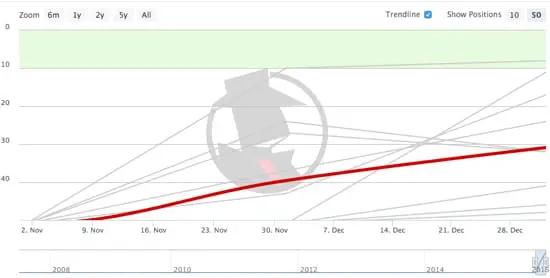
Looking at the inbound clicks from Google on Spyfu, we saw an upward trend in organic search traffic. We also looked at several difference sources to verify the organic traffic from Google, including SearchMetrics. We then looked at the Google Analytics traffic, as well. Google Analytics was installed on the website before the website was moved from StlMotorcars.com to Stl.Cars. We compared the website traffic before and after the move:
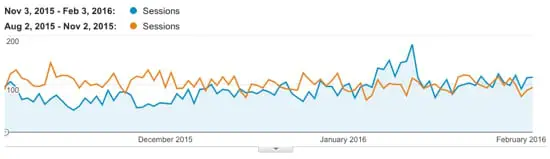
Overall, the percentage of new sessions is up 7.51 percent over the previous domain name, StlMotorcars.com. After the St. Louis Motorcars moved their website from StlMotorcars.com to Stl.Cars, the site’s Social Media and Referral traffic went up. The referral traffic went up 33.67 percent, and the traffic from Social Media websites went up 20.09 percent. Another noteworthy point is that the conversions from organic search went up slightly when the site moved from StlMotorcars.com to Stl.Cars.
Conversion rates going up has been an interesting trend amongst websites that have moved from a .COM to a New gTLD domain name, based on Globe Runner’s data of tracking and watching other websites that have moved from a .COM to a New gTLD domain name.
Google Search Console Data
Another source of data we used to measure the effect of moving from StlMotorcars.com to Stl.Cars was the Google Search Console, formerly called Google Webmaster Tools. We looked at the Search Analytics data within the Google Search Console and compared the data before the move and after the move, as seen below:
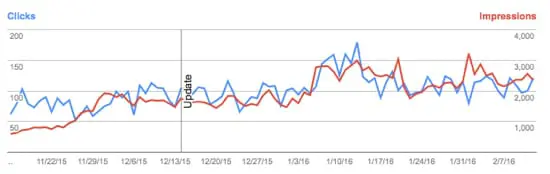
Overall, we can see an upwards trend in total clicks and impressions on Desktop and Mobile, which is good. We don’t see any evidence that the move from the .COM to the .CARS domain has hurt traffic, impressions, or clicks.
Conclusion
Based on our thorough review of the keyword rankings, third party data, Google Analytics data, and Google Search Console data, we have concluded that the site did not suffer anything as a result of the move. We have observed direct evidence that the site’s overall search engine rankings have gone up. The website’s overall traffic is trending upwards since the website was moved from StlMotorcars.com to Stl.Cars. Globe Runner can independently verify that the move from STLMotorcars.com to STL.CARS was beneficial for St. Louis Motorcars as far as organic search traffic is concerned.
Please note: Globe Runner was compensated for their time to review the data collected and produce a report on the findings. In no way did this have an effect on the outcome of the study or Globe Runner’s opinions about the results.
5 REASONS CLAIMED AND CORRECT ONLINE DIRECTORY LISTINGS ARE VITAL
Crucial to your online marketing strategy is the use of online directories. These directories consist of organized listings of websites, and they are managed by human beings rather than automated software. This allows you to get more control over the information available online about your business, ensuring accuracy of information and more precise implementation of online marketing strategies. This means claimed—and correct—online directory listings are not only helpful, but also absolutely vital. Here are 5 reasons why:
1. Ensures consistency: If your business has been around a little while, even if it’s just a month, there is likely a listing of it somewhere on the Internet. In many cases, these records may have inaccurate information, so claiming online directory listings allows you to correct that. This ensures the consistency of information available about your business online, thereby making you easier to find.
2. Proves ownership: Claiming your online listing provides evidence that you are the owner of your business. This allows you to promote your brand on search engines while boosting the security of your listing. When claiming your listing, you will be asked to verify your business, either by phone, mail, or email.
3. Increases online presence: Claimed listings in online directories provide links to your site, making them an excellent source for link building. This helps increase your online presence and will ultimately increase the odds that people will find their way to you when searching online for your services.
4. Increases precision: Online directories are organized by category. When you claim a listing, you will be able to place it in a category that best fits its description. This makes it far easier to find your business online as it matches relevant search criteria on search engines.
5. Boosts rankings: The categorical precision and accuracy of information provided through claiming online directory listings ultimately helps improve your odds of ranking high on search engines. Also, many search engines utilize online directories to find results that match users’ search criteria, making online directory listings absolutely vital to your overall SEO strategy.
Not only will you rank higher on search engines like Google, the consistency of information about your business will ensure that people reach you rather than find themselves awash in muddled, half-accurate data. In addition, claiming your listing will secure your right to promote your business on search engines. This ultimately gives you an edge against other businesses that have not claimed or corrected their online listings.
If you’re not sure where to start with claiming online listings, Accelerate Online Marketing is here to help you. Contact Accelerate today to get started.
CONTACT FORM 7 – 4.4 UPDATE RELEASE IS CONTROVERSIAL
Some news regarding our favorite contact form plugin. You may start seeing new alert messages crawling across wordpress-backends asking to check contact form validation, and settings. Having a second look into what these messages mean for the website, and mean for you could be very important in the next few weeks.

This marks a departure in cf7’s previous programing policies to now attempting to try to help with you entering all the contact form settings properly. Problem is, the community does not think its entirely perfected yet.

The main focus is on email settings. CF7 form fills often fool the server to make the email look like it’s coming from someone else. Example, instead of clients getting an email from wo*******@********in.com, the email looks like its from ji****@***il.com.

CF7 defaults to this method, but also marks through the validator as this is a problem. Weird, huh?They have decided to validate this way to help with client’s spam settings. Making an email look like its from someone other than wo*******@********in.com can flag some spam settings.Problem is, its often really nice to be able to immediately view email, and hit reply knowing the email will go directly to who filled it out. The new method is to copy the email information, and start a new email fresh.Confusing, isn’t it?Work arounds to this are being worked on, and several new blog posts are popping up. This link is beneficial: https://www.wiyre.com/solution-contact-form-7-issues-your-contact-form-has-a-configuration-issue/Nothing is immediately wrong. Just cf7 is trying to start to respond to many of their emails being marked as spammed. Hang tight with this plugin while they make transition, and enable this validator to become more powerful.
- « Previous Page
- 1
- …
- 25
- 26
- 27
- 28
- 29
- …
- 45
- Next Page »