












GOOGLE CHANGES NEW SEARCH RESULTS PAGE LAYOUT
Google is constantly updating to keep up with the latest in trends and digital developments, and recently they’ve made some subtle, yet important changes to the search results page layout. Although they are cosmetic, these small changes can have quite a big impact, and play a much larger role when it comes to tracking analytics for both paid and organic searches.
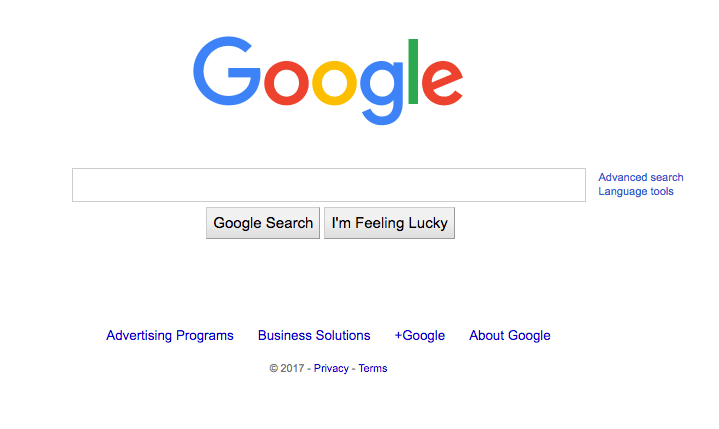
Below is the before and after pictures of what Google’s design was, and what it looks like today for their homepage.
Before
After
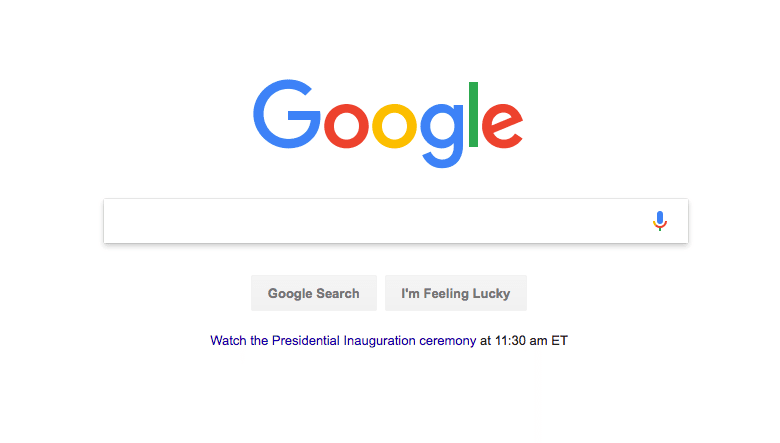
The subtle design features a much more distinct box around each item, with a drop shadow on the home page. You can find that changes were made to both the search results, as well as the search engine page.
Each search result is now more distinguished, and as you can see from the image below, the ads are more difficult to decipher from the organic results. The only thing that really separates the ads from the organics is the small green box to the left of the ad. This small separation will make it more difficult for users to identify the difference between the two, and I expect it to increase click through rates on the ads.
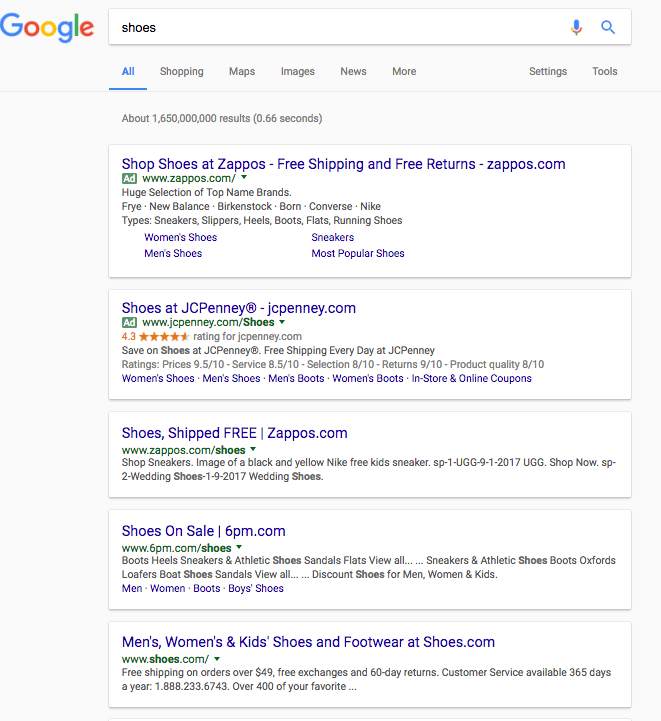
I first noted this change as of 01/19/17, and we’ll continue to track changes to the search results. We will be tracking to see if there’s any change in paid versus organic traffic for our clients.
5 REASONS TO RUN SEO AND PPC TOGETHER
When determining their online marketing strategy, many companies feel like they need to opt for either SEO or PPC. After all, they both ultimately achieve the same end—attracting visitors to your site and increasing revenue. Using both might seem redundant.
The truth is it’s not redundant at all. SEO and PPC do reach the same ultimate goal, but they do so by different means. PPC is highly targeted, whereas SEO is more organic, and the two can bolster each other dramatically. Following are five reasons why the two should be combined:
- Expanded data: When researching the effectiveness of keywords, using SEO and PPC helps you figure out what’s most effective by providing more overall data. This lets you quickly figure out what changes to make and increase clickthrough and conversion rates more promptly, making you more agile.
- PPC generates results quickly: Not only does PPC bolster keyword data, but it does so very quickly. This makes it optimal for testing keywords prior to use in an SEO campaign.
- SEO helps find long-tail keywords: Just as PPC helps inform short keywords, SEO can help you gather data on long-tail keywords. It does this naturally, and it can help you improve your PPC campaign with more targeted wording.
- Dominate the results page: A very practical way that PPC and SEO help each other out is by essentially doubling your presence on search engine results pages. Assuming both your ads and your content are well designed, you’ll be able to have organic results as well as paid ads appear on relevant searches.
- SEO can reduce PPC costs: In certain industries, high ranking keywords will demand a large price for PPC. In these cases, it’s more cost-effective to use these expensive keywords for SEO while targeting the cheaper ones in your PPC campaign.
At the end, the two combined add up to far more than either could accomplish independently. Contact the dedicated Digital Rockstars at Globe Runner to learn more about how our Dallas SEO services and PPC services can benefit your business.
GOOGLE PUSHES MAP PACK DOWN WITH ORGANIC RESULTS
UPDATE: Our discovery was picked up on 09-15 by Barry Schwartz at Search Engine Roundtable with comments from others in the industry.
Many are already familiar with Google’s Local Map Pack. Originally known as the ‘Local 7 Pack’, where 7 local businesses were featured, we saw it cut down to just 3 being featured in August 2015. Landing a spot in the Map Pack, whether it’s been 7 or 3 listings, has provided local businesses many benefits, including:
1. Enhanced visibility in search results
2. On occasion, 2 organic listings – one in the map pack and another in the traditional organic results
3. Reviews, phone numbers, and other items featured that encourage / make it easier for customers to reach you
Google Pushes Map Pack DOWN with Organic Results
Originally, the Map Pack came directly after paid ads which appeared at the top of the page. But this morning, Daniel Thomason, one of our senior SEO specialists, noticed multiple organic listing appearing ABOVE the map pack, in addition to paid ads:
As you can see in the image above, 4 paid ads are still featured at the top, but directly under those paid ads and BEFORE the 3 Pack are 4 organic results.
This means the local map results are HALF WAY DOWN THE PAGE!
How Did We Find This?
In this case, a search for ‘air duct mold removal’ triggered the results. It appears Google might have interpreted this as a do-it-yourself query, as the first 4 results have info on how to tell if you have mold in your air ducts, steps to remove it, etc.
This was the first time anyone on our team had seen this and we hadn’t seen chatter of it online either. We’ve got a discussion started at the Local Search Forum if you’ve got any input or can replicate these results.
How Might This Affect Local Businesses?
Clearly, this is not good for local businesses trying to achieve high organic visibility in Google.
From a mobile perspective, we’ve already seen the local map get pushed off the screen just due to paid ads appearing above it, but now it could potentially be even further down with these organic results included above.
For desktop searchers, it likely prevents a certain amount of results from ever being seen by them.
We know through use of user-tracking tools that people are very unlikely to scroll through pages to find what they’re looking for. Similar to what’s happened with mobile, this pushing down of the map pack makes it more likely searchers end up going to a paid ad to solve their problem, regardless if that company’s actually the closest service provider to them, the best reviewed, etc.
Final Thoughts
We don’t think this is something to freak out over – everybody in our industry knows Google’s always testing things in their search results. In fact, when searching ‘air duct mold removal’ later in the day, we saw results without any local map, results without any paid ads, and results with an answer box at the top.
But we do think it’s something to watch and be concerned with – local SEO is filled with enough challenges already, and if this becomes a standard feature in Google’s search results, it’ll be another challenge we face.
6 SEO TIPS TO HELP YOUR SMALL BUSINESS SIZZLE THIS SUMMER
The year is half way over, but there’s still time to heat things up in 2018. Whether you’re bent on driving more traffic to your site or simply need more sales in the pipeline, search engine marketing has never been hotter.
We’ve pooled six of summer’s best SEO practices to help you sizzle this season. Look out, these SEO optimization tips are coming in hot!
1. Make sure yourmenu of services is up to date
In essence, this is your secret sauce to help out-market your competitors, get clear about your brand’s keywords, and define your categories in Google. Adding a FAQ, testimonial, and case study section to your service page will really sell it, too!
2. Utilize Google Trends and Insights to plan compelling content
‘Editorial data-based stories’ is a new feature of Google Trends that’s helping content creators make their blog topics, keywords, and social media strategies more specific – and effective! With access to data trends culled from trillions of online searches, digital marketers can gear content based on what users all over the world are querying both in real-time and overtime – for free.
3. Take advantage of new tools like In-Marketing Audiences
Want to improve your search campaign performance on Google and Bing? In-marketing Audiences allows you to target users with search histories that align with your product or service. It’s free, has the potential to lower your CPA, and helpful for gearing your search campaigns and online ads toward audiences at the end of the buying cycle.
4. Have your web dev team code for priority hits
Wish you could control what loads first on your site? Chrome Beta is about to help your most important features take center stage. In our quarterly review of the most promising digital marketing trends of 2018, we learned that developers will soon have the power key in code that distinguishes certain digital assets on your site as high-priority. This means that critical header or prized picture can start captivating your target audiences sooner than other content.
5. Set up local service ads (LSAs)
Whether you build houses or clean them, you’re likely operating in a defined SBA (service business area). Makes sense to put your online advertising dollars there, right? Google local service ads is a pay-per-lead ad platform that can help small businesses keep their review ratings high and increase their brand awareness in their local market.
6. Drill down and really look at your data
Google analytics used to be the end-all-be-all for making discoveries through data. However, Google Tag Manager, GA’s more sophisticated older sister, can track any activity you program it to. It collects information from a variety of verticals, giving marketers the freedom to isolate activity on any number of key metrics. Essentially, the more you understand what users are doing on your site, the better chance you have of making them customers.
Hot on the trail of more SEO best practices for the rest of 2018? Give us a shout! We promise we won’t just blow hot air at you.
VIDEO: THE DIFFERENCE BETWEEN SEO AND PPC
Hi, Eric McGehearty from Globe Runner here, and today I want to talk about the difference between SEO and PPC.
I think most of us know that search engine optimization is a process of getting a website to rank better in search results on Google, Bing, Yahoo, or whatever search engine you choose in the organic section.
Pay per click is a form of advertising, generally in search, that is the process of buying ads at the top of a search engine based on certain keywords.
They have a lot in common, because with both we’re targeting specific keywords and phrases to get a relevant customer or buyer to come into the website. If you have a number 1 result on SEO and a number 1 result on pay per click, you’ll achieve a similar outcome.
But with all that said, what should you expect from a campaign? The biggest difference is speed. SEO is something that is built over time and earned based on lots of factors including your popularity on the web. Other factors include how many people are linking to you, who is linking to you, your content, how great it is, your keyword usage, your site architecture, and your indexability.
When you are thinking about an SEO campaign and evaluating the performance, it should be looked at monthly, quarterly, annually. As much as you would evaluate any other KPI.
But it is a long term goal and not expected to see huge gains from month to month. With compounding interest in mind, you will see massive gains over extended periods of time.
Pay per click is a little different. It’s much quicker. you will see results very fast. in fact, you will see traffic the first day you turn it on. And that traffic hopefully will convert to leads and sales fairly quickly.
It usually takes a few weeks to a few months to really dial a pay per click campaign in and start generating really measurable, good results, but nonetheless, it’s a fast return on your investment.
Will it have a compounding interest effect? Generally no, not without doing extensive A/B testing and conversion rate optimization. Those will improve over time and ongoing enhancements to the campaign will improve but it won’t compound the same way SEO does. You will need to spend more money to get better results.
If your pay per click campaign is profitable, that’s exactly what you should do. If it’s not profitable, you should cut if off or make some significant changes to the way the account is structured before it continues.
Thanks so much, I look forward to talking to you next time.
WHAT IS THE PURPOSE OF CONTENT MARKETING?
Content marketing has become a valuable part of online marketing campaigns, but many companies might wonder why. It might not be immediately clear exactly what content marketing is or what it’s meant to accomplish. Others might feel like they have an idea, but actually go about it in the wrong way.
Defining Content Marketing
In reality, the purpose of content marketing is actually quite simple, but first, just for fun, let’s look at what content marketing is not:
- Advertising
- Brochures
- Keyword spamming
- Sales gimmicks
- Carrots
It’s not about holding a carrot out in front of your audience and baiting them into a purchase, nor is it about ranking first on Google (though it certainly helps with that). It’s about informing people, raising awareness of your brand, and cultivating trust. In a nutshell, content marketing is creating valuable content and making it available online.
Results of Effective Content
The positive effects of good content go beyond simple advertising. While a strong advertising campaign does help consumers consider what you have to offer and make purchases, it isn’t as effective as content marketing at building lasting relationships with your customers. Effective content will have the following results:
- Informs the customer: First, effective content informs the customer. Your potential and current customers want information prior to making a purchase. They often have questions, ranging anywhere from “What type of mouthwash should I buy?” to “What do I do if I’m accused of a crime?” If you can answer relevant questions, you help them along the process of making an informed decision about your services.
- Builds awareness: Quality content that provides valuable, practical information will build awareness of your brand. It is very useful in link building, especially when other sites use your content as a reference and give you credit for it. Effective use of keywords also helps spread your name across the internet as your content comes up in web searches.
- Establishes trust: As you build awareness and credibility through quality content, you establish trust among your client base. They see you as reasonable, knowledgeable, and competent. This leads to lasting customer-business relationships.
- Keeps you current: It’s not just about keeping your audience informed. You also need to be kept up-to-date on what’s going on in your field. By putting out regular content, it helps you be aware of news and events relating to your area of business. In addition, it helps keep your site current as well, which is helpful for SEO.
So how do you get content that does this? Web marketing services like Accelerate Online Marketing can help you out there, so don’t hesitate contact us!
GOOGLE INCREASES LENGTH OF TITLE TAGS: WHAT NOW?
This past week, it was widely reported that Google made changes to their search results pages. One of the changes that they made was to increase the width of the main search results column. Then, since the width of the main search results column received an additional 100 pixels, there was room for Google to increase the length of title tags. Now, more of your title tag will show in the search results. The length of Title Tags has increased in the search results. Or, another way to look at it is that more keywords will show in the search results. But before you go out and update all of your title tags, you need to consider a few things.
- The length of Title Tags in Google’s search results has increased to 70–71 characters, which is up from its previous 50–60 characters.
- Just because a keyword in your title tag doesn’t show in the search results doesn’t mean that Google isn’t considering it as a part of their algorithmic review of your page.
- Well written title tags are still important.
- A good excuse to review your title tags on all pages.
- Google still may rewrite your title tag depending on the search query.
The length of Title Tags in Google’s search results has increased to 70–71 characters, which is up from its previous 50–60 characters.
Since Google increased the size of the search results column from 500 pixels to 600 pixels, they had more room for our title tags in the search results. I suspect that this increase is most likely due to the fact that more of us are using larger screens for our desktops. I use at least a 27 inch screen on my desk, and in my home office I use a 42 inch screen. On a laptop, even if it is a 15 inch laptop, the screen resolutions have gotten much better, so it’s logical that Google would make this change.
Just because a keyword in your title tag doesn’t show in the search results doesn’t mean that Google isn’t considering it as a part of their algorithmic review of your page.
If you have a title tag that is longer than what is being shown in the Google search results, Google still may use keywords that you put in your title tag. For example, if you have a blog post with a long title, there may be words in there that are relevant even though Google isn’t showing those words in the search result. In an ideal situation, though, shorter titles are better, you generally don’t want a long title that’s in the form of a sentence. Unfortunately, I still see people write title tags as if they’re a place to write a sentence. We need to think of Title Tags as if they’re a headline–and something that the Google user sees in the search results. That title tag should encourage someone to click on through to your website.
Well-written title tags are still important.
Don’t underestimate the power of a great title tag. As I mentioned before, the Title Tag should encourage someone to click on through to your website. Don’t just stuff keywords into the Title Tag because you think they will help your site rank better. Just yesterday I reviewed Title Tags on a website and the site owner had stuffed their main website’s keyword (the one keyword they want to rank for) into all Title Tags on every single page. That’s excessive and is just plain outright search engine spam.
A good excuse to review your title tags on all pages.
Google’s update of the length of Title Tags is a good time to review all of the title tags on your website. I would use something like Screaming Frog’s SEO Spider to crawl your site and review your Title Tags.
Other alternatives: review the HTML suggestions in Google Search Console. You can also use the site:yourdomain.com search query at Google to look at all of the pages they have indexed. Review all of the title tags as they appear in the search results. You may see some that need to be updated and ones that are just too long. But I would, though, crawl your own site and review the Title Tags, as there can be pages with duplicate Title Tags that Google is not indexing.
Google still may rewrite your title tag depending on the search query.
Keep in mind that at the end of the day, Google may still feel the need to rewrite your page’s Title Tag no matter how you write it. Their algorithm will decide when and for which search queries they will rewrite your Title Tag if they think you’ll get more clicks on your search result. I once saw Google rewrite every single Title Tag on a website–I simply saw what Google liked and what they didn’t, and rewrote all of the Title Tags on every page based on what Google was telling me it should be. That’s an extreme case, but if you notice that your Title Tags are being rewritten, you may want to rewrite it.
Sure, Google has given us more room for adding more keywords or words in our Title Tags. But that absolutely doesn’t mean that we need to rush out and rewrite our Title Tags. Quite the contrary. If you’ve optimized the website and you’ve done what you need to do to write great Title Tags, then this is just another change by Google. If you have good Title Tags, you don’t need to do anything.
OPTIMIZING CONTENT WITH HELP FROM GOOGLE SEARCH CONSOLE’S SEARCH ANALYTICS

As SEOs, we’re always looking for new and innovative ways to get content ideas, and optimize content on websites. Here is one way that you can optimize the content on your website at individual page level, and get content ideas for new content at the same time. Using Google Search Console (formerly called Google Webmaster Tools), you can use Search Analytics to look at each individual web page on your website and see how that page is being found in Google’s organic search results.
We’re always looking for ways to get content ideas and optimize content on websites. Here is how to optimize the content using Google Search Analytics.
Let’s go through the process, using a specific example web page, and see how we can optimize it better, update it, and maybe get some new content ideas.
First, log into Google Search Console. Select the website that you want to work on.

On the left side, choose Search Traffic, then Search Analytics, as shown above. You’ll be taken to the Search Analytics tool.
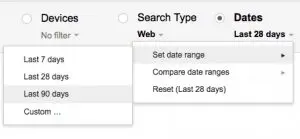
First, choose the past 90 days of time, as shown above. We’ll want to look at the maximum amount of time we can (currently 90 days) unless, of course, the page you want to analyze hasn’t been online for 90 days. But in this case, the page we’re going to analyze is a blog post that’s ranking “okay” but we want to get more organic search traffic to it. It’s been posted more than 90 days ago, so we should have plenty of data to look at.
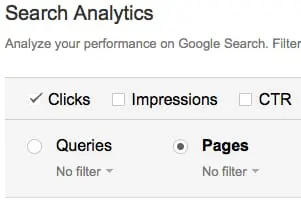
Next, choose the Pages option, as shown above.
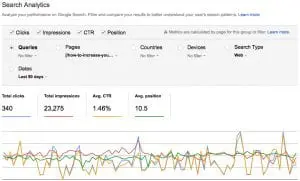
For this next step, you’ll need to click on a specific page on the list. That will take you to the individual page’s details. In the screen capture above, I went further and selected the following:
Queries
Impressions
CTR
Position
In this view (as shown in the above screen capture), we’re looking at the Search Queries for one particular page on a site, which was a blog post about increasing followers on Google Plus.
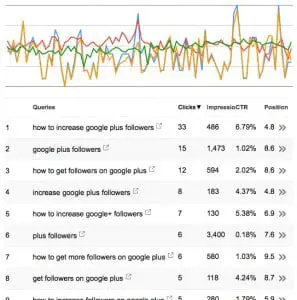
As you can see from the screen capture above, there are a lot of search queries. In this list alone there’s 200 search queries (I believe that’s the limit that Google will show). I’m showing only the first few search queries at the top of the list here.
If I were to optimize this blog post further, I would concentrate on looking at the search queries here to see how searchers are thinking about the page’s content–and what their user intent is. Based on the search queries, “how to” appears to be used a lot in search queries, so I may want to rewrite or add to the content on that page and specifically add a how-to list of action items or tasks that someone can use to increase their followers on Google Plus.
Since this page is currently ranking about #4 to #10, by getting it to rank higher for certain queries it will get more traffic. I can sort the columns by impressions to see which search queries have a lot of impressions, which is an indication of where the traffic is–so I can take advantage of it. Certainly if there is one particular keyword phrase that brings in more traffic, I’d want to adjust or rewrite the title tag and the title of the post so that it includes that keyword phrase.
Also, any social media posts promoting this content should include those keywords in the description, and any link building efforts can actually use those keywords as well. In fact, technically speaking, if I were going to build links to this page, I would use a lot of those search queries (keywords) to diversify the anchor text of links to the page–as much as I can, rather than focus specifically on one or two main keyword phrases.
By looking at the list of keywords that this page is found for, there are other search queries on the list that the content if being found for–but it’s not necessarily exactly what those searchers are looking for. Rather, here are some related keywords that are interesting, and I’d want to create more content around these keywords, perhaps linking those new blog posts to the original content (about increasing your Google Plus followers):
how to get followers on google plus business page
how to get likes on google plus
google plus management services
Finally, as you start analyzing each page of your site, you’ll find that there may be pages where the search queries that the page is being found for is totally wrong–or the user intent doesn’t appear to match the content of the page. That will allow you to figure out how to adjust the content on the page so that it reaches the right searchers.
31 REASONS WHY THE GOOGLE PENGUIN ALGORITHM HASN’T UPDATED YET
As you probably are aware, Google hasn’t updated their Google Penguin algorithm update in quite some time. In fact, it’s been so long since we have seen an update related to links that we’ve even seen small businesses literally shut their doors as a result. Certainly that’s not Google’s fault at all, but the lack of a Google Penguin update has become quite the joke and frustration for many in the search community.
Back in January 2016, Search Engine Journal reported that Google’s Next Penguin update “to happen within weeks”. Well, as of this post, it’s now been months, not weeks. Google was “aiming for launching penguin this quarter, but we don’t have a more precise timeframe”, according to Gary Illyes.

While we wait for another update, there are a few things that you can still do. We’ve detailed them here on our blog.
Here at Globe Runner, we decided that we would help Google out and list excuses why their Google Penguin algorithm hasn’t launched yet. Here are 31 reasons why the Google Penguin algorithm hasn’t been launched yet.
1. We missed the opportunity to turn it on during World Penguin Day, so we’ll have to wait another year.
2. We need to hire a few more PR (public relations) people to handle all the questions from the media that we’ll get once it launches.
3. The Quality Raters aren’t done testing it.
4. We’re still trying to figure out how to stop relying so heavily on links as a part of our algorithm. Then we won’t even need a Google Penguin update.
5. We’re waiting for Matt Cutts to come back. Wait. Did he ever leave?
6. There are browser compatibility issues that we haven’t been able to figure out yet.
7. Our lead developer is on vacation.
8. It’s all due to global warming. It’s just not cold enough for the Penguin to return.
9. There’s a bug in the code.
10. If everyone would just stop building links for just one day, we’d have enough time to catch up.
11. There’s not enough data for us to review, we need more bad links to review.
12. We haven’t received enough link spam reports, so we don’t have enough data.
13. The Quality Raters aren’t ready reviewing and rating all of the links.
14. It worked perfectly when we first ran it.
15. We’re still working on the quality of our code.
16. The junior level developers aren’t done documenting all of the changes in the code.
17. Larry asked us to add a feature that wasn’t originally in the scope.
18. There were too many developers working on it, and we had to reassign some to another project with a higher priority.
19. There are other, more high priority development projects that we are working on.
20. We’re working on the rest of the Alphabet code first.
21. There’s just not enough time in the day to get it done.
22. There’s really no such thing as a bad link. Just disavow it or nofollow it.
23. It’s taking longer than we expected for the AI to learn how to determine a bad link from a good link.
24. Rank Brain.
25. We just figured out that all along we were collecting the wrong link data. So we have to restart.
26. We were analyzing the wrong link data, but we’re all good now.
27. We forgot to commit the code that incorporates Google Penguin into the algorithm.
28. We’re waiting for y’all to stop searching, just for a few minutes, so we can turn it on.
29. Google Penguin hasn’t been integrated into the real-time algorithm yet.
30. We found a previously known bug in the code, but the project manager said not to work on it yet.
31. Gary Illyes said it isn’t ready yet.
Have any more excuses that you’d like to add to our list? Feel free to list them in the comments.
- « Previous Page
- 1
- …
- 3
- 4
- 5
- 6
- 7
- …
- 12
- Next Page »