












GOOGLE PENGUIN 3.0 REFRESH: WHAT YOU SHOULD DO NOW
Starting on Friday October 17, 2014, Google began refreshing the Google Penguin algorithm update. The previous update was last October (October 2013). It’s been more than a year, and there are plenty of websites that were hit back in 2013. Some of those sites, if they did a proper link cleanup, are now seeing some recovery of Google organic traffic. Officially, Google announced that this is a Google Penguin refresh and could take weeks to complete. It’s not necessarily the Google Penguin 3.0 that we were all hoping for. It’s just a refresh, in fact.
So, if you’re not currently seeing any good results (better rankings or more traffic from Google organic search) from this latest Google Penguin refresh, then what now? What can you do right now to help your website possibly benefit from a refresh of Google’s Penguin algorithm? Is there anything you can do? Yes, there is.
First off, let’s get a few things straight:
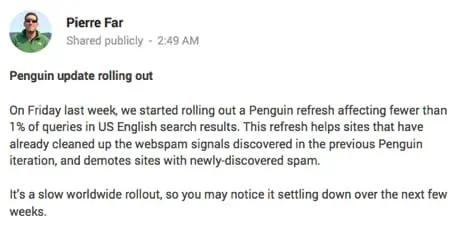
– This is a refresh of the Google Penguin algorithm update from last year. It’s not technically Google Penguin 3.0. Although Pierre Far’s Google Plus post refers to “Penguin Update rolling out”, we need to pay attention to what he said: it’s a refresh and not an update.
– An update of the Google Penguin algorithm would indicate that there are new “signals” or “new ways” that Google is calculating low quality, inorganic links to your website.
– A refresh indicates that there are no new signals being included: we can use what we know about the previous Google Penguin algorithm update to work on cleaning up our site’s link profile.
It’s important to note what Google’s Pierre Far said: “This refresh helps sites that have already cleaned up the webspam signals discovered in the previous Penguin iteration”. So, if you have already cleaned up your site’s link profile, and you did a good enough job of getting rid of the link spam, then you could see more traffic from Google organic search in the future as this begins to roll out over the next few weeks.
But, if you have not cleaned up your website’s link profile, and there are still spammy links pointing to your website, then it’s very unlikely that you will see any increased traffic from Google organic search. I think it’s very clear: this Google Penguin refresh will reward websites who have cleaned up their link profile in the past. Again, it’s important to note that this is not necessarily Google Penguin 3.0. In any case, there’s still time to clean up your links. And, I would add that most likely you will be rewarded by this refresh if you cleaned up your site’s links in the past year, up until about a month ago. But if you just cleaned up your site’s links in the past week, you will most likely not be seeing any rewards from the Google Penguin refresh that just started on Friday.
Why?
Well, it takes time for Google to review links to websites. In fact, we don’t even know if the link reviews are technically done by an automated process or if Google uses the Google Quality Raters (human reviewers) to review websites. And, typically, any new links that a website receives (especially links from low quality websites that aren’t crawled that often by Google) takes time before it’s “applied” to your website’s actual search engine rankings. Even though Google is fast a crawling, any changes we make to our websites or even our link profiles may not take full effect for a period of time.
So What Now?
Well, this news about Google Penguin being refreshed is actually good news. It’s not an update. So, we can use the typical information we know about Google Penguin to continue to clean up our site’s link profile. Even though it’s highly unlikely that a site’s profile cleaned up this week will benefit from this latest Google Penguin refresh, there’s no better time than right now to start cleaning up your site’s link profile (or re-reviewing all of the links to your site).
So, let’s get started cleaning up a site’s link profile using these steps:
– Review Google’s Webmaster Guidelines regarding link schemes. It’s important to make sure that your site isn’t violating any of those guidelines.
– Download all of the links to your site, from several different sources:
– Majestic links
– a hrefs links
– Google Webmaster Tools links
– Open Site Explorer links
– Put all of your link data into a spreadsheet and remove the duplicates.
– Start reviewing the links, paying particular attention to non-branded “keyword rich” anchor text links.
There are several ways to review your site’s links. There are tools out there that will help you come up with an updated list of links that includes more data, ideally in a spreadsheet form.
– Crawl the links yourself using Screaming Frog SEO spider.
– Crawl the links yourself using IBP (Internet Business Promoter) link building tool. Could be useful for contacting sites who links you want removed, as it has built-in templates for sending emails manually to site owners.
– Use a paid tool like Link Risk by Kerboo to crawl and analyze the links.
– Use a paid tool like Link Research Tools‘ Link Detox tool to crawl and analyze the links.
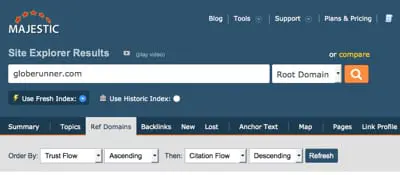
– Use the Majestic site to determine which links are low quality versus higher quality. For example, you can perform this search at Majestic to see which sites have low Trust Flow but high Citation Flow:
Whatever tool you use (free or paid tool), you’ll still need to manually go through all of the links and determine for yourself if that link is “spammy” and inorganic or if it’s a good, natural link. Most likely will be obvious, and will need to be removed and/or disavowed using the Google Disavow links tool. But, to be highly effective, you need to get those links removed completely.
Look for these types of links, most likely most sites will need to get rid of them:
– Low Quality Directory Links. Links from “directories” other than Dmoz.org, BOTW.org, and Yahoo! Directory (soon going away).
– Comment Spam. Links included in comment spam. If the link is from a comment on a blog post and includes “keyword rich” anchor text as the commenter’s name, for example, then it should be removed. Yes, and that’s even if it’s a nofollow link.
– Web 2.0 links. If the link is on a “social bookmarking” site (other than StumbleUpon, Pinterest, etc.) where people “vote” for the links (vote up or down or include a point system) then most likely you need to get rid of the link.
– Links that violate Google’s Webmaster Guidelines for link schemes.
– Links that are in press releases on low quality press release sites (other than PRWeb.com and PR Newswire, etc.).
That’s just a start of the types of links that most likely need to be removed. Again, it takes a manual review of the links and a decision by you on whether or not you need to remove the link or not. If you have a lot of links or are not comfortable making the decision as to whether or not you can do the link cleanup, feel free to contact me.
At this point, the Google Penguin 3.0 refresh is just that: it’s a refresh of the previous Google Penguin algorithm, with no new “linking” signals included. So, technically speaking, can we really call this Google Penguin 3.0? Maybe not. There still is no better time to start cleaning up your site’s links than now.
References:
Google Releases Penguin 3.0 — First Penguin Update In Over A Year
https://searchengineland.com/google-releases-first-penguin-update-year-206169
Google AutoCorrects: Penguin 3.0 Still Rolling Out & 1% Impact
https://www.seroundtable.com/google-penguin-3-impact-roll-19321.html
Google Confirms Penguin 3.0 Update, Here’s The Reaction So Far
https://www.searchenginejournal.com/google-confirms-penguin-3-0-update-heres-reaction-far/118404/
GLOBE RUNNER TEAMS UP WITH BOUTIQUE MARKET RESEARCH AGENCY GREEN ZEBRAS TO OFFER WEBSITE ANALYTICS
Globe Runner today announced its partnership with boutique market research agency Green Zebras in Malaysia to provide website analytics, competitive intelligence and digital research.
This is Globe Runner’s first partnership with an international market research agency and its first business collaboration in Asia.
Kuala Lumpur-based Green Zebras was founded by ex-Synovate/Ipsos Malaysia managing director Steve Murphy and former TNS Malaysia and Research International managing director Yazid Jamian. Murphy and Jamian are veterans of the research scene in Malaysia, Singapore and Asia Pacific.
Green Zebras offers quantitative and qualitative research services including advertising testing, customer intelligence, community panels, product testing and brand tracking.
Globe Runner has a suite of tools and proprietary services to conduct SEO audits, competitive intelligence, tracking and analytics of brands’ sites, social media and digital platforms.
“We reverse engineer other people’s algorithms to make sense of how consumers interact with sites,” said Globe Runner CEO Eric McGehearty. “We are excited to work with Green Zebras and develop these tools in the context of market research.”
Globe Runner was started in Texas by McGehearty in 2008. In addition to its core offerings of SEO, online advertising and content marketing, the agency also provides branding strategy and social media services. It joins Green Zebras’ network of partners that includes Vision Critical, Commetric, BuzzBack, Discovery Research, Luma, TapestryWorks and Gordon & McCallum.
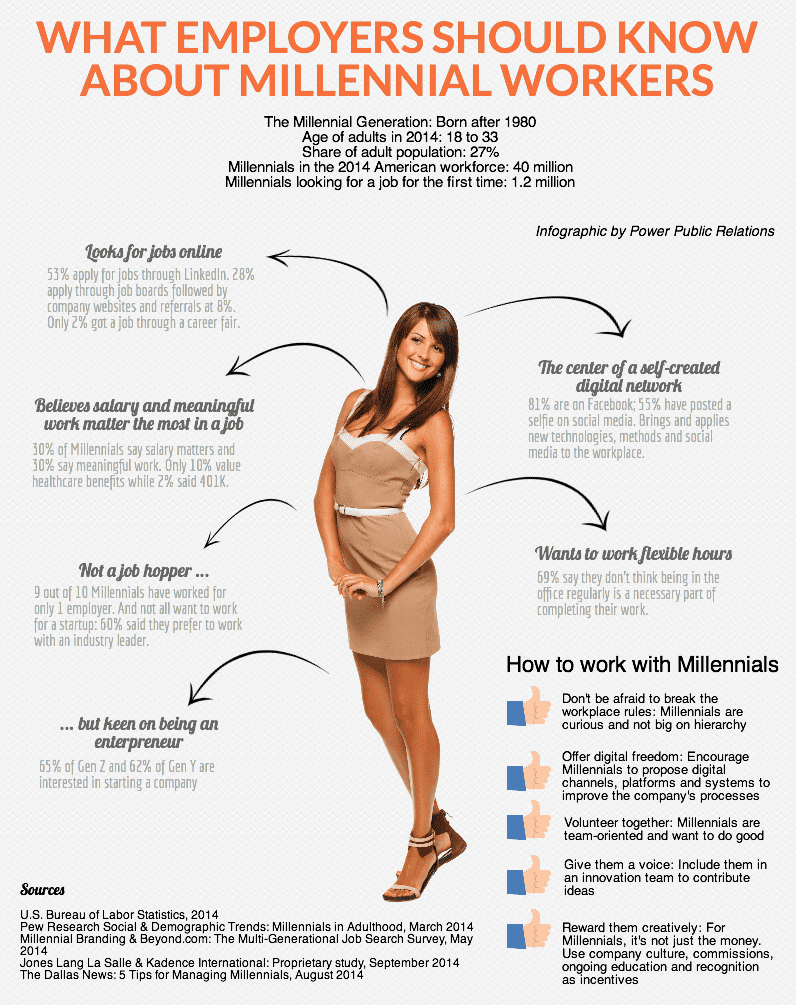
WHAT EMPLOYERS SHOULD KNOW ABOUT MILLENNIAL WORKERS [INFOGRAPHIC]
Amy Power, CEO of Power Public Relations, recently shared with the Dallas Morning News her five best tips for managing millennials in the workplace.
These principles were based on the latest stats about millennial workers. We put all these stats together in one infographic for a handy overview.
SEARCH ENGINE MARKETING STUDY: .COM VS. NEW GTLDS
Update February 2015: We have updated our research, and you can find the results here: .COM Vs. New gTLD Domain Names: 8 Months Later.
Globe Runner did a search engine marketing study to find out which are better for marketing: .Com or a New gTLD Domain name.
Since the beginning of the Internet, we’ve been mainly using three main Top Level Domains (TLDs) for our websites: .COM, .NET, and .ORG. We typically are used to seeing and using the top three TLDs, and those websites currently make up a majority of what we see in the search engine results pages, such as in Google’s search results. Since January 2014, however, there are literally hundreds of new Generic Top Level Domains (New gTLDs) coming available, and many are already available for registration.
New gTLD market share courtesy ntldstats.com
The most popular domain name amongst the new gTLDs is .xyz, but when it comes to “keyword rich” TLDs, .photography is on top. It is widely thought that one way to potentially gain some search engine marketing advantage would be to buy a keyword rich domain name that includes the TLD as one of the main keywords. This strategy has been said to not matter when it comes to search engine ranking advantages in Google, though. In March, 2012, Matt Cutts, from Google, addressed a myth about the new gTLDs.
Specifically, Matt Cutts said regarding organic search engine rankings in Google:
“Google has a lot of experience in returning relevant web pages, regardless of the top-level domain (TLD). Google will attempt to rank new TLDs appropriately, but I don’t expect a new TLD to get any kind of initial preference over .com, and I wouldn’t bet on that happening in the long-term either. If you want to register an entirely new TLD for other reasons, that’s your choice, but you shouldn’t register a TLD in the mistaken belief that you’ll get some sort of boost in search engine rankings.”
So, buying a keyword-rich new gTLD domain name apparently does not carry any extra weight when it comes to actual search engine rankings, at least not in Google’s organic search results. But what about actual real-world search engine marketing (PPC)? What if we were to see what real consumers desired?
We had so many questions about the new gTLD domain names that we set out to find out, using real-world data, whether or not the public cares about the domain name when they see it. We set out to set up tests, a search engine marketing study, where we could determine which are better for search engine marketing: .COM domain names or new gTLD domain names?
.COM Vs. gTLD Test Overview
As a leading interactive marketing agency based in the Dallas, Texas area, Globe Runner wanted to find out, first-hand, which TLD (or new gTLD) performs better from a website marketing or search engine marketing perspective: this is our first search engine marketing study. For the purpose of testing the overall marketing performance of .COM domains versus new gTLD domain names, we thought that it would be important and most appropriate to use Google AdWords, a leading source of paid internet traffic.
In the case of our primary test, we were able to secure two keyword rich domain names: one with the keyword in the domain name, and the other with the keyword in the domain name and in the new gTLD.
We chose these domain names for the primary test:
www.3CaratDiamonds.com
www.3Carat.Diamonds
and we chose brand-related keywords for the second test. We chose these domain names for the second test:
www.MattitosMenu.com
www.Mattitos.menu
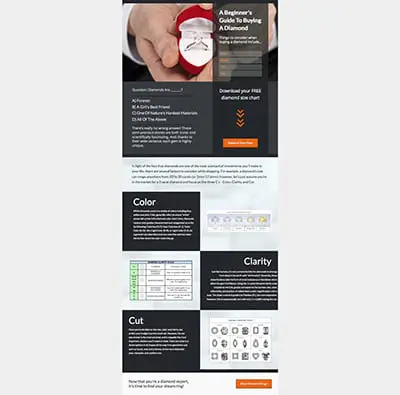
We wanted to make sure that the domain names we chose were very close in nature—but they also presented us with an opportunity to measure the results based on the .com domain name and the new gTLD being used. We created two separate landing pages for the tests. One landing page was used on the “diamonds” domain names:
For the “menu” test, we use one landing page on both domain names:

We put the same landing page on both domain names and used the same ad copy in our Google AdWords ads. We bid on the same keywords, with the same budget. Both ad campaigns ran at the same time. Those sites are still up and running today, so you can see the landing page that we used on both of those domain names if you go to those websites. Essentially they were exactly the same–except for the domain name.
The Results
After we ran our Google AdWords campaigns for a specific period of time, it was clear to us, in many aspects, that the .Com outperformed the .Diamonds domain name in certain key areas. However, in other key areas, the .Diamonds domain name performed much better.
Based on the results of our “diamonds” test, it ultimately cost us more to use the .Com in a Google AdWords campaign than it did a .Diamonds domain name. The overall cost was $.43 cents more (the .Com was more expensive).
We also looked at the results for the test on MattitosMenu.com versus Mattitos.Menu. These results were, in fact, quite different than what happened on the first test. Let’s take a look at the test results first for the .Com versus the .Diamonds doman name, and then the resutls of the test for MattitosMenu.com versus Mattitos.Menu.
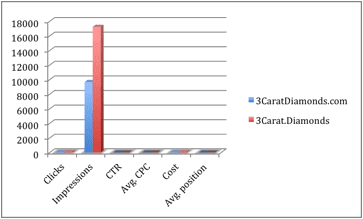
It cost less per click for a .Diamonds domain than to run the same keywords on a .Com domain name, and the total campaign cost was lower. With a higher CTR on the .Com domain name, it appears that end users may favor the .Com domain name over the .Diamonds domain name. The .Diamonds domain name, however, was given quite a few more impressions than the .Com domain name, giving the .Diamonds domain name more visibility. In fact, it appears that Google AdWords actually favors use of the .Diamonds domain name, giving it more impressions and even better positioning. The average position for the .Diamonds domain name was better.
Another of the data points we looked at is the effective CPM for the keywords. We calculated the effective CPM for each of the .Com and .Diamonds campaigns, and they are as follows:
3Carat.Diamonds
Effective CPM (cost per thousand impressions): $4.02 per thousand views
3CaratDiamonds.com
Effective CPM (cost per thousand impressions): $7.24 per thousand views
Based on the “Effective CPM”, it cost nearly twice as much to advertise a .COM domain name than it did a .DIAMONDS domain name. So, it appears that Google AdWords favors the .Diamonds domain name over the .Com domain name.
What About Conversions?
Where it really gets interesting is when we look at the conversions. We set up two different goals for the “diamonds” test. One was the download of a PDF file, and the other was a “Shop Diamond Rings” button located at the bottom of the landing page.
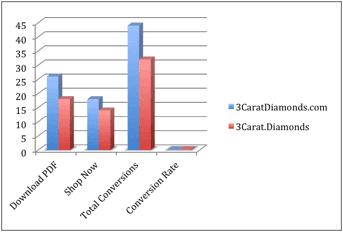
There were more conversions on the .com domain name for both the download of the PDF file and for clicks on the “Shop Diamond Rings” button on the site, and the total conversion rate was higher on the .Com domain name than it is on the .Diamonds domain name. So while the Google AdWords tends to favor the new gTLD domain name, consumers appear to favor the .Com (we saw nearly a 20 percent better conversion rate on the .Com domain name).
Our Other gTLD Test
Similar to the first test, using .Com versus .Diamonds, we set up another test using a .Com domain name versus a .Menu domain name, using a local restaurant in the Dallas/Fort Worth area of Texas, called Matittos.
We set up two campaigns, one for each domain name. We used the same ad copy for both campaigns, except that the display URL (and the landing page) was different.
We set up a landing page (the same one) on MattitosMenu.com and on Mattitos.Menu. On the landing page, we did not intend to “sell” anything—we just wanted to drive traffic to the website and allow potential customers of the restaurant to view the menu. Here’s what the landing page looked like at the time of the test (it’s still live on MattitosMenu.com and Mattitos.Menu of you’d like to look there, as well).
Based on the results of our test, it appears that Google doesn’t necessarily prefer the .Com domain name over the .Menu domain name. Google served up nearly 10,000 more impressions of the .Com domain name than they did of the .Menu domain name. The CTR was actually better and cheaper using the .Menu domain name. Also, the average position of our ads using the .Menu domain name was better (it was higher) than the .Com. So it was clear to us that Google AdWords actually prefers the .Menu domain name over the .Com.
Final Thoughts
Our overall goal when setting up these tests was ultimately to determine whether using a .Com domain name or a new gTLD domain name is better when it comes to search engine marketing and Google AdWords. We are not totally convinced that one is necessarily “better” than the other.
What we did see, though, is that Google AdWords tends to favor the new gTLDs, as they served up more impressions, for less cost, and a better average position then the .Com domain names we used. At the same time, though, when it came to conversions, the public appeared to favor the .Com domain names.
We want to be totally transparent when it comes to our testing and the tests that we performed. We have compiled all of the data, including the actual CTR, CPC, budget, and even the keywords that we used during the tests. Use the following form to download our full 27 page research report.
ANOTHER GOOGLE RECONSIDERATION REQUEST: MANUAL PENALTY REVOKED
It seems as though it is now a regular occurrence around here: we are able to get a Google manual action (a Google manual penalty) revoked for clients. With this latest client, we got word today that their manual penalty from Google has been removed. This is bittersweet, because the client came to us after having paid another “Penalty Removal Service” to remove the penalty. Turns out that this penalty removal service had filed THREE Google Reconsideration Requests already, and was getting ready to file the 4th reconsideration request.
Globe Runner stepped in, manually reviewed all of the links using our proprietary process, took the time to send and document all of our efforts properly, and then filed the reconsideration request. Within days the penalty was revoked (removed) by Google. It didn’t take us 3 reconsideration requests. It only took us one.
Here’s the email that the client received from Google, declaring that their manual action was revoked:

When you receive a manual action from Google, it’s important to take it seriously. You’re most likely already seeing a significant drop in organic search engine traffic. And you won’t see more traffic from Google until the penalty is removed. Keep in mind that a manual action is not related to any sort of Google Algorithm Update like the Google Penguin update. If your site’s traffic has gone down drastically all at once, then first check to see if the date of the drop in traffic corresponds to a Google Algorithm Update. Check the Moz.com list of official updates.
Then, if you cannot find any date that corresponds with a well-known Google Algorithm Update, you need to look in Google Webmaster Tools to see if the site has a manual action filed against it. Log into Google Webmaster Tools. Select the website, then on the left side, choose Search Traffic, then Manual Actions, as shown below:

If you have a manual action, then it will be shown there. If you don’t, then it will say “No manual webspam actions found.” If your manual action is due to link issues, then it will say that. And there are two separate types of manual actions: Full and Partial. Both need to be addressed.
What To Do Next
In any case, if you suspect that there is a linking issue, or low quality links pointing to your website, you need to identify those links, clean them up, and then upload a disavow file.
If there is a manual action, you need to identify them, take the time to remove those links or try to get them removed, and show proof that you’ve done so. We typically use our proprietary process to clean up the links, detail everything that we’ve done (even show emails to Google), and then disavow the the links we couldn’t get removed. We then file the reconsideration request with links to spreadsheet(s) and all of the documentation that we’ve been collecting during our efforts. Those spreadsheets and documentation is listed specifically in Google Drive, and a link to the documents are given to Google when the reconsideration request is filed.
If you don’t have a manual action, then you will need to clean up the links and upload a disavow file. If your site has been hit by the Google Penguin algorithm, then you’ll need to wait until they refresh that algorithm. There has been recent confirmation of that, and I can tell you that there are lots of sites (even sites whose links I’ve cleaned up) that are still waiting for a Google Penguin refresh.
As for this particular client who I just got their Google manual action removed? As I said earlier, the previous penalty removal firm (who I won’t name here) tried 3 times unsuccessfully to remove the penalty. Here’s what happened:
– Client hired SEO firm. That SEO firm created low quality or inorganic links to the client site.
– Client got penalized.
– Client hired “penalty removal service” which is a company owned by the SEO firm.
– “Penalty removal service” failed to see that their own links were inorganic, and failed to remove them.
– “Penalty removal service” filed 3 separate reconsideration requests, unsuccessfully.
– Client hires Globe Runner. We review the links. We get links removed. We file proper disavow file. We file the reconsideration request.
– Client’s penalty removed.
In this case, sometimes it takes someone who really knows that they are doing in order to get a Google Manual Action revoked. If you have a manual action and your “penalty removal service” has tried to get the penalty removed without any luck, then contact us–we’ll get the penalty removed. Sometimes within days, as with our latest client.
GOOGLE OFFICIALLY REMOVES GOOGLE AUTHORSHIP, CLAIMS IT WAS ONLY A TEST
Google has officially removed Google Authorship. Apparently they’re calling this one of their tests that they decided to remove. That’s interesting, as I actually thought that Google was actually using Google Authorship as a search engine ranking factor, and it was fully integrated into the Google organic search algorithm. But apparently we were all hoodwinked, it was only a test. And all tests must come to an end.
In a Google Plus post today, John Mueller announced the end of the Google Authorship test:
I’ve been involved since we first started testing authorship markup and displaying it in search results. We’ve gotten lots of useful feedback from all kinds of webmasters and users, and we’ve tweaked, updated, and honed recognition and displaying of authorship information. Unfortunately, we’ve also observed that this information isn’t as useful to our users as we’d hoped, and can even distract from those results. With this in mind, we’ve made the difficult decision to stop showing authorship in search results.
(If you’re curious — in our tests, removing authorship generally does not seem to reduce traffic to sites. Nor does it increase clicks on ads. We make these kinds of changes to improve our users’ experience.)
Frankly, I really liked Google Authorship, and am sad to see the Google Authorship test be completed. What did Google Authorship do for me? It caused me to want to write more, to write great content, and claim my authorship: and be proud of what I write. To show it off, so to speak. To tell everyone that I am the one who wrote the content, and no one else. That’s ultimately good for the web, and good for users. Apparently it just wasn’t good enough for Google. After all, it was just a test.
So, at this point, what are we supposed to do with Google Authorship? What about the code that we put on our websites?
Leave the Authorship Code
Well, you can leave the code on your website and the websites that you wrote for. It will, in no way, harm your website or your search engine rankings–or the search engine rankings of where that content appears. John Mueller from Google has confirmed that it’s perfectly fine to leave the code alone. It might actually help users to know that you were the one who wrote the content, and it provides a link to your Google Plus profile. That might provide some additional interaction.
What about Google Publishership
Officially, Google has stated that Google Publishership is totally unaffected by this announcement. So, Google Publishership is alive and well, and Google will apparently still be using it in some way or fashion. So, it’s important to make sure that your Google Publishership code is applied to all pages on your site, and it links back to your site’s Google Plus profile page (your business page).
Google introduced Google Authorship back on June 7, 2011. The Google Authorship test was killed today, August 28, 2014.
PROOF GOOGLE DOESN’T CARE ABOUT NOFOLLOW LINKS
I have known for a while now that Google doesn’t care too much about the nofollow attribute that’s added to links. I won’t go into statements from Matt Cutts about nofollow links, since he’s currently on vacation and not here to defend himself. But, nonetheless, let’s look at some recent proof that you can rank really well in Google organic search with nofollow links from Twitter.
Let’s take a not-so-recent blog post of mine, right here in this blog, where I wrote about Business Insider’s Top 100 Tech Influencers on Twitter. The post is a topical post, and I refer to it as a list to use to start connecting with tech influencers. It’s a helpful post for many. But that’s not the issue here. What’s the issue here is the statistics for this blog post:
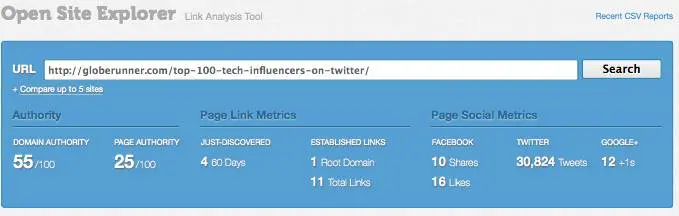
To see the live stats, you can go right to Open Site Explorer and enter the URL of the post. I have personally done no link building for this post. As you can see, the “normal” links are only really from our own site, whereas the links are from the home page and other blog category pages. So, the fact that the post is on our blog isn’t necessarily a reason for the post to rank well in Google organic search.
The majority of the activity is ONLY from Twitter. As of this post, there’s over 30,000 tweets or mentions on Twitter. Those are 100 percent “nofollow” links. As a result of those tweets of the blog post’s URL, the blog post is ranking number one for many related keyword phrases, such as “tech influencers”:
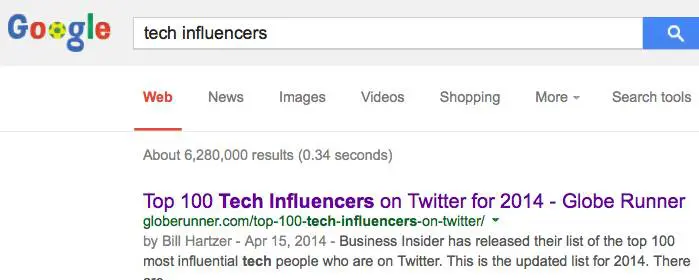
The links to this blog post (all of the Tweets and RTs) are tagged as being “nofollow” links. So, they’re not supposed to “count” when Google analyzes them for organic search engine rankings. Let’s take a look at some sample Tweets of this post. You’ll see below that the links have a dotted line around them. That’s from my Firefox browser add-on, which highlights links that are “nofollow” links.
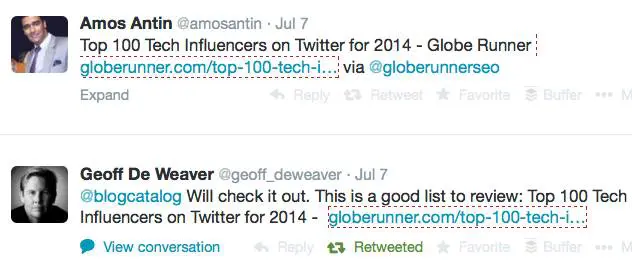
I’ve written before about the marrying of social and search, and even spoken about it at several conferences, such as Pubcon. Social media plays a huge role now in SEO, and if you’re not Tweeting, Plus 1ing, and Liking your new blog posts, then you’re missing out–and not doing proper SEO. SEO is not just about on-site optimization, it’s about getting real human eyeballs to your site. And Google knows that. That’s exactly why that post is ranking well in Google organic search.
So, frankly, there’s proof enough for me that Google doesn’t care much about nofollow links anymore. At least when it comes to Twitter.
Bill Hartzer is Globe Runner’s Senior SEO Strategist. Follow him on Google Plus. You can also follow him on Twitter as @bhartzer.
HTTPS SECURE WEBSITES HELP TRUST AND SEARCH ENGINE RANKINGS
Back in 2013, Google quietly moved to secure search, passing less keyword referral data to website owners. Now, Google is officially recommending that website owners move their websites from http to https, making their websites secure. If Google can trust your site more, know that it is secure and you’re the one who posted content on it, then your site could rank higher. Google is “starting to use HTTPS as a ranking signal.”
Because of Google’s official stance on https and their calling for “for HTTPS everywhere on the web”, starting today, we are recommending that our clients begin moving their websites from http to https. We realize that this, in many circumstances, is a big undertaking, will have an additional cost, and will take some time to complete. However, over the long run, will be beneficial not just because it could increase your website’s search engine rankings.

Even if you do not sell products and services directly on your website, your website should be secure and use https rather than http. John Mueller, from Google, had this to say about why all websites should use https, even if you’re not selling products on your site:
Some webmasters say they have “just a content site”, like a blog, and that doesn’t need to be secured. That misses out two immediate benefits you get as a site owner:
1. Data integrity: only by serving securely can you guarantee that someone is not altering how your content is received by your users. How many times have you accessed a site on an open network or from a hotel and got unexpected ads? This is a very visible manifestation of the issue, but it can be much more subtle.
2. Authentication: How can users trust that the site is really the one it says it is? Imagine you’re a content site that gives financial or medical advice. If I operated such a site, I’d really want to tell my readers that the advice they’re reading is genuinely mine and not someone else pretending to be me.
On top of these, your users get obvious (and not-so-obvious) benefits. Myself and fellow Googler and HNer Ilya Grigorik did a talk at Google I/O a few weeks ago that talks about these and a lot more in great detail: Google I/O 2014 – HTTPS Everywhere
Even though your website is merely a “content website”, the trust that is given when your website is valuable. While Google has been using Google Authorship to convey some trust factors, overall I believe that we all should secure our websites; and Google, like a lot of us, want to see more trusted, secure websites. It’s just better for the entire web community as a whole to have secure websites.
I can personally tell you that as someone who has worked a lot to clean up link profiles of websites, I see quite a few hacked websites with links embedded by someone other than the site owner. By making your website secure and using https, it will be that more difficult for someone to hack into your website.

The Cost of a Secure Website
The cost of a secure certificate for your website can cost as little as $89.95 for two years. Dotster is currently offering secure certificates through Geotrust for $89.95 for two years. Godaddy offers certificates for $69.95 per year. I realize that this isn’t very cheap, but if you have an online business, then it’s imperative that you protect it–so moving your entire website to https from http is a good move. Now we have another reason to make this move, which is the potential for better search engine rankings in Google.
How much would it cost you if your website wasn’t secure and it got hacked or your website visitors started seeing rogue ads on your website? It could cost you business, and your site would be trusted less.
Google is offering a new support web page that explain site security and gives you the best practices when setting up HTTPS. In some cases, you may need to move to another web server, one that supports HSTS: “Use a web server that supports HTTP Strict Transport Security (HSTS) and make sure it’s enabled.
This mechanism tells the browser to automatically request pages using HTTPS even when the user enters http in the browser location bar. It also tells Google to serve secure URLs in the search results. All this minimizes the risk of serving unsecured content to your users.”
Bill Hartzer is Globe Runner’s Senior SEO Strategist. Follow him on Google Plus.
GOOGLE PIGEON ALGORITHM UPDATE: WHAT WE KNOW
On July 24, 2014, Google rolled out a new algorithm update that has been dubbed the Google pigeon algorithm update, which affects local search engine rankings. Local search engine rankings refer to search queries that include a city name in the query. Since the update on July 24th, there have been some changes (fluctuations) in the search results, so as of the time of writing this, we still may see some further changes to the search results for certain keyword phases. Here is what we know about the Google pigeon algorithm update.
So far, there is speculation that this latest Google Pigeon update could be a version of the Google Venice algorithm update back in 2012 that included two main local search improvements, as reported by Google:
— “Improvements to ranking for local search results. [launch codename “Venice”] This improvement improves the triggering of Local Universal results by relying more on the ranking of our main search results as a signal.”
— “Improved local results. We launched a new system to find results from a user’s city more reliably. Now we’re better able to detect when both queries and documents are local to the user.”
There has also been further speculation that the Google Pigeon update combines data from the Google My Business database with the knowledge graph database. Frankly, this 2nd speculation seems much more plausible, that the current data from Google’s My Business has been integrated with the knowledge graph. We knew this was coming, and even a few years ago I started recommending the use of Freebase because it is part of the knowledge graph. If you have not listed your company in Freebase, I recommend you do so as soon as possible.
Regardless of whether or not Google has integrated the knowledge graph with the Google’s My Business database, here is what we know so far regarding the Google Pigeon update:
— There are less local listings are displaying in the actual search engine results pages (SERPs). Commonly referred to as the 7 pack, 3 pack, and 1 pack, those local listing callouts don’t show up as much as they used to prior to the Google Pigeon update.
— More review-type websites are showing up in the SERPs. Websites like Yelp.com and other Internet Yellow Pages (IYP) sites seem to have benefitted from this update.
— Some industries have taken ranking hits across the board, with all of the sites in the same industry having been affected.
— Some small businesses are seeing huge search engine ranking increases. It used to be that many multi-location brands were ranking well, but with this update there appears to be some rankings increases for single-location small businesses.
Chris Sanfilippo reported some of his findings, which are in line with what we’re seeing:
1. Some keywords are no longer showing a 7-pack
2. Some keywords that never showed a 7-pack are now showing a 7-pack
3. Some 7-packs are now “3-packs”
4. For “tampa house cleaning”, one website is ranking organic 1 &2, which are above the map listings, they are also ranking in the map position A. (location set to Tampa)
5. KW + city results have changed, and are no longer the same as “keyword” with location set to city.
6. Yelp’s rankings haven’t improved for my niches, it’s actually the opposite.
7. For my niches the Google+ centroid has changed in a major way and the map is zoomed out, showing results much farther away.
Linda Buquet, from the Local Search Forum, is reporting that “Geo searches are different now. In past if you search for City + KW and your location was elsewhere, didn’t matter much. You could change search location that that city and results would be the same. But now they are wildly different. So to do an accurate search you need to reset to location of the query.”
At this point, it does appear that the Google Pigeon update has affected a significant amount of local SEO, but at this point it’s still too early to tell specifically if it will have as much of an impact as other recent Google updates, such as Google Penguin and Google Panda.
I’ll keep you posted, as local search and local SEO has definitely been shaken up a bit by this Google Pigeon update. There are certainly winners and losers in this update.
- « Previous Page
- 1
- …
- 31
- 32
- 33
- 34
- 35
- …
- 45
- Next Page »