














WORLD CUP 2014 MARKETING: FIFA PARTNER ADIDAS CRANKS UP SOCIAL MEDIA; NIKE WARMING UP FOR AMBUSH CAMPAIGN?
With only 30 days to go to kickoff, Adidas and Nike’s World Cup 2014 marketing strategies are ratcheting up.
Online buzz in the US for the week of May 3 to May 9, 2014 shows Adidas winning by a handy length as the SociaLitmus chart above shows. Nike’s share of voice World Cup-wise across all major social media platforms registered only 5% compared to Adidas which captured 95% of mentions.
This online state of affairs should satisfy soccer’s governing body FIFA which brooks no nonsense from brands flouting World Cup marketing rules. In March the organizer issued a warning to non-sponsor brands about free riding on official sponsors’ coattails. At the last World Cup in 2010, FIFA famously sued a Dutch brewer for allegedly trying to hijack attention by dressing two fans in orange, the brand’s colors. The case was settled out of court.
Adidas averaged 134 social media mentions a day in the past week, with a total of 938. Majority of these were on Twitter, where an EA-branded soccer ball and Panini sticker book were being raffled off to retweeters of the promotion. Mentions of Adidas made up roughly 10% share of voice overall for all the keywords being monitored, which generated over 10,000 mentions. Keywords being tracked on SociaLitmus include the US Men’s National Team (USMNT), US team captain Clint Dempsey and player Landon Donovan, and official FIFA partners and sponsors.

Nike may be relatively quiet, but it would be foolhardy to think that the sports brand would not try to pull off another Johannesburg. Nielsen research figures for the 2010 World Cup show that online buzz about Nike was twice as high as that of official sponsor Adidas. In fact Nike was the number one brand associated with the World Cup, followed by Adidas.
Repeating its playbook in 2010, Nike on May 9 released a slick World Cup-themed ad, Take It To The Next Level, which was directed by Guy Ritchie. Their 2010 ad, Write The Future, received over 14 million views during the event. It will be interesting to see what else Nike has up its sleeve for 2014.
LINK BUILDING IS DEAD
Yes, there, I said it. Link building is dead. Link building for SEO purposes started getting really sick when Danny Sullivan went on his rant about link building back in June 2012. Well, here we are now, almost two years later, and we now have official confirmation that link building is dead, from Duane Forrester of Bing:
You should never know in advance a link is coming, or where it’s coming from. If you do, that’s the wrong path.
If you are building links, doing link building in the “traditional”, old-style ala 2003 link building, then you’re doing it wrong. What Duane is saying is that if you ask for a link, and you know ahead of time that you are going to get a link on X site, then guess what? You’re not doing it the right way or in any that’s acceptable, according to Bing and, (I’m going out on a limb here) Google.
You should be earning your links, and not building links. Link Building is Dead.
It’s now link earning, not link building.
So how do you earn your links? One way would be to start focusing on being a content marketer. A content creator. Someone who is not doing old-style SEO, but doing Public Relations. Reach out to the media. Reach out to bloggers. Don’t worry about where your links will be placed, and don’t worry about whether or not those links are going to be “nofollow” links or not.
One reason I mentioned HARO last week and the low quality, inorganic, unnatural links that Google flagged during a reconsideration request last night, is that typically Help a Reporter Out is not a source of low quality, spammy links. It’s a source that allows you to connect with real reporters/journalists/media outlets who will mention you, your company, or even your client if there is a fit. They’re after information or quotes that they can use in real content. And that real content is where you want to be mentioned, not some fake, low quality article or blog post that no one will read.
So how could the search engine determine whether or not a link is natural, and organic? There certainly are several ways, and obviously Bing and Google have algorithms to deal with these sorts of things. When I say that they can tell, they can tell. But let’s speculate on one simple way:
If a link is added after-the-fact, meaning that the URL was crawled by the search engine and a link was not there, and suddenly appears in content at a later date and time (after the initial crawl from an initial discovery of the URL), then there is a chance that it’s an inorganic link. To be honest with you, as a blogger I typically don’t go back to older articles and place links. I may add internal links to other pages on the same site, but that’s different. If a link appears several months later in an older blog post, then why was it added? Most likely it’s an inorganic link.
The search engines could be counting URL mentions and brand mentions as “links”. I’m speculating, but what if the search engines are now counting brand mentions just as if they were a link and passing on some sort of value (not PageRank) but something else, let’s call it “BrandRank”. What if a brand mention in Forbes or on CNN.com was just as good as getting a link from one of those sites? It’s possible, and probable in the future if Google is going to put less value on links in the future.
So, now we have “official” confirmation that traditional link building is dead. Great. That only means that what I am doing to build brand awareness for clients, and what Globe Runner as an agency is doing, is right on track: we’re brand builders, content marketers, and that’s how we do SEO now.
Yep, link building is dead. RIP link building. I sure won’t miss it.
Bill Hartzer is Globe Runner’s Senior SEO Strategist. Connect with him on Google+ or on Twitter as Bhartzer.
GOOGLE FLAGS HELP A REPORTER OUT, PRESS RELEASE LINKS AS BAD LINKS
As you probably know by now, Google has been on the prowl lately, flagging and penalizing links from directories, paid and sponsored links, links in guest blog posts, and, now you can add Help a Reporter Out links to this list that you should be cautious about.
In the response to a recent Google Reconsideration Request (I’m in the process of cleaning up a client’s links and getting rid of their Google manual penalty), Google gave three example links that “violate their guidelines”. Their response was something like this:

Now, I realize that this particular website does have inorganic links pointing to the website. And I’ve been working hard to clean up the organic links pointing to the website, mainly done by a previous SEO working on this particular website. However, the links that Google points out as examples in their response to our reconsideration request are like this:
– two links from Help A Reporter Out.
– one link from a media outlet who picked up a press release we distributed via a newswire.
The first two links provided as “inorganic” links by Google are, in fact, where the owner of this particular business was quoted in an article. In BOTH cases of the first two URLs, we had used the Help A Report Out service to respond to a request for a quote from a business (which was in a particular industry). As far as we knew, the reporter or journalist was writing an article and needed a legitimate quote from a business owner. Not only was the business owner quoted properly, we’ve seen traffic from these articles to the website. And, oh yeah, for those who care, the “anchor text” of the links are “branded” (i.e., the anchor text is the company’s name) and NOT a keyword-rich anchor text links.
The second link that Google flagged as being inorganic was, in fact, where a site picked up a press release that was put out on a popular press release distribution service. The news that was being reported in the press release was that this particular business was an official Toys for Tots drop-off location. Even the Toys for Tots website lists this business as an official drop-off location.
So, at this point, it is my impression that Google now doesn’t like links obtained from using Help A Reporter Out, and they don’t like links that are from websites who pick up stories from popular press release distribution services. Why?
Well, a Google manual review from a reconsideration request flagged those links as being inorganic links. In other words, the website is still manually penalized because of links obtained from Help a Reporter Out and a popular press release distribution service. If Google isn’t targeting Help A Reporter Out specifically, then perhaps HARO needs to do some more “policing” of the reporters who are using their services, as the last thing we need is for things like this to happen. There’s not much we can do about popular press release distribution services, though, as the popular press release distribution services really can’t do much about low quality websites picking up your press release. They are, though, being a lot “pickier” when it comes to the press releases that you submit to them, as they really do, in fact, need to be news.
Bill Hartzer is Globe Runner’s Senior SEO Strategist. Connect with him on Google+ or on Twitter as Bhartzer.
UPDATE: I want to clarify a few things that have come up regarding this. First off, I can tell you that in the case of the HARO articles, these were from legitimate HARO requests. In fact, we responded to requests for quotes from HARO. Just like we have done in the past with great success. The sites where the articles appear seem to be legitimate news sites or media sites. However, upon further investigation, it appears that the sites in particular where our links appear are “doing fishy or spammy things” in regards to inter-linking and duplicating of the content/articles. So, I believe that our client is “caught up” in this, and being innocently penalized because we innocently responded to a HARO request for a quote.
In no way are we, nor our client, involved in the “fishy or spammy” things that these websites/media outlets are doing. So, I still am recommending that you be very cautious in what you respond to when HARO is involved.
Update 2 I’ve updated the title of this post so that it is clear that Google has only flagged links that were a result of responses to HARO requests as being inorganic, unnatural links. I do not want anyone to get the impression that Google is targeting HARO in any way other than flagging inorganic links.
GLOBE RUNNER’S SOCIALITMUS: FIRST OMNIBUS SOCIAL MEDIA COMMAND CENTER FOCUSES ON 2014 WORLD CUP
Globe Runner is proud to announce the launch of SociaLitmus, an event-specific omnibus social media command center for the 2014 World Cup organized by FIFA. The command center technology will be provided by MutualMind.
The 2014 World Cup runs from June 12 to July 12, 2014 in Brazil and will be attracting a potential audience of 3.2 billion soccer fans across the world. In a recent Reuters/Ipsos poll, survey findings showed that over 100 million Americans plan to follow the World Cup.
What is an omnibus?
Most people think of omnibus as the historical term for the passenger vehicle, but it can mean anything from an anthology of written works to a group of objects.
The common thread is collective benefit, where groups work more efficiently than an individual.
SociaLitmus adopts the same philosophy with its social media command center powered by Mutual Mind.
Like a bus where all passengers pay fares to share a ride, SociaLitmus allows multiple brands to share a social media command center by paying an access fee. The cost is significantly lower than the investment required in building one from the ground up.
And like a bus with a fixed route, SociaLitmus will only run during a specific period: The 2014 World Cup in Brazil from June 12 to July 12.
It will be designed specifically for this event, preloaded with hashtags, event sponsor and partner brands, popular teams, etc. that are relevant to the 2014 World Cup alone.
The benefit for brands: Real-time social media research that is cost-efficient, focused and actionable.
Event- and location-specific = More signal, less noise
SociaLitmus’ 2014 World Cup social media command center will cover only the USA so brands targeting the growing US soccer market will get meaningful, focused results and analysis.
And as it will be preloaded with relevant terms, the hours needed to research and populate a traditional social media command center are effectively eliminated.
For an additional fee, participating SociaLitmus brands can create customized dashboards with their own keywords and hashtags. This ensures privacy for the brand in designing and tracking their social media campaigns.
Beautiful, insightful graphics + downloadable reports
Get real-time visibility on 2014 World Cup social trends, developments and chatter with SociaLitmus’ elegant dashboard. Zero in on and analyze the campaigns and promotions that are getting traction. See what people are talking about online when and where.
For campaign planning, all data can be exported into CSV or Excel.
Cost-effective research = Better ROI
Do any of the below describe your brand?
- Serious about social and invest in it, maybe even more than or in lieu of traditional
- Have a distinct social media voice, with a solid following on different platforms
- Experienced in organizing social media campaigns
- Looking to build brand and grow sales among US soccer fans
- Fanatical about ROI
- Punches above its weight; a challenger brand
Then Globe Runner’s SociaLitmus is for you. For details, costs and other information, get in touch.
TOP 100 TECH INFLUENCERS ON TWITTER FOR 2014
Business Insider has released their list of the top 100 most influential tech people who are on Twitter. This is the updated list for 2014. There are some surprises, as it’s interesting to see several people from the search industry make the list this year.
For example, Rand Fishkin @randfish comes in #73, while Matt Cutts @mattcutts came in 32nd in the list. Danny Sullivan @dannysullivan beat out @mattcutts and Danny is 22nd on the list.
100. Rupert Murdoch Handle: @rupertmurdoch
99. Zeynep Tufekci Handle: @zeynep
98. Hilary Mason Handle: @hmason
97. Jim Dalrymple Handle: @jdalrymple
96. Keith Rabois Handle: @rabois
95. Bill Gurley Handle: @bgurley
94. Kontra Handle: @counternotions
93. Evelyn Rusli Handle: @EvelynRusli
92. Jeff Weiner Handle: @jeffweiner
91. Emily Chang Handle: @emilychangtv
90. Tristan Walker Handle: @tristanwalker
89. Kathy Sierra Handle: @seriouspony
88. Brooke Hammerling Handle: @brooke
87. Rafat Ali Handle: @rafat
86. Gabe Rivera Handle: @gaberivera
85. Baratunde Thurston Handle: @baratunde
84. Ben Bajarin Handle: @benbajarin
83. Rory Cellan-Jones Handle: @BBCRoryCJ
82. Mat Honan Handle: @mat
81. Alexia Tsotsis Handle: @alexia
80. Sarah Lacy Handle: @sarahcuda
79. Dennis Crowley Handle: @dens
78. Dan Primack Handle: @danprimack
77. Joanna Stern @joannastern Handle: @joannastern
76. Steve Silberman Handle: @stevesilberman
75. Peter Kafka Handle: @pkafka
74. Andy Ihnatko Handle: @Ihnatko
73. Rand Fishkin Handle: @randfish
72. Geoff DeWeaver Handle: @geoff_deweaver
71. Marissa Mayer Handle: @marissamayer
70. Ryan Hoover Handle: @rrhoover
69. Martin Bryant Handle: @MartinSFP
68. Joel Gascoigne Handle: @joelgascoigne
67. Christopher Mims Handle: @mims
66. Nilay Patel Handle: @reckless
65. Christopher Soghoian Handle: @csoghoian
64. Lance Ulanoff Handle: @LanceUlanoff
63. Bill Gross Handle: @Bill_Gross
62. Chris Dixon Handle: @cdixon
61. Ruhani Rabin Handle: @ruhanirabin
60. Bryan Kramer Handle: @bryankramer
59. Joshua Topolsky Handle: @joshuatopolsky
58. Charles Arthur Handle: @charlesarthur
57. Marco Arment Handle: @marcoarment
56. David Pogue Handle: @Pogue
55. Kevin Rose Handle: @kevinrose
54. Steve Case Handle: @SteveCase
53. Chris Sacca Handle: @sacca
52. Jon Russel Handle: @jonrussell
51. Chris Ziegler Handle: @zpower
50. Mike Isaac Handle: @mikeisaac
49. Paul Haddad Handle: @tapbot_paul
48. Mark Gurman Handle: @markgurman
47. Ed Bott Handle: @edbott
46. Horace Dediu Handle: @asymco
45. Mary Jo Foley Handle: @maryjofoley
44. Mike Butcher Handle: @mikebutcher
43. Rene Ritchie Handle: @reneritchie
42. Hiten Shah Handle: @hnshah
41. Marc Benioff Handle: @Benioff
40. Tom Merritt Handle: @acedtect
39. Kim Dotcom Handle: @KimDotcom
38. Brad Feld Handle: @bfeld
37. Loic Le Meur Handle: @loic
36. David Heinemeier Hansson Handle: @DHH
35. Mark Suster Handle: @msuster
34. Chris Pirillo Handle: @ChrisPirillo
33. Fred Wilson Handle: @fredwilson
32. Matt Cutts Handle: @mattcutts
31. Arianna Huffington Handle: @ariannahuff
30. Tom Warren Handle: @tomwarren
29. Alex Wilhelm Handle: @alex
28. Paul Thurrott Handle: @thurrott
27. Farhad Manjoo Handle: @fmanjoo
26. Scott Hanselman Handle: @shanselman
25. Tim Cook Handle: @tim_cook
24. MG Siegler Handle: @parislemon
23. Dave McClure Handle: @davemcclure
22. Danny Sullivan Handle: @dannysullivan
21. Chris Hadfield Handle: @Cmdr_Hadfield
20. Kara Swisher Handle: @karaswisher
19. Tim O’Reily Handle: @timoreilly
18. Hunter Walk Handle: @hunterwalk
17. Paul Graham Handle: @paulg
16. Dave Winer Handle: @davewiner
15. Nick Bilton Handle: @nickbilton
14. Jim Roberts Handle: @nycjim
13. Marc Andreesen Handle: @pmarca
12. Walt Mossberg Handle: @waltmossberg
11. Ezra Klein Handle: @ezraklein
10. Anil Dash Handle: @anildash
9. Bill Gates Handle: @BillGates
8. Benedict Evans Handle: @BenedictEvans
7. Mathew Ingram Handle: @mathewi
6. Elon Musk Handle: @elonmusk
5. Robert Scoble Handle: @Scobleizer
4. Om Malik Handle: @om
3. Aaron Levie Handle: @levie
2. Jeremiah Owyang Handle: @jowyang
1. Jack Dorsey Handle: @jack
For the full list along with commentary about why each person was picked, you can see the list on the Business Insider site: https://www.businessinsider.com/100-influential-tech-people-on-twitter-2014-4?op=1.
Bill Hartzer is Globe Runner’s Senior SEO Strategist. Follow him on Google Plus.
LOCAL BUSINESS REVIEWS FOR TRICKY BUSINESSES
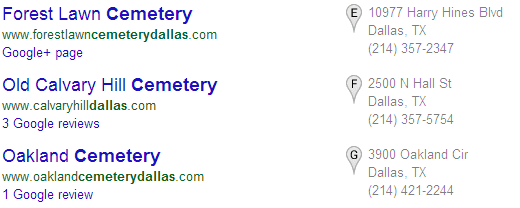
What’s a tricky business? It’s a special category of companies that tend to create negative reactions through advertising. How is a funeral home supposed to gain online reviews? Can criminal defense attorneys advertise to criminals? When a B2B company’s customers are spending $20+ million on construction projects, can customers be expected to react the same as those from an ice cream shop? The short answer is no. Tricky businesses require a unique approach. For today, my goal is to only tackle Local business reviews.
Many businesses are simply review magnets and can easily receive hundreds of online reviews in a month. It’s nice to have a product and a service that consumers love, but when a business provides a service that is a necessity, it can be much harder. Google has already taken some steps against tricky businesses. For many, the local carousel isn’t even an option. For others like consulting companies and agencies, the local pack doesn’t even appear in results. Here are several other reasons why it will be difficult, if not impossible to receive reviews for your local business.
Why Your Customers Won’t Leave a Review Online
- Your customer’s aren’t excited for your product or service, often due to need vs. want (ex: morgue, funeral home, cemetery)
- Your customers are too busy and don’t see the value (B2B businesses that target C suite executives)
- Your customers aren’t internet savvy (ex: nursing homes)
- Your customers want to remain anonymous (ex: criminal defense attorney’s, strip clubs)
- Your customers don’t know you (ex: B2B company working for clients with multiple contractors)
Ice Cream Shops Aren’t Competing with Funeral Homes
Luckily your competition is other local businesses that are just as tricky. Your quantity and length of reviews can be much less than other industries. Receive only a couple of reviews and you should see a direct increase in local rankings. If you do have a competitor in your industry with many reviews, it’s probably a sign of foul play. Read the reviews and look for these signs:
- Were the reviews written all in the same month or in chunks of time?
- Are the reviews overly promotional, too well written or all positive?
- Are the reviews from employees or vendors? In Google, you can click on the name and arrive at someone’s Google + profile.
If you believe a competitor is creating false reviews, you can report it. Most review sites include guidelines on what is a false review. Here are Google’s. A word of caution, report the review at home and use a non-work or non-identifiable email address.
If the reviews are valid, it should give you insight into who is leaving the review, information you can use to increase reviews for your own business.
Step 1: Identify Your Customer Lifecycle
A recent Moz blog on local reviews is worth reading, especially for the customer lifecycle section, which can’t be overlooked. It is critical to analyze when and how you interact with customers, the stages of the relationship, and especially when the customer is happiest.
Take those insights and define when the customer should be encouraged to review. Keep in mind the guidelines for review sites which include: no incentives for leaving a review, no negative reviews for a competitor, no reviews on business premises and a few more.
The idea isn’t to ignore reviews and wait for them to happen, you’re probably doing that now and it isn’t working. The idea is to meet the guidelines of review sites, yet encourage reviews through proactive planning and education within the customer lifecycle.
Step 2: Identify Customer Loyalty
Next, it’s important to call out and define which customers are most loyal. Whether it’s repeat business or a customer who has turned into a loyal friend, chances are you have a small list of customers who would be more than happy to write a honest review if you simply asked them.
Take advantage of these friendly customers first, before putting in place a process for the future. Make sure to space out the reviews, you don’t want a lot to hit your profile all at once, it’s a sign of spam and they could be removed.
Step 3: Identify Which Sites Are a Priority
It’s confusing to ask customers for a review on any site so point them to those that matter most and only recommend 3. Look at the top citations by industry or research your competition. If a restaurant, Urbanspoon should be on your list or for a law firm, Avvo is a good bet. Google and Yelp tend to impact rankings more heavily for every industry, so don’t overlook the big players over those in your niche.
Also, take into careful consideration the experience of the review sites you are asking customers to write a review on. If your customers tend to wish anonymity, don’t encourage reviews on Google +. Or at least explain how customers can create an alias name for a new Google + profile. Google + can be one of the most valuable citations, but often requires the confusing and tedious creation of a new Google + social profile. Use clear, step by step directions on how to leave a review depending on your method of execution.
Step 4: Execute Your Local Review Campaign
Depending on your customer lifecycle and how you interact with customers, execute your review campaign. In person can be effective, especially for those with very difficult online customers. Instead of blatantly asking for a review, consider a survey which can be a printed handout or taken online. Not only will you get direct feedback from customers on many levels of your product or service, but at the end you can ask for a review and maybe even provide an incentive, for completing the survey – not the review. A review is a true indicator of customer satisfaction, and it can allow for a data crunching moment, your net promoter score.
An email campaign can also be effective, but don’t send a one off campaign. Reviews will arrive after constant engagement. Depending on your industry, consider a monthly email newsletter which provides ongoing touch points after a sale and provides value to your customers through editorial content from your blog. In the email, you can periodically send a reminder to leave a review or for those customers who engage most with the email, send a segmented campaign, asking for their honest feedback.
Combine a review strategy with other elements and you will reap multiple benefits including changing one time buyers into loyal, repeat customers.
Step 5: Use Workarounds for Reviews & Improve Local Rankings
If you still struggle with the idea of asking any customer for a review, even indirectly, than some of these suggestions might be helpful…
For a large organization, especially B2B, Foursquare can be your friend. Don’t overlook the power of a large group of employees. Announce an internal Foursquare competition, encouraging check ins between offices. The excitement could even likely carry over to your customers. Either way it adds a ton of social activity and contributes positively to your Local ranking factors. Employment sites such as Glassdoor and Indeed.com also should be a focus for employee reviews, especially if recruiting is a key component to the success of your business.
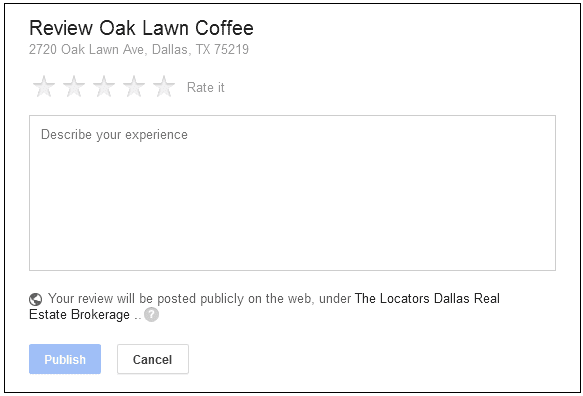
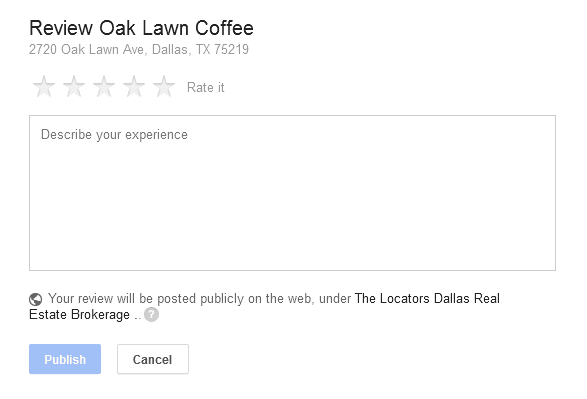
BARNACLE SEO ON GOOGLE +: THIS REAL ESTATE COMPANY IS LEAVING A REVIEW OF THEIR FAVORITE LOCAL COFFEE SHOP, A POPULAR DESTINATION.
For a truly tricky business, review other businesses as your business. This can be done on Google + and many other citation websites. If you have created a Google + Local or Brand Account, login and review vendors, suppliers, friendlies in your industry and more. Just make sure you can actually vouch for their services, remember it’s your company reputation on the line. This is also of great benefit. A business to business review on Google + links to your business Google + account! This could lead to more visibility and hits to your local business review page. It also sends a message to the business to reciprocate and review your company, adding more reviews to your own profile. David Mihm popularized this practice, now seeing a resurgence as barnacle SEO.
Corey Barnett is a Globe Runner Online Marketing Specialist. Follow him on Google Plus.
INTRODUCING A NEW GOOGLE PLUS QUALITY METRIC: VIEWS PER FOLLOWER VPF
Google Plus recently introduced a new public metric on user profiles where they show the total number of post views the user has generated. This, in itself, is an interesting metric, because it shows how active each user is on Google Plus, and how many people have actually viewed posts they have made. But I have decided to take this number one step further, and introduce a brand new quality metric: Views Per Follower (VPF).
Views Per Follower (VPF) should be calculated as follows:
Number of Total Views / Number of Followers
That the number of total views a user has generated, divided by the number of followers the user has. The higher the VPF number, the more “reach” this user has, and, I believe, the higher the quality posts that the user is posting. It could also indicate how “engaged” those followers are, because the more engaged they are the more Google Plus tends to show that users’s posts to followers. Let’s look at some specific examples, using specific users:
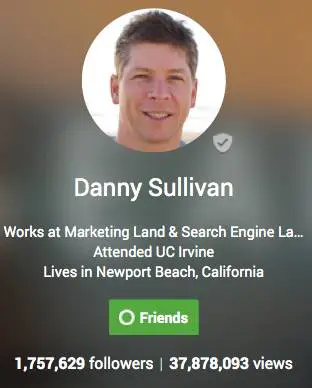
Danny Sullivan (Search Engine Land):
Number of Followers: 1,757,629
Number of Views: 37,878,093
Views Per Follower VPF: 21.5
As you can see, for every follower that Danny Sullivan has, each follower has viewed an average of 21.5 of his posts. Let’s take a look, though, at another public profile, the profile of Sergey Brin from Google:
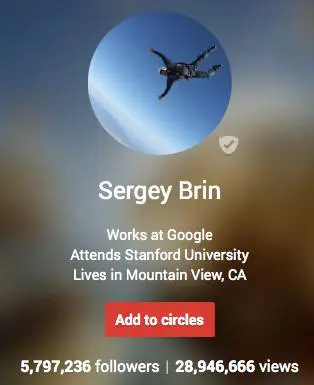
Sergey Brin (Google):
Number of Followers: 5,797,236
Number of Views: 28,946,666
Views Per Follower VPF: 4.99
And, just to be fair, let’s take a look at my personal Google Plus profile, as a comparison. Remember, the higher the VPF number, the better: which means that this user’s followers are more “engaged”, and they view more posts that the user makes.
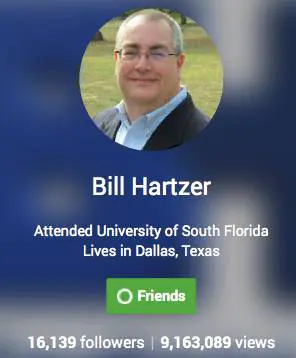
Bill Hartzer
Number of Followers: 16,139
Number of Views: 9,163,089
Views Per Follower VPF: 567.76
Danny Sullivan’s posts on Google Plus are viewed by more of his followers, but what his numbers show are that there are a lot of followers who do NOT see his posts, and I bet that a lot of those followers aren’t very active on Google Plus. They know they should be following Danny Sullivan because, well, he’s Danny Sullivan. But they’re not very “engaged” with Danny’s posts. But compared to Sergey Brin’s followers, Danny looks really good: Sergey’s followers are really, really not very engaged, are most likely not very active on Google Plus, and just don’t see many of Sergey’s posts.
But let’s take my profile, for example. Sure, I don’t have a million or five million followers on Google Plus. But, if you look at my VPF, you’ll see that my 16,000 followers are highly engaged, active Google Plus users. They see my posts. They engage with my posts enough so that Google Plus shows them more of my posts.
There are a lot of different reasons why your Google Plus’ profile VPF is what it is, but you have to keep in mind that a quality profile on Google Plus isn’t dependent on the number of followers you have. In fact, it’s all about how engaged your users are: and by calculating the VPF for a user’s profile will show how active, how good their posts, are, and, how engaged that users’ followers are on Google Plus.
So, what’s your Views Per Follower VPF? Is yours higher or lower than mine?
Bill Hartzer is Globe Runner’s Senior SEO Strategist. Follow him on Google Plus.
Gideon Rosenblatt has also come up with, essentially, the same type of metric, and there’s an interesting discussion going on over on his Google Plus post.
GOOGLE ADDS KNOWLEDGE GRAPH DROP-DOWN WITH COMPANY DATA TO SEARCH LISTINGS
Google has recently added a drop-down to the search results listings that include Knowledge Graph data when you click the drop-down. Here’s an example of the new drop-down:

Previously I have only seen Knowledge Graph data included in the right sidebar when you search for a company name or brand. But, now there is a small drop-down next to the site’s URL, as shown above. When you click the drop-down, it looks like this:
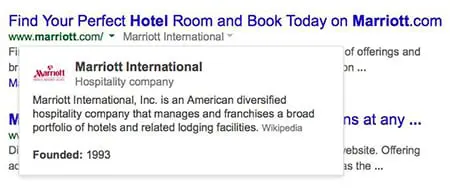
The data is clearly from the Knowledge Graph, although for the Marriott Hotels example above there is no source shown. I was able to see that for another query, related to software outsourcing, the data comes from Wikipedia:
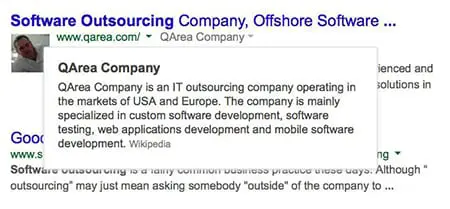
The good news here, I suppose, is that it’s not huge major brands like Marriott that this is showing up for–it’s other companies that are now being included with this new Knowledge Graph drop-down in the search results. So, there’s a chance that if your company is included in the Knowledge Graph (like being in Wikipedia or Freebase.com), then there’s a chance that your site will get a drop-down like this, as well.
Google announced they were testing this back in January, but I’m personally seeing this much more now, so perhaps it’s now being rolled out to more sites’ search listings now.
GOOGLE RECONSIDERATION REQUESTS: ARE MANUAL REVIEWS REVIEWED BY HUMANS?

Google’s “manual review” process of websites who have been penalized for violating Google’s Webmaster Guidelines is far from being a “manual” process. In fact, based on the response to a recent Reconsideration Request, I am now convinced that “manual reviews” are far from that: even the Manual Review process at Google has been algorithmized and automated. Google needs to immediately change the wording on what they call a Manual Review. Because it’s not manual: humans aren’t obviously not manually reviewing websites, and they do not personally review reconsideration requests. Calling the process a manual action or implying that they manually review websites is deceptive and dishonest if Google’s employees or subcontractors don’t manually review websites.
Google needs to immediately change the wording on what they call a Manual Review if they’re not reviewed by a human.
I’m going to go out on a limb here by saying that Google’s “manual reviews” of websites are not manually reviewed by Google employees, their subcontractors, their sub-subcontractors, or even humans. Based on the results of a recent “manual review” of a Reconsideration Request based on a site’s “manual” penalty for having inorganic, unnatural links pointing to their site, there is no possible way a human reviewed the request.
Google gets about 5,000 requests for reconsideration every week:
Let’s take a look at an example of a recent Reconsideration Request I was involved in. This particular website was given a manual penalty or technically a “manual action“, or “partial match”:
Unnatural links to your site—impacts links
Google has detected a pattern of unnatural artificial, deceptive, or manipulative links pointing to pages on this site. Some links may be outside of the webmaster’s control, so for this incident we are taking targeted action on the unnatural links instead of on the site’s ranking as a whole.
So, what does this really mean? The site has links that need to be removed because they violate Google’s Webmaster Guidelines. The site is “trying to rank” for certain phrases, so they got links placed in articles on blogs and were involved in some “guest post” type of activities. Google doesn’t like that, it violates their guidelines, so needs to be cleaned up.
Fine. I get that.
So, one of the things that we do here at Globe Runner is clean up these messes, and get manual link penalties removed or “revoked” as Google likes to call it. And we’re good at it. In fact, just yesterday, we got a positive response to a Reconsideration Request, where a manual action was revoked on a site that needed its links cleaned.
Here at Globe Runner, we have a very in-depth process of identifying and cleaning up a site’s links. In fact, some other SEO companies have called our process “overkill”. But that’s fine. We always go above and beyond what could be done to remove a manual penalty from Google.
So, why do I think that Google’s “manual reviews” are not done by humans? Let’s take look more at this particular site’s reconsideration request and the what we did for this website, and then you can decide. The following is from part of a lengthy letter we made available to Google via Google Docs. We used the Reconsideration Request form in Webmaster Tools to request a review:
Overall, after gathering all of the links to the site, we ended up with:
52,252 Total Links
217 referring root domains
693 Healthy Links
709 Inorganic Links
569 “live” inorganic links to get removed (including nofollow links)
What We Did to Clean Up the Links
We manually reviewed all of the 569 links that were still “live”, which included links with the “nofollow” attribute as well as links without the “nofollow” attribute in the link.
We looked up the site owners of all 569 links, using a combination of whois lookups as well as manually visiting the sites to find the site owners. We began contact website owners on February 5, 2014, and requested that the links be removed. Around February 8, 2014, we sent second requests for link removal after we hadn’t heard from site owners who didn’t remove the links. On February 17, 2014, we sent a third round of requests for link removal after we still had not heard from site owners who didn’t remove the links.
As of February 24, 2014, we have heard from 296 site owners. Of those site owners who responded:
– 12 sites refused to remove the links
– 257 links were successfully removed based on our email requests
– 27 links – site owners requested payment to remove the links
– 2 links – we were unable to contact site owners
– 274 links – site owners were completely unresponsive after 3 contacts
– 256 links were removed as a result of our link removal efforts
We prepared, and uploaded, a new disavow file that includes the links whose site owners were unresponsive, site owners we were unable to contact, and site owners who requested payment for removal.
So, after hearing from 296 site owners who responded to our numerous emails, we got 256 links removed. Keep in mind that is of the total 52,000 links we found: but in reality many were site-wide links and links that no longer existed, so there were actually only about 4000 links total. And we provided a spreadsheet of every single URL and included all of the email responses we received, close to 300 emails!
Google denied this reconsideration request. In fact, not only did they deny this reconsideration request, but they were “helpful” and included sample URLs that they had a problem with. They provided 3 sample URLs. Google does this to help point out the types of links that they have a problem with.
The 3 sample URLs provided were URLs included in our spreadsheet. Not only that, the sample URLs included domains where the site owner specifically told us that we must pay to get the link removed. Which is documented in the reconsideration request, along with copies of the emails we received. Not only that, all of the sample URLs given to us by Google in response to our reconsideration request were disavowed because we could not get the links removed (again, documented in the response).
After seeing the efforts that we went through to get hundreds of links removed, documented, and even included the actual emails, Google told us that URLs they had a problem with are ones that we couldn’t get removed.
I’m convinced that there Google’s so-called “manual reviews” of websites are not actually reviewed by Google employees. If that were the case, then would they have included sample URLs that we documented that we could not get removed because a site owner wants payment? I realize that Google gets over 5,000 reconsideration requests every week, and there are a lot of sites to deal with. So part of the Reconsideration Request process has to be automated. But to continue to deceive website owners into thinking that a human at Google is going to manually review their request is misleading.
As for this particular site, I believe this is an isolated incident, as we get plenty of positive responses to our reconsideration requests based on the work we do to clean up links. We’re working on finding more “bad links” and “inorganic links” to this site, and will continue to get more links removed. And at some point we will file another reconsideration request once we’re convinced we’ve gotten all the links removed or taken care of in some way (perhaps by disavowing them and documenting why they’re disavowed).
Whatever the case, Google claims that every reconsideration request is reviewed by a human. Here’s some further reading if you’d like to see what’s been addressed in the past:
Google Reconsideration Responses – SE Roundtable
Google: We Get 5,000 Reconsideration Requests Per Week – SE Roundtable
Bill Hartzer is Globe Runner’s Senior SEO Strategist. Connect with him on Google+ or on Twitter as Bhartzer.
Update: 5:16pm CST March 5, 2014
Google confirms that they do, in fact, manually review reconsideration requests. Here’s the tweet by Nathan Johns:https://platform.twitter.com/embed/index.html?dnt=false&embedId=twitter-widget-0&frame=false&hideCard=false&hideThread=false&id=441350840603779072&lang=en&origin=https%3A%2F%2Fgloberunner.com%2Fgoogle-reconsideration-requests-manual-reviews-reviewed-humans%2F&theme=light&widgetsVersion=219d021%3A1598982042171&width=550px
- « Previous Page
- 1
- …
- 33
- 34
- 35
- 36
- 37
- …
- 45
- Next Page »