













INVENTIVE TACTICS TO DOUBLE YOUR EMAIL LIST
People are wary of email soliciting. Maybe it’s junk mail fatigue, maybe it’s genuine distrust, but on the extreme end, ask for an address and you may as well be requesting their social security number.
Still, we all know companies whose email list numbers in the thousands with impressive open rates to boot. So how do marketers overcome the skepticism and keep subscribers engaged over the long haul?
That, my friend, is today’s aim.
Looking for inventive ways to double your email subscribers? These tools and tricks are designed to do just that.
Why Prioritize List Growth?
You’re still reading so that means you are at least partially invested in growing your email list. Great!
For those of you still on the fence or who need to make a case to the higher-ups, what if we told you that with no email growth strategy in place, you’re likely to lose about half of your list within two years.
According to Hubspot, email marketing databases degrade by about 22.5% every year. Some of your subscribers change companies, others actively unsubscribe part way through the year, and many fed you an inactive yahoo email from the beginning and haven’t logged in since 2007.
We repeat, the time to double your email list is now!
Here are five essential, creative practices to implement starting with your next email campaign.
- Use buyer personas to list segment. You know we’re big proponents of both buyer personas and email segmentation. The two go together as naturally as search marketing and increased sales. Certain users will respond better to certain content. It’s your job to use the demographic information you have about your subscribers to send them pointed emails with information that’s most likely to speak to their specific interests. We also recommend segmenting by action so you know if a reader is more likely to follow a certain CTA or consume particular pieces of content.
- Host an event. Workshops, speaking engagements, and networking events are great ways to bring in fresh potential subscribers. Whether you invite industry leaders, contact social media influencers, or just give out free snacks, there’s no shortage of options to draw a crowd. Simply look within your immediate community to create a killer panel. Or, if you’re like us, consider promoting a cause. In our case, we decided to turn our office into a gallery space, inviting talented local artists to show their work a few times a year. Whatever type of event you host, make sure to use a site like Eventbrite to register guests, send tickets, and capture their emails in the process.
- Offer a guest WiFi. You’ve done it a thousand times at the airport waiting for your plane to board. The security line was a breeze and you now have an hour to kill before takeoff. You shore up appropriate WiFi networks on your laptop and see the Boingo Hotspot or free airport guest WiFi. With the flick of the keyboard you enter your email address, hop online, and never give it a second thought. Similarly, offering a free guest free WiFi option to your patrons or clients who visit your office is a great way to grow your email list without much work. Apps like Gazella make the collection even easier, integrating the collected contacts into platforms like Constant Contact.
- Run a paid ad. Paid search is everywhere these days. It’s a critical part of any digital marketing strategy that can help you knock out all variety of end goals. While most people think it’s designed to increase your web traffic or improve your page views, you can also use it exclusively as an email capture. We’ve seen plenty of clients have great success creating a Facebook paid ad that steered browsers to their email sign-up sheet, effectively doubling their email subscribers in the span of the campaign.
- Go analog. We’re living in a digital world, but don’t underestimate the value of good ‘ol pen and paper. You might try sending out postcards to former customers with a QR code that takes them to your subscription page. Or you could simply create email sign up sheets on rotation at trade shows, your brick and mortar stores, or at the receptionist area of your office.
These email list growth tips only scratch the surface of all the many ways you can increase your subscribers.
Want us to talk you through additional email marketing strategies? Make contact – see you in our inbox!
SOCIAL MEDIA CHANGES YOU NEED TO ACT ON NOW
There’s no such thing as a static social media platform. Like most of the internet, social sites and the algorithms that power them are continuously being updated. Sometimes the changes are sweeping and make our lives easier. Other times they’re hardly noticeable at all, but can still have a huge impact on your social media marketing strategy.
The most recent algorithm changes to Facebook, LinkedIn, and Instagram are a mixture of both, but definitely ones your small business needs to act on. Ahead is a recap of what you should be aware of moving forward and how to plan accordingly.
Facebook Compresses Mobile Ad Format
Social media advertising is mission-critical in the pay-to-play world marketers are contending with, and that goes double for ads viewed on mobile devices. Ad format changes on the largest social media network mean social media marketers will need to make their new paid posts even punchier with less space for images and copy.
Last month, a Facebook Business blog announced the compression, stating that as of August 19th mobile News Feed ads would shrink to, “match the look and feel of the new Facebook design introduced earlier this year.“
Now, images and media will be capped at a vertical 4:5 aspect ratio, down from a previously generous 2:3. Copy, which used to show a lengthy seven lines, will now be reduced to a mere 3 lines of primary text before being truncated.
Why the change? According to the same post, Facebook is looking to “drive increased ad effectiveness and make it easier to use the same assets on Facebook News Feed and Instagram feed.” Essentially, this is great for cross-promotion between the two Facebook-owned channels, and not simply about looks.
What businesses need to do: Starting now, you can maximize your Facebook ad potential by making your first three lines of ad text as irresistible as possible, and formatting all your media to fit the predetermined height ahead of time.
LinkedIn Adopts Reaction Buttons
For the last three years, Facebook users have enjoyed emoting via their reaction buttons. Now, LinkedIn is following suit, offering desktop and mobile users the chance to not just “like” a post, but respond using a professionally-appropriate “celebrate,” “love,” “insightful,” and “curious” reaction.
They certainly took their time rolling out this feature. Now that it’s more than just a passing trend, the professional networking platform is hoping the reaction buttons will ultimately help them remain relevant among other social media players and increase overall engagement.
What businesses need to do: Make sure you’re posting regularly on LinkedIn. Include a variety of professional content so you can capitalize on these projected increasing engagement rates.
Instagram Cracks Down on “Offensive” Posts
All businesses want to make sure their Instagram posts and stories are seen by as many target audience eyes as possible. But they will need to be extra cautious to see that what they’re sharing doesn’t border on “inappropriate content.”
Now, even if a post doesn’t technically violate the network’s Community Guidelines, content that is too sexually suggestive or otherwise offensive will still have a drastically reduced reach. According to one Facebook Newsroom article, the demotion will limit, “those types of posts from being recommended on our Explore and hashtag pages.”
For the time being, your Instagram Stories bar will not be subject to the same problematic content management strategies, but best to steer clear anyway.
What businesses need to do: Before you post, verify that nothing you’re putting out into the world can be considered clickbaity or fake news-worthy. You should also be very careful about sharing any offensive memes (especially if they or the comments contain hate speech) or content that can be perceived as sexualized. In other words, don’t even attempt to push the limits. It’s also a good idea to review the “borderline content” section of the Instagram Help Center.
As the saying goes, “the only constant is change.” But don’t spend too much time mourning the past. If you need a hand to help your social media content roll with the changes just make contact.
LOCALIZED SOCIAL MARKETING + SEO POST GOOGLE+ SHUTDOWN
Logged on to your Google + page lately? If so you might have noticed something different – nothing at all. Though the shuttering of this once highly promising social media platform wasn’t a total surprise you might have been anticipating more time together – and you’re not alone.

When Google first announced the shutdown we were told we would have until August 2019 to say goodbye. But security bugs coupled with reported, “low usage” forced Google’s hand. Earlier this year they revised that date to April 2nd.
And close it down they did. But what now? If Google + has been a component of your SEO and social media marketing plan you may be looking for a new way to get in front of your target audience.
Here’s how localized social marketing strategies are picking up where Google + left off and helping businesses move onward and upward.
How will the Google + Shutdown impact your SEO + Social?
Google and search marketing are one and the same, so it stands to reason that a social networking product under this all-seeing search engine would make SEO soar, right? Wrong.
The good news is that you haven’t just been doing it wrong this whole time. Poor user adoption across the board meant that posts didn’t really amount to much in the way of increased traffic or SEO benefits. That paired with a security breach that compromised the accounts of more than 500k businesses left the writing on the wall.
More good news – even if you were active on the low-performing social site, posts from your other social media profiles have been and will continue to (literally) pull rank. In other words, you really shouldn’t see much of a dip in your search rankings.
Remember that social signals have always had minimal impact on SEO while things like successful website development and backlinks from other credible sites to it count for a lot!
In the wake of this atypical Google blunder, be sure to go back through your site and other profiles to remove the G+ link and icon. Staying goodbye to G+ shouldn’t sink your SEO ranking, but dead links still can.
Google My Business (GMB) and Adwords pages will also not be impacted but hit those heavily for a nice counterbalancing effect.
Localized Social Marketing
Fear not. Especially if you have more than one location or run a multi-store brand platform like Facebook makes it easier than ever to communicate with your local audience in the wake of the Google + shutdown.
SOCi, a social media and reputation management platform, defines localized social marketing as, “marketing efforts that focus on building a local presence for a business, leveraging locally-driven communication channels to reach the specific local communities it serves.” The idea is to turn things like social reviews and ads into “two-way engagement channels.”
According to findings published in a recent SOCi report, “more than 70 percent of brand engagement on social is happening on location Pages.”
Setting up local Facebook Pages for your various locations makes capturing reviews a breeze and gives local leaders a chance to answer questions in more personal and thorough ways than your corporate team can.
In the end, it may not be as tearful a Google+ goodbye as you’d envisioned, but that’s ok. Where Google has closed a door, social media has opened a window.
Want help improving your SEO or setting up a localized social marketing strategy? Let us take your brand beyond.
KEYWORD RESEARCH THAT WORKS: THE Q4 2019 EDITION
Mom used to say, “it’s not what you say, but how you say it.” When it comes to effective keyword strategy, it’s both.
Keywords have long been the building blocks of any solid SEO foundation, but the tactics that reliably drive organic traffic have changed considerably.
Today, if you’re looking to tap into the phrases your customers are actually searching for, you’ll not only have to optimize your site’s content with the right keywords, you’ll probably need to do so for hundreds of other relevant keywords.
First, you have to find them.
Whether you’re trying to get certain key pages to rank higher in SERPs, increase your web traffic, or both, this 2019 guide to keyword research can help.
The Basics of Keyword Research and Search Intent
We’re sure you’re anxious to start finding valuable keywords to add to your website, but let’s start at the beginning.
Keywords are individual words or short phrases that internet users plug into a search engine. Let’s take the most searched keyword on Google for example. Someone might type in the keyword “Facebook” or a phrase like “how do I get more followers on Facebook?” Regardless of what set of words are strung together, the most important aspect of finding the right ones comes down to one thing: search intent.
Search intent, the ultimate goal of the searcher, is different from search volume, which is typically expressed as the number of searches in a month. Keyword intent generally falls into one of four categories:
- Informational: The searcher might have a problem or query they’re looking to solve. Generally these are expressed as “what’s” or “how to’s.” For example, “how to rank higher in Google” would be an informational search intent.
- Navigational: As it sounds, navigational search intent helps the user get to a specific site. For instance, if you were attempting to log in to LinkedIn, you’d likely type that branded inquiry into the search engine to direct you there.
- Commercial investigation: If a user wants to compare two things (SEO vs Paid Advertising) or find the, “best keyword research strategies,” they’re making an investigation intent.
- Transactional: With a transactional intent, someone is ready to take action. Usually, this involves making a purchase or downloading a piece of marketing content.
Brainstorming Keywords
Guessing the best keywords for your site is never a good idea. At the same time, you definitely need a solid jumping-off point, and brainstorming some possible keywords could lead you to the relevant, traffic-increasing phrases you’re after.
As you begin to brainstorm, start with a few basic questions to get the ball rolling:
- What would someone typing this keyword expect to come up?
- What keywords are most relevant to your business, industry, etc.?
- What questions or problems is a user mostly likely to have that your brand can solve?
- What types of content would someone searching this keyword be most interested in?
- What other terms might a customer use to describe what you do? (ie: Digital marketing agency vs. online marketing firm)
Remember that even similar phrasing might have very different intents so start by coming up with as many variations, associated words, and related search topics as you can and test them individually later. Keep a spreadsheet of your ideas and different keyword iterations to help you keep track.
How to Find Long-tail Keywords
Once you have a general idea of the main keywords you’ll be targeting in your copy and content, you’ll want to build on them with long-tail topics.
Despite what the name suggests, long-tail keywords don’t improve your rank and direct web traffic to your site based on their length alone. Instead, these search queries are high in search demand despite their unimpressive search volume. This means less competition for these highly targeted phrases.
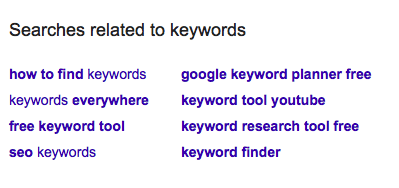
Perform some Google searches with the keywords you identified in the step above, then use them to discover additional long-tail keywords by looking critically at the “searches related to” field at the bottom of the page.
Tools to Help with Keyword Research
Not sure how to find keywords on your own? There are several reliable paid and free keyword tools that can help.
Three of our favorites include:
- Google Keyword Planner. The gold standard in keyword research.
- Keywordtool.io. To spy on what types of questions people are searching for.
- Keywords everywhere. Simply download the Chrome or Firefox extension to see how often a particular word has been searched for in a given month.
Dad used to say, “Say what you mean, and mean what you say.” Though they may not have known it at the time, your parents actually gave you some sage advice when it comes to executing an effective keyword strategy. Employ a little old wisdom and new-age advice, and you’re sure to have traffic streaming in from all angles.
Need some help keying in on keywords? We’ll give them something to talk about.
NAVIGATING EFFECTIVE PAID ADS WITH FACEBOOK’S CREATIVE COMPASS
Imagine you’re invited to a networking event. When you get there, you discover that it consists of various businesses shouting over one another. If you’ve ever attempted to increase your Facebook visibility organically, you know the feeling.
Paid Facebook ads, on the other hand, give your business a platform, acting like a microphone that airs over the loud speakers of your target audience’s personal computer.
Hoping to expand your business this year? Facebook is piloting some new diagnostic tools that promise to do just that…eventually.
Facebook’s Creative Compass
Creative Compass aims to give creatives valuable insights into the effectiveness of their ads. While currently only available to select agency partners, Facebook is planning a larger roll out for all users this year. The more you know in advance, the faster your business will be able to adopt this ad-changing technology.
The diagnostic tool was built to assess key elements including the visual aspects of an ad, how well it fits with the target audience, the brand association, and message comprehension. The end result is an easy-to-interpret scorecard that takes user behavior to a new level of understanding.
You’ll still have access to your standard click-throughs and conversions information, but they’ll be supported with additional data like a relevancy score for 13 individual categories from noticeability to CTA.
Marketers will then have the ability to update ads or create new campaigns armed with deep insights on the emotional reward users get from the ad. With this knowledge, Facebook aims to make it easier for advertisers to anticipate, understand, and increase the likelihood of a user taking action because of an ad.
Facebook Advertising Best Practices
Until the Creative Compass becomes fully available to everyone, what can you do in the meantime to bolster the effectiveness of your Facebook ads?
Glad you asked.
The best place to start is to determine your goals.Are you after more web traffic? Increased engagement on your Facebook page? More email sign-ups for your newsletter? New leads for your marketing agency? Get clear on your end goal from the beginning to structure your ad appropriately.
Some campaigns may simply be about getting more likes to your Facebook page. That’s nothing to sneeze at!
Others will send browsers to a specific page on your website, where you’ll be ready to sell them on your outstanding products or services.
Some other Facebook ad best practices include:
- Using high-quality photos that are owned by you. Avoid stock photos when you can and try to capture original images that you own the rights to.
- Creating a captivating call to action. Be it a button on your ad or a clever turn of phrase, make sure to dangle the bait in an irresistible way.
- Being selective about what you advertise. You already run the risk of users becoming tone-deaf to your ad. Save your juiciest pieces of company news, blow out sales, and heart-palpitating giveaways for your paid ads to give them extra staying power.
- Checking for typos! We shouldn’t have to say this, but we do. You also need to keep it short, sweet and focused with perfect grammar to boot. Nothing turns a potential customer off faster than a wall of words full of the wrong ‘there.’
That’s the long and the short of it. If you don’t feel like you’re a Creative Compass expert, no need to fret. We’ll show you the way.
6 WAYS TO WOW YOUR BOSS WITH LITTLE-KNOWN GOOGLE DRIVE TRICKS
We’ve come a long way since the days when one false stroke of the typewriter key would render a document unusable. Now we can access entire presentations from any device, translate them into a completely different language, and see the changes in real-time, all without ever worrying about hitting the save button.
It’s the Googleverse. We’re just living in it.
Think you know your way around Google Drive? Chances are you haven’t even scratched the surface. Ahead are a small handful of underutilized and overlooked capabilities that could reconfigure your workday. Even two or three off this list will be enough to seriously impress the boss and boost your productivity.
1. Dictate your next report.
Whether you critically injured your hand or simply want to work while you meal prep for the week, Google Docs can receive full dictation down to the last comma. Seriously. It puts Siri to shame. A quick visit to the voice-commands guide will get you up and running with fine point proficiency. Plus, it renders spell check virtually unnecessary. (Though we always recommend a final read-through.)
2. Scan and upload files.
Did you know your Android phone doubles as a scanner? Save yourself a trip to the office by taking a photo of the document you want to scan directly from Google Drive. You can later edit the PDF without ever leaving the platform (take that Adobe!). Once uploaded, simply right click on the PDF or image and it’ll open up in an editable converted Google Doc.
3. Translate documents and drawings.
International collaboration just got a whole lot easier. Google speaks hundreds of languages and can easily translate entire documents from one tongue to another save for a few minor grammatical issues. Download the translate app and you can also interpret handwritten words, phrases, or symbols.
4. Create and embed a QR code.
Whether you want to amplify your ads, supercharge your invoices, or give your events a virtual boost, QR codes are the way to go. To identify a specific user or locate important info that won’t fit in an excel-sized cell use Google’s free QR code generator. It’s a simple piece of script that only needs the specific cell you’re referencing to be added. Conversely, you can also create a QR code in other free online generators that links to a Google Doc or Spreadsheet you want coworkers or clients to have access to.
5. Host a virtual Q&A during your presentation.
Select the ‘present with audience q&a’ feature from your drop-down menu and onlookers can submit questions and comments as you go through each slide. All they need is the link which can be easily shared in advance of your presentation.
6. Enhance your suite with extensions and add-ons.
Though Google Drive may seem all-powerful we all get by with a little help from our friends. In this case, there’s an entire industry of apps, add-ons, and extensions to support your work together. One aptly-named Drive Companion creates a desktop application that can easily access files in windows that won’t disrupt your flow. Some others we like are Grammarly, which auto-magically reviews anything you write, alerting you to misspellings and possible grammar issues. We also couldn’t work from home effectively without docu-sign. It allows you to upload and virtually sign a set number of documents each month. You can even save your version and email back to the recipient all within the site.
But the fun doesn’t stop there. You could get a veritable masters degree in Google Drive with all its productive pit stops. Although, there’s something beautiful about the a la carte method, too. Really, it’s not a matter of whether Google Drive can help you navigate your workflow, but how.
Want us to lead your journey through Google Drive? There’s no app for it (yet), but feel free to make contact the old fashioned way.
SCRUB UP YOUR SOCIAL MEDIA BIOS FOR INCREASED CONVERSIONS
Social media users are a judgmental bunch. In the literal blink of an eye, they’ll subconsciously size you up based largely on your bio. How quickly are we talking? About a tenth of a second. And these first impressions can be hard to shake.
If you’ve been writing your social media bios as an afterthought, time to start treating them like the valuable pieces of real estate they are. Here are seven ways to scrub the images, copy, and links in your bios to increase your conversions and strengthen your branding.
Images
1. Use a hi-res profile image
In social media marketing, a quality profile image is critical. True, some platform’s profile pictures are super small but that doesn’t mean they’re any less important.
Your profile picture is the first place a user is likely to look when visiting you on social media, and one of the last things they’ll remember about your company.
According to one scientific study, online photo first impressions influence perception so strongly that they usually remain even after interacting with you or your brand.
When uploading your profile picture, make sure it’s free of pixelation and the same across all your other social media channels. Even for small spaces like Instagram, hi-res images or renderings of your logo or leadership work best.
2. Take advantage of your header image
Some social networks like Twitter and Facebook have header images located behind your profile picture. This is where you can give followers a snapshot of your company’s personality, products, and services, or current sales and specials. There’s really no limit to what you can do with this highly visible piece of property.
Same rules as above apply here, too. Make sure the image – be it photo or graphic – is clear, high-quality, and properly formatted to fit the space.
As for what to cover on your cover, don’t be afraid to get creative! We’ve seen clients have great success advertising the following on their header images:
- An inspirational quote from a historical figure or CEO.
- A candid photo of their team.
- New individual products or an entire line of them.
- Giveaways, networking events, industry awards.
- Seasonal greetings or work anniversaries.
- Fan acknowledgment for hitting 10K likes.
- Testimonials or reviews.
- Sales or limited time offers.
- Percentage of each sale or annual profit that goes to charity.
Pictures may be worth a thousand words, but the actual words count for a lot, too. Next up: how to make those count.
Words
1. Use keywords
What modern business isn’t interested in improving their search results? Keywords are your brand’s most direct way to convene with the search engines and increase your ranking.
Thing is, your social media bios have much stricter character limits than other pieces of content you create. So while a couple of key terms are important, your bio still needs to read as a human wrote it. As with all other mediums, keyword stuffing is a no-no.
One way to give your social bio keywords extra staying power is to include your location. For instance, it’s no accident our Instagram reads, “Digital marketing agency in Addison, Texas.” It’s a great way to introduce yourself to local potential customers.
2. Develop your bios
Your bio is born from concise copy that tells social media users: who you are, what you do, your contact info, your USP (unique selling proposition), how you can help them, and what you want them to do (your CTA).
Tools like Bio Gen — bio generator for social networks and Designer Bio Generator™ can help you get a skeleton bio pulled together, but you may want to add some personal flare to help with the overall impact.
3. Include CTAs
Speaking of CTAs, it’s great if your profiles have their own specific calls that change and correspond to different marketing initiatives throughout the year.
Some of our favorite galvanizing CTAs include:
- Expressing what you want: “Click the link in our bio for a free consultation”
- Asking for shares: “Tag us + #brandedhashtag to be featured”
- Promoting sales: “Shop our Summer sale”
- Highlighting a contest: “Caption this photo for your chance to win!”
Now that you’ve asked them what to do, time to tell them where to go!
Links
1. Utilize different links for different marketing goals
Many companies simply link to their website. Be it a specific landing page like your contact page or one you’ve created for incoming social media visitors, remember to keep the link updated in your social profile. You can even use a UTM code or bit.ly link to help you track the number of visitors you’re getting from your social media profiles.
Other popular links include:
- Updates about product launches.
- Email sign-ups for webinars.
- Articles written about your business or your latest YouTube video.
- Event registration pages for speaking engagements or networking events.
2. Offer promo codes
Followers always appreciate a little extra incentive to take them from socializing to making a sale. If your budget allows for it, consider including a small promotional code in your bio. These types of online coupon codes are known conversion drivers. Bonus: they also double as conversion trackers! Just make sure to create a unique code for each of your profiles so you can more accurately account for the increased traffic.
Take it from us, your bio is the beginning of your relationship with your followers. Make sure it starts off on a good foot with the best possible social media bio.
Want a social media professional to take a stab at your bios? Just say the word?
MUST KNOW PAID SEARCH STATS AND TERMS
PPC could easily be rebranded to PTP – pay to play. That’s where online advertising is and has been heading for the past few years. But succeeding in this digital playing field is more than a roll of the dice. This is a game of strategy.
If you’re ready to run successful PPC campaigns, let these terms get you up to speed. If you’re still on the fence, let these paid search stats do the convincing.
PPC Terms
Good game players know they have almost zero chance of being a worthy component if they don’t fully understand the premise. Though there may be many routes to winning, you first need to make sure you’re speaking the same language.
This glossary of PPC terminology can help.
AdGroup: Manually created subdivisions of the same overall campaign. Each can be set up and sorted by themes such as product type or keywords.
Average CPC: Is the average of what it costs you every time a user clicks on your ad. This figure is the cost of your ad divided by the number of clicks in a set timeframe.
Bounce rate: Users who land on one page of your site and leave it immediately make up your bounce rate percentage. The lower this number, the better.
Broad Match: PPC ads that are shown to a user based on their search and your targeted keyword.
Click-through-rate (CTR): A percentage showing the number of times your ad has appeared to users in relation to the number of times that same ad has been clicked. A high CTR means your copy and keywords are resonating with users. Lower CTRs require some investigating into the user’s behavior and effectiveness of your ad.
Daily Budget: An amount you feel comfortable spending on PPC ads each day.
Geo Targeting: Target areas at the country, state, and zip code level that you want your ad shown to.
Impressions: How often your paid search ad shows up online. These are usually higher than your click through rates, but with repetition and time, they can help spread brand awareness.
Keyword: The word or phrase a user searches for that also aligns with your products and services.
Remarketing: Ads that appear to a user who has previously landed on your site. Ads can be further targeted based on the portion of your site they viewed.
Once you’ve committed these ABCs to memory (or bookmarked the page to refer back to), we recommend brushing up on the paid-per-click statistics that can help make you a better marketer.
2019 PPC Stats
According to Invesp the average person is served over 1,700 banner ads per month, but only half of them are ever viewed. This is just one example of a statistic that can put paid search into perspective and help you shape your strategy accordingly.
Here are 10 others we think are worth noting as you continue on your PPC pilgrimage.
- 3.5 billion Google searches are made every day. (Internet Live Stats)
- Businesses make an average of $2 in income for every $1 they spend in AdWords. (Google)
- Search ads can increase brand awareness by 80 percent. (Google)
- The top 3 search results get up to 35% more clicks than their first page competitors. (SmartInsights)
- By 2019, mobile advertising is expected to represent 72 percent of all U.S. digital ad spending. (MarketingLand, 2018)
- 33 percent of internet users find display ads completely intolerable. (Adobe)
- Consumers are 27 times more likely to click on online video ads than standard banners. (CMO)
- When local search ads (LSAs) are present, 25.3% of all clicks are on paid results. (Bright Local)
- Roughly a third of all mobile Google searches are related to location. (Blue Corona)
- The average cost-per-click on Bing is $1.54 and the average CPC on Google is $2.69
Key takeaways include: advertising with location, location, location in mind. Running PPC campaigns on the less competitive and cheaper, Bing. And utilizing video to make your pitch.
So there you have it. Think of your paid search ads as pawns in a battle of wits. It’s your goal of increasing conversion rates verses their discerning attention.
Need a little help putting your campaign together? Let us do the work for you!
SOCIAL POSTING: WHAT’S TOO MUCH AND WHAT’S TOO LITTLE?
Posting on social media takes Goldilocks-like sensibilities. No, we’re not suggesting that your social media strategy is child’s play. In fact, having a well-developed social media presence is a critical part of running a successful business in the digital age.
Instead, what social media experts prescribe is a not-too-much, not-too-little approach to running your social channels.

So how do you achieve that “just right” sweet spot when posting on social media? That’s what we’re about to unpack.
General Rules for Posting on Social Media
Every business is different. In fact, let’s make that rule #1. Keep it in mind as you continue reading.
What do we mean by that?
Start with these tips and times as a baseline, but make sure you’re checking your insights and analytics regularly to see how your particular audience compares. Make adjustments so you’re posting the right kinds of content when they’re most active
The next two rules may seem obvious. But they’re worth repeating.
1. Post consistently. The more consistently you post, the less the frequency matters. That may sound like a bold statement to make in a post that’s all about how often you should post on social media, but we stand by it. Why? Because the absolute worst thing you can do is give your social media followers the silent treatment. It’s the equivalent of ghosting. Better to post at a pace you can actually manage without burnout.
2. Make sure your content is high quality. Again, posting too much won’t be an issue if the content you’re sharing is truly high quality. The more engaging your social media posts are the more likely your followers are to take notice.
How Often to Post Per Platform
Before we launch into the specifics of how often to post on different social media channels, we’d like to take an opportunity to give some sage advice.
Don’t try to be a star on each one.
Your audience is likely to be more active and engaged on one of two platforms. Put your effort there.
That’s not to say you can’t or shouldn’t have a profile on each of the five major players. (You absolutely should.) However with your limited marketing resources we recommend focusing on one or two or hiring a digital marketing agency to post for you.
Here’s how often to post on each of the most popular social media sites:
- Facebook: HubSpot recommends posting on the king of all social media platforms 1-2 times per day. Of course, some of that depends on the size of your follower count. Typically, oversaturating them with content will cause your Facebook audience to tune you out, hide your posts, or worse, give you the old unfollow.
- Twitter: Life moves fast on this microblogging platform. Most experts say posting between 5-10 times a day is the best way to get in front of the majority of your audience. Check your analytics to see when you have the most eyes on your posts and try to spread them out accordingly.
- Pinterest: The social media buffs at Buffer recommend posting on Pinterest up to 30 times a day. If that sounds like a lot to you, start small. Once you get in the habit of posting 5-10 pins a day you can work your way up for more exposure.
- LinkedIn: By their own admission daily posting on LinkedIn tends to yield the best results. Remember to keep the content business professional – think case studies, industry news, company milestones, etc.
- Instagram: Posting to your feed 1-2 times per day is best for the ‘gram. If you have additional content to share, consider making updates to your stories to keep from overwhelming your followers.
When it comes to social media, you don’t want to seem like you’re yelling or whispering. Talking in a consistent, conversational tone will help you keep a pace that encourages all variety of Goldilocks type followers to hang on your every word.
Want us to do the posting for you? Let’s chat!
- « Previous Page
- 1
- …
- 6
- 7
- 8
- 9
- 10
- …
- 44
- Next Page »