











DIGITAL MARKETING NEWS: FEBRUARY 2014
Digital Marketing News: February 2014
As a digital marketing specialist, it is absolutely necessary for me to stay up-to-date with the latest industry news, updates, and consumer technology trends. In February, I found the following articles to be especially noteworthy or interesting.
Link Building
‘Link Building in 2014 is All About Your Brand & Reputation‘ is a great article discussing the impact Google search algorithm updates can have on businesses, especially small and medium sized businesses. The writer gives a detailed and easy to read description of past algorithm updates which directly targeted specific link building strategies. Quoting sources such as Matt Cutts, Google’s Head of Webspam, this article explains why it’s important to include branding more than ever when developing a digital marketing strategy and link building campaigns. My favorite quote from the reading:
If you read the interview carefully, you’ll see that it’s a blueprint for content marketing. Basically, it lays out the components of how you can create great content on and off your site, promote it with strong social media presences, press releases, and other tactics to build a great brand online.
Keyword Research
Another article, ‘Keyword Research After The Keyword Tool, (Not Provided) & Hummingbird Apocalypse‘, describes the “Keyword Apocalypse” and how to move forward and understand the new era of keyword research. Because of the destruction of valuable keyword data and tools which were used to make data-driven and justifiable decisions, digital marketers now have to adjust to a new Google and a new tool set.
Google shifted to a new algorithm called Hummingbird in late August, 2013. I found trying to describe the updated algorithm to somebody who doesn’t work in the digital marketing industry to be fairly difficult. This article includes the easiest-to-understand description of Hummingbird I have read:
In fact, the only thing that Hummingbird changed was how the actual search query was processed. In short, Google rewrites your search query. [What’s a good place to get Chinese food?] might be rewritten as [chinese food canton ohio].
The author then goes into detail about the correlation between words and how that relates to your keyword research and content strategies. He introduces readers to new and existing tools that can help discover keyword phrases, search volumes, synonyms, and more. He does a great job of explaining how to perform thorough keyword research using techniques that will support your online presence and marketing initiatives moving forward.
Keyword research is still very important, but knowing your user is more important. If you pay attention to your users and listen to what they have to say, you’ll discover plenty of valuable information that can be used to develop great marketing strategies used to attract the customers you want.
Google AdWords
A third article titled ‘The Real Reason AdWords Isn’t Working For Many Small Businesses‘ is a good read because it describes some common misconceptions with Google AdWords. Evidently, the article is a response to a New York Times write-up which describes AdWords as not being practical for small business. The author uses the examples from the New York Times article to show the usual mistakes AdWords customers make and why they struggle to find success with AdWords. My favorite quotes are:
“Here’s where the biggest disconnect occurs for many people when it comes to PPC. It’s not about the cost per click – it’s about how much effort advertisers put in.”
“…dismissing paid search as a customer acquisition strategy would be crazy. Why? Because for many AdWords customers, the cost of the ads isn’t the issue.”
In the author’s opinion, the top three mistakes that cause an unsuccessful AdWords campaign as the following:
1) Infrequent Logins
2) Not Enough Activity
3) No Negative Keywords
I’ve witnessed great success with Google AdWords and believe it should be a part of any company’s digital marketing strategy. The information that can be gained from AdWords is almost invaluable. You can discover converting categories, sticky keywords, niche online communities, and more.
ARE SITES OUTRANKING YOU WITH YOUR OWN CONTENT?
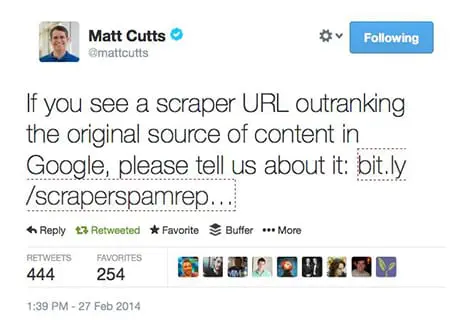
If you answer yes to this question, then you have a potential search engine ranking problem on your hands. But the good news is that it can be fixed. If you are seeing other websites outrank (or show up higher in the search results than your site) and they appear to have copied your website content, there definitely is a problem. Here is what you need to do in order to fix this situation.
Google has released a new form that allows sites to report scrapers.
To make sure that you’re really experiencing someone who is copying your content and using it without your permission, we first need to check.
1. First, you need to see if someone has truly copied your content. Take one of the URLs that you suspect it’s happening to (a page on your site) and run it through CopyScape.com. This will show you if any of the pages they find on the web are copying your content. If the site outranking your content shows up in this list, then there’s a good chance you have an issue.
2. Next, you need to take the title of one of your pages. I prefer to use the title tag, but it could be a very unique headline (such as the title of a blog post) and put it in quotes and search for it in Google, like this:
"Link Removals: Sometimes Websites Get Taken Down"
That’s the title of my last blog post here on this blog, so I thought that I would go ahead and use it as an example. When you search for the title in quotes (hopefully it’s unique) then you should only see your page or your blog post. But, if something else shows up in the search results, then:
- The phrase in quotes you searched for might not be unique enough. Try a sentence from your page.
- You might have shared the post on social media sites like Google+, Twitter, or your Facebook page. That’s okay.
- The content that’s stolen or copied from your site might be showing up
If it’s the last case, that your content appears to have been taken or copied, then there are generally a few reasons why:
- Your site is not as trusted as the other site. Unfortunately, sometimes if you have a fairly new site or a site with Google Penguin issues then the other site (the site scraping/copying/stealing your content) is going to rank better.
- The other site has higher PageRank than your site, and has more links or more trusted links than your site.
This last issue can be a problem. Because the other site has higher PageRank, it gets crawled and its content gets indexed faster than your site’s content get crawled and indexed. Therefore, the way Google’s duplicate content filter works is that whatever page or site gets crawled first, that’s the originator of the content. Then, if Google finds other copies, then those won’t rank as well as your site’s content.
One good way to deal with a situation like this is to get more trust and authority for your website. I know that can take time, and it involves getting new trusted and authoritative links to your website. It’s not an easy fix.
Another way to deal with this, though, is something that you can do RIGHT NOW. Whenever you add new content to your site, like a new page or a new blog post, you must immediately go over to Twitter and/or Google+ and post something about it. Include the original URL of the page, and not just a “tiny url”. It needs to be the full URL if possible. Twitter will change it to a tiny URL, and that’s okay. Google Plus is also important, as well. When you post, Google finds the new URL and will crawl it. This will minimize the chances that the other site will get your content posted and crawled.
If you are using WordPress, and you make a blog post, there are settings in WordPress that will cause your site to send a “ping” to Google (and other search engines and sites) to notify them of an update. It will send them the new URL. This also will help cause Google to crawl your new page.
Another way to deal with copied content that’s outranking you is to file a DMCA takedown request. Find out more about the Digital Millennium Copyright Act, which, when filed properly with Google and the site’s web host, will cause that content to be taken down. Google will remove the page for their search results and the site’s web host usually complies by removing the content, as well. They might even remove the entire website.
Finally, if you are having trouble with Google search engine rankings of your content and there is a scraper site involved (someone copying your content and outranking your site) then you can use Google’s new Scraper Tool to notify them of the problem. This doesn’t mean that they’re going to do something about it right away, but they may use that information in a few possible ways:
- Google may use the data to program a new part of their algorithm. Very likely.
- Google may use the data to remove the other site from their search results. Highly unlikely.
Whatever the situation, Google will use the information you give them somehow. I would first deal with the situation by doing several or all of the tasks I mentioned above. But then you might want to report it. That might, at a minimum, just give you a “warm and fuzzy feeling” that you reported it to Google.
Bill Hartzer is Globe Runner’s Senior SEO Strategist. Connect with him on Google+ or on Twitter as Bhartzer.
LINK REMOVALS: SOMETIMES WEBSITES GET TAKEN DOWN
One of the services we provide here at GlobeRunner is a process of cleaning up a website’s links. Due to the recent Google Penguin algorithm updates in the past year or so, a lot of sites have suffered dramatic search engine ranking losses and have had severe hits to their site traffic. One thing that we do very well here at Globe Runner is get a site’s traffic back due to Google penalties.
The Google Penguin algorithm update determines whether or not you have low quality links or “questionable” links pointing to your website that attempted to manipulate your site search engine rankings. If you have low quality links pointing to your website, you need to get those links removed. Not only do you need those links removed, you can also disavow the links.
During the link removal process that we go through, which is extremely thorough, we come across some pretty strange situations. In fact, in some extreme cases, we may not mean to get a website banned or taken down by the site’s web host. But, sometimes that happens. One such situation occurred, and now, when you go to the site, you see this message:
Well, I guess we got the link removed, ya think?
Bill Hartzer is Globe Runner’s Senior SEO Strategist. Connect with him on Google+ or on Twitter as Bhartzer.
HOW TO KNOW IF A WEBSITE HAS DISAVOWED LINKS
By now, you probably have heard that if you do not like the websites that are linking to your website, you can tell Google (and Bing.com) that you don’t like them. You can upload a file with a list of domain names or URLs of sites that they should not take into account when considering the links to your website. Google has extensive information about the disavow links process here.
Keep in mind, though, that it is impossible to know if a website that you do not own has disavowed links or not.
But how do you know if your website has disavowed links already? I know that can sound a bit weird, but to be honest with you it’s not a weird question. In fact, with so many different people working on websites nowadays, and companies hiring various search engine marketing and switching SEO companies all the time, it’s sometimes not an easy question to answer. Sometimes you don’t actually know if a disavow file has been uploaded in Google Webmaster Tools. And even if someone “thinks” or “knows” that they uploaded one, there’s no telling what domains or links were disavowed.
So, it can be confusing, but there is a really easy way to figure out:
– if a disavow file was uploaded
– what the file looks like
It’s also helpful, for example (or mandatory) that you have the actual disavow file that was uploaded, especially if you are going to analyze the links again and possibly submit a new disavow file. Usually I just add on to the current file after removing the duplicates. But again, you have to have the last disavow file that was uploaded.
Here’s how to find out if your site has disavowed links.
First, go to the disavow links tool. On that page, you’ll see a list of websites that you’ve verified in Google Webmaster Tools. The following is a screen capture of what it looks like, for my personal blog/website:
Select your site’s URL and then click “DISAVOW LINKS”.
Then, click the disavow links button again:
Once you click that button, you’ll be taken to a page where you’ll be notified when you last uploaded a disavow file, as shown below. If there a file has been uploaded, then great: you’ll see a download button, as shown below:
If you don’t see a date and time and a download link, then the site does NOT have a disavow on file with Google.
By the way, have I mentioned that we’re experts in dealing with disavow files and helping websites recover from Google linking penalties? Feel free to contact us if you have questions about the process or need help. Remember, if it’s not done right you can easily hurt your site’s rankings even worse than they are now.
Bill Hartzer is Globe Runner’s Senior SEO Strategist. Connect with him on Google+ or on Twitter as Bhartzer.
WHAT’S HOT ON GOOGLE+ REMOVED, REPLACED WITH EXPLORE TAB
Google Plus continues to make changes to their interface by making feature changes and moving content and options around. I am not surprised, as Google is constantly tweaking their search results pages for a better user experience. So why shouldn’t they do this with Google Plus?
The What’s Hot and Recommended on Google+ feature, which previously was available on the “Home” drop-down menu, has gone away. Now, this content appears on the Explore tab.
As you can see, my personal list of tabs is “SEO” and “Dallas” circles, and then it shows the “Explore” tab. By clicking the Explore tab, you’ll see the most popular posts on Google Plus, from other users (other than from your own circles).
What’s interesting to note is that while Google+ has removed the What’s Hot page (option), they have not updated their online help for this option. It still says that you can find the What’s Hot content by going to the Home drop-down list:
To see What’s hot: Choose Explore What’s hot from the Google+ navigation menu.
Apparently now Google+ doesn’t want us to know that this content is hot, they want us to Explore the content. It’s not a really big difference between the two, but there is a connotation that the “What’s Hot” content is more “exciting and thrilling”, because it’s “What’s Hot” rather than actually content that is something that we should just “Explore”.
What I’d like to know is that when they made this change from What’s Hot to Explore, has the number of shares and +1s on this content gone up or down?
Here’s a tip: If you go to your Explore tab on Google+, then these are the hottest or most-shared recent posts on Google+. To build your following and connect with influencers, you’ll want to share this content and connect (and follow) these people. You can also look at the Ripples of these posts and see who the influencers are and connect with them, as well.
Bill Hartzer is Globe Runner’s Senior SEO Strategist. Connect with him on Google+ or on Twitter as Bhartzer.
HOW TO: FIND ALL THE POSTS BY A GOOGLE AUTHORSHIP VERIFIED AUTHOR; WITH ANALYTICS
Writers often write for more than one blog or website. Good writers are in demand, so they will tend to write for several different publications. When it comes to Google Authorship, those writers who have adopted Google Authorship and accepted it as the norm now will often verify their authorship on multiple websites. Wouldn’t it be nice to be able to see just how good that author is? Wouldn’t it be great to see what other blog posts or articles they’ve written? Well, now you can search Google and find all of the articles that a verified Google Authorship author has penned. And, combine that with certain analytics, you can see how great their articles really are.
When an author verifies their Google Authorship, they must list the websites that they contribute to or write for in their Google Plus profile. If you were to go to my Google+ profile, you would see a list of websites where I have verified my authorship. I personally list a lot of sites, especially sites that I own, as well as my blog and the company blogs where I have written and write. But what if you wanted to see a list of articles or blog posts that I’ve written and verified my authorship? Let’s use myself as an example and I’ll show you exactly how to do that.
First, you have to find one of the articles or blog posts that I’ve written. That’s generally not very difficult, just find somewhere in the Google search results were my Google Authorship photo snippet appears, like below:
Next, you’ll need to click on the link where it says “By Bill Hartzer”, as shown below:
You are then taken to another Google search results page, where you have more posts that I have written. In the search box at the top, remove everything (the text) except for the author’s name. I have scratched out what you need to remove, in red, below:
Notice that the author’s name is in Blue in the search field. Once you remove the text and leave the author’s name, you can search again. Below, you will see the result of that:
As you can see, even though I searched originally for a post that appeared on the Globe Runner blog, you now see a search result that includes all of the posts where I have verified Google Authorship. And most likely, the “best” search result (the most appropriate one) will be the first one. And the better posts will most likely rank better in the Google search results.
So, what if we were to add in some analytics to these search results? What if we turned on a Firefox add-on that shows some stats and analytics about each of these posts? Well, let’s do just that. Here’s a screen capture of my posts and articles where I’ve verified Google Authorship and have the SEO Quake Firefox plug-in installed:
Now, we can see the posts where I am the verified author and you can see just well I write, how my posts tend to get links, and you can even see other data like PageRank, number of links to the post, and other interesting analytics.
Bill Hartzer is Globe Runner’s Senior SEO Strategist. Follow him on Google Plus.
FURTHER PROOF GOOGLE LIKES QUALITY LINKS OVER QUANTITY?
We have all heard it before from someone else in the SEO industry, or even read about it on Search Engine Land, Search Engine Watch, or heard it discussed. But really, how do we know that Google really does like quality links to your website over quantity? In a recent review of several posts that I’ve made here on the Globe Runner blog, I’ve noticed something very interesting: Google Authorship Photo Snippets appear in search results based on quality of links, not necessarily on the quantity of links.
I took a look at 6 blog posts I’ve made here on the Globe Runner blog. Yes, I know this isn’t a very large or statistically relevant sampling, but it’s what I’ve got. And there happens to be some interesting findings if you look at all of these posts and the data that I gathered.
When I first starting gathering all of the data, I wanted to see why certain blog posts of mine are showing the Google Authorship photo snippet, which Mark Traphagen and I have talked about and reviewed on an earlier post. That post is an interesting read, and Mark’s comments are worth reading, as well.
But that’s not what I ended up finding in my quick research regarding these posts. Let’s take a look at all of the information I gathered. Again, it’s not a lot of info, but preliminarily there is one post that stands out: the one that has the most links. But, interestingly enough, there is no Google Authorship photo snippet in the search results.
Google Authorship Photo Snippet Appears
Is Google Authorship Photo Snippet Query Dependent, Not Content Quality or Author Dependent?
https://globerunner.com/google-authorship-photo-snippet-query-dependent-content-quality-author-dependent
Links to G+ custom URL
49 results in Google for Title in quotes
Majestic: 24 links from 12 domains
Open Site Explorer: 0 backlinks
Ahrefs: 7 backlinks, 6 domains
Listed in SEL searchcap
7 Tweets
15 G +1s
1 Page Authority
Google Authorship Photo Snippet Appears
Google Gives Webmasters Better Search Query Data in Webmaster Tools
https://globerunner.com/google-gives-webmasters-better-search-query-data-webmaster-tools
Links to G+ custom URL
34 results in Google for Title in quotes
Majestic: 0 backlinks
Open Site Explorer: 0 backlinks
Ahrefs: 0 backlinks
1 tweet
61 G +1s
1 page Authority
No Google Authorship Photo Snippet
How To: Add Do Follow Links on LinkedIn
https://globerunner.com/add-follow-links-linkedin
Post linked to old G+ Url, not the new one with custom URL.
229 results in Google for Title in quotes
Majestic: 22 backlinks, 10 domains
Open Site Explorer: 9 links, 4 domains
Ahrefs: 17 Links, 7 domains
Mostly social bookmark links, no quality links
28 Tweets
36 G +1s
38 Page Authority
No Google Authorship Photo Snippet
Google Authorship Photo Snippet in Search Results Not Author Dependent
https://globerunner.com/google-authorship-photo-snippet-search-results
Post didn’t have authorship verified. Now fixed. We’ll see if it eventually shows photo snippet.
32 results in Google for Title in quotes
Majestic: 24 backlinks, 7 domains
Open Site Explorer: 0 links, 0 domains
Ahrefs: 4 backlinks, 1 domain
Mostly social bookmarks, no quality links
3 Tweets
12 G +1s
1 Page Authority
Google Authorship Photo Snippet Appears
10 SEO Posts that Shaped 2013
https://globerunner.com/10-seo-posts-shaped-2013
Post links to old G+ profile, NOT the new custom URL for G+ profile
235 results in Google for Title in quotes
Majestic: 19 links, 8 domains
Open Site Explorer: 3 links, 1 domain
Ahrefs: 20 backlinks, 8 domains
Mostly social bookmarks, no quality links
30 Tweets
15 G +1s
27 Page Authority
Google Authorship Photo Snippet Appears
New Contributor To A Blog? Here’s What You Need to Do
https://globerunner.com/new-contributor-blog-heres-need
34 results in Google for Title in Quotes
Majestic: 3 links, 2 domains
Open Site Explorer: 1 link, 1 domain
Ahrefs: 2 links, 2 domains
1 link from an authority site.
44 Tweets
8 G +1s
24 page Authority
So, with all of these posts, I checked the following information:
– whether or not the post has my Google Authorship photo snippet appear
– the title of the post
– the URL of the post
– the number of results in Google for a search with that post title in quotes
– Number of Majestic SEO links to the post
– Number of Open Site Explorer links to the post
– Number of Ahrefs.com links to the post
– whether or not there are any “good” or authority links to the post
– how many Tweets to the post
– how many Google +1s on the post
– the page authority of the post
There was one post in particular, the one about dofollow links to LinkedIn, that has the most links. Yet it still has a low Page Authority after several weeks of being posted. There are really not a lot of quality links to the post. I couldn’t find any links from authority sites to the post. Mainly lower quality social bookmarks to the post (feel free to check the links yourself).
But, what’s interesting to note here is the fact that the Google Authorship Photo Snippet shows up for certain posts and NOT the post that has the most links (by far). In fact, there is a post where the photo snippet appears with only 3 links! One of those links is from an “authority” site or domain Technorati. And, of course, the post that got linked from Search Engine Land also has its Google Authorship Photo Snippet appear in the search results.
So, could this be preliminarily the Google “Author Rank” at work that we’ve all heard about? Perhaps. But from what I can tell, Google shows the photo snippet from Google Authorship with posts when that post has links from sites that have authority and that are trusted. It’s a good thing to have your photo appear in search results: so why not tie that with posts that have good links.
What do you think? Is this proof that you need quality links over a large quantity of links? I personally think so. In fact, whether or not your photo appears in search results can be dependent on ONE link.
Bill Hartzer is Globe Runner’s Senior SEO Strategist. Follow him on Google Plus.
GOOGLE QUIETLY UPDATES LINK QUALITY GUIDELINES FOR WIDGETS
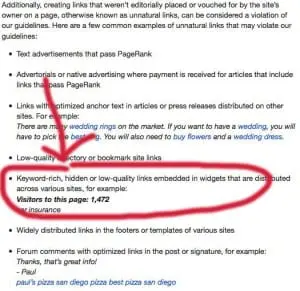
Google has quietly updated their link quality guidelines for widgets. More specifically, in Google’s Acceptable Webmaster Guidelines (in Google Webmaster Tools), they have changed the wording in the link schemes section.
I took a look at the archive.org update for that page on January 9th, and it appears that the change was not there. But today, January 10, 2014, the section on widgets has been update to read:
Keyword-rich, hidden or low-quality links embedded in widgets that are distributed across various sites, for example:
Visitors to this page: 1,472
car insurance
Previously, the text on the page said this:
Links embedded in widgets that are distributed across various sites, for example:
Visitors to this page: 1,472
car insurance
This is actually a very interesting update on Google’s front. They actually now are more lenient when it comes to links within widgets. They previously said that all links embedded in widgets would hurt search engine rankings. But now, they realize that there are some links in widgets that can be helpful. Or at least that’s the impression that they’re giving me.
I only hope that they continue to re-evaluate their link policies in the future like this and realize that there are cases where links are actually helpful to surfers.
So, what does this change mean? Google has a problem with widgets being used as a link tactic, especially when the intent of the link embedded in the widget is not a quality link. In other words, I personally interpret this new change as meaning that it’s now “okay” to embed links in widgets. However, if you use a keyword-rich anchor text link, a hidden link, or a low quality link (perhaps a link that’s off-topic to the subject of the widget), then you could get penalized for those links in the widgets. I would go as far as saying that you probably should not sell links in your widgets.
But, I also interpret this to meaning that if you created the widget and distribute it, then it’s okay for you to include a link back to the site if you are the owner of the widget and you want people to know how to get the widget, for example. If you embed a link in a widget, I recommend using a branded link or your company name as the anchor text to make sure there is no confusion (and you don’t get penalized).
One example of a ‘widget’ that would fall into this category would be infographics. As long as you include a branded anchor text link (your company name or website name) in the link code, when people embed the infographic in their site those links would be okay. If it were to be a keyword-rich link then Google would have an issue with those links.
h/t to Barry Schwartz and Kenichi Suzuki for noticing this change.
Bill Hartzer is Globe Runner’s Senior SEO Strategist. You can follow him on Google Plus.
GOOGLE AUTHORSHIP PHOTO SNIPPET IN SEARCH RESULTS NOT AUTHOR DEPENDENT
I recently wrote about the Google Authorship photo snippet not being author-dependent, but rather it’s search query dependent. In that post, I showed two examples of the same exact URL in the search results: one search query showed the Google Authorship photo snippet, and another search query showed the same URL (same blog post) without the photo snippet.
I can now, with confidence, say that the Google Authorship photo snippet is most likely not related to the actual author who wrote the content. Just because a certain author wrote an article on your site (and properly verified Google Authorship), doesn’t mean that their photo will appear in the search results when someone searches in Google and that article appears in the search results.
Have a good, quality author that’s Google Authorship verified on your site does NOT mean that their photo will appear in the search results for all (or even some) queries.
Let’s look at a specific example. I have verified my authorship with Google on this site and my authorship is not showing in the search results:
For the search query “Google Authorship Photo Snippet“, here is the search results as I see it:
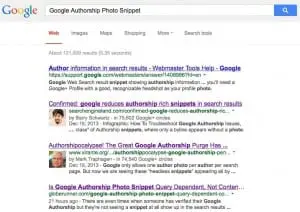
I have verified Google Authorship on this site, and the Rich Snippets Testing Tool shows that Google Authorship is working:

But, for this particular search query, Google is choosing not to show the Google Authorship Photo Snippet in the search results. Not only that, they’re choosing not to show that Authorship has been verified, which is one of the “classes” of Authorship:
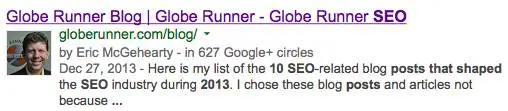
1. The Google search result shows the verified author’s photo and name in the search result, like the one below:
2. The Google search result shows the verified author’s name, but no photo, like the one below:

3. The Google search result does not show the verified author’s name or photo in the search results.
There are reports that Google is working on author authority but that “has not officially been rolled out yet.”
So, what is definitely a given is that this is definitely going to change in the future. Expect changes to the Google Authorship Photo Snippets in the search results, as it’s a fluid situation that’s going to change as Google eventually rolls out “author authority”.
Bill Hartzer is Globe Runner’s Senior SEO Strategist. Follow him on Google Plus.
- « Previous Page
- 1
- …
- 34
- 35
- 36
- 37
- 38
- …
- 45
- Next Page »